

For Rust, prioritize comfortable aim and easy access to essential actions over maximum DPI. Choose a lightweight mouse for frequent repositioning, or programmable side buttons if you want nearby access to assigned controls.
Among these options, Redragon M617 Ultralight Honeycomb Shell Wired stands out for its specified 41 g weight and flexible cable. Logitech G305 Lightspeed Wireless Gaming Mouse offers a 1 ms report rate and up to 250 hours of stated battery life on one AA battery. Redragon M913 Wireless RGB MMO Gaming Mouse 16000 suits players who want many side buttons, but its 12-button layout may be more than Rust needs.
This guide compares listed specifications and their practical trade-offs. Advertised sensor and battery figures are manufacturer-provided, not independent measurements. For another game-specific comparison, see our gaming mouse picks for PUBG.
Top Gaming Mice for Rust

Pros
- Versatile Bluetooth, 2.4GHz, and USB-C wired connectivity
- Ergonomic contoured shape with dual finger rests
- Rechargeable 1000mAh battery with charge-and-play capability
- Adjustable polling rate up to 1000Hz
- Stores USB receiver inside the mouse body
Cons
- Software configuration requires Windows and wired or 2.4GHz mode
- Bulky ergonomic dimensions are unsuitable for small hands

Pros
- Dual HyperSpeed wireless and Bluetooth connectivity options
- Up to 535 hours of extended battery life
- Nine programmable buttons for custom macro setups
- Durable mechanical switches rated for 60M clicks
- High-precision 18,000 DPI optical sensor
Cons
- Configuration and optimization require Razer Synapse software
- Battery life varies depending on usage conditions

Pros
- Lightweight 41g honeycomb shell
- Five selectable DPI settings
- Flexible paracord cable
- Software-based control customization
Cons
- Wired connection is not wireless
- Medium symmetrical shape may not suit every grip

Pros
- Ergonomic right-handed shape for comfortable handling
- On-the-fly DPI sensitivity adjustment buttons
- Five fully programmable buttons via Razer Synapse
- Ridged rubber scroll wheel provides tactile grip
- Reliable high-precision 6,400 DPI optical tracking
Cons
- Tethered wired cable limits placement flexibility
- Mechanical switch lifespan limited to 10 million clicks
- Button remapping depends on Razer Synapse software

Pros
- Up to 7200 adjustable DPI
- Nine programmable buttons with macro editing
- Ergonomic contouring with finger rest design
- Customizable seven-mode RGB backlighting
Cons
- Full macro customization requires separate software download
- Tethered wired connection limits freedom of movement

Pros
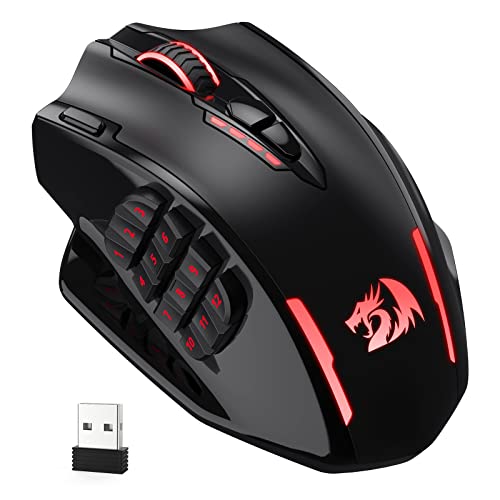
- 12 dedicated programmable side buttons
- Dual 2.4GHz wireless and USB-C wired modes
- Pixart 3335 sensor with adjustable 16000 DPI
- Up to 80 hours of battery in Eco mode
- Full wireless configuration through dedicated software
Cons
- Battery life drops to 45 hours with RGB enabled
- Key remapping requires proprietary driver software
Pros
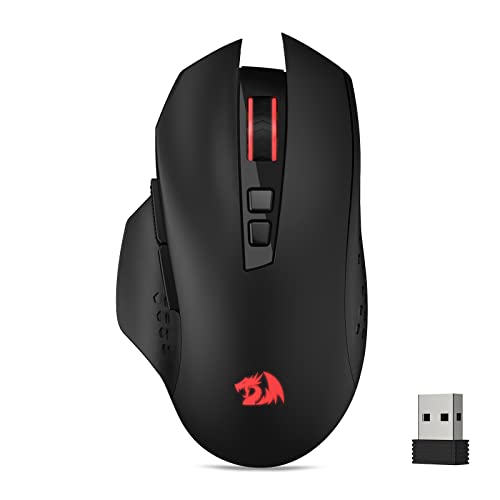
- Wireless 2.4GHz connection
- Seven programmable buttons
- Five adjustable DPI levels
- Polling rates up to 500Hz
Cons
- Battery not included
- Scroll wheel lighting is not always on

Pros
- Lightweight 62-gram construction
- Wired and Bluetooth connectivity
- Up to 10000 DPI through software
- 1000Hz polling rate
- Customizable RGB lighting
Cons
- Expanded DPI settings require software
- Battery life is advertised, not independently verified

Pros
- Fast 1 ms wireless report rate
- Long-lasting battery life from single AA cell
- Precise 12,000 DPI HERO optical sensor
- Integrated internal storage for USB nano receiver
Cons
- Requires replaceable AA batteries instead of internal recharging
- Accessing extended Endurance mode requires Logitech G HUB software
Rust Mouse Picks by Play Style
Best lightweight wired option: Redragon M617
Redragon M617 Ultralight Honeycomb Shell Wired weighs 41 g and includes a flexible paracord cable, five programmable buttons, and five DPI settings, including 10,000 DPI. Its low listed weight may suit players who make frequent, broad mouse movements, while the cable avoids battery management.
Pros: Specified 41 g weight, programmable controls, and lightweight cable. Cons: Wired connection limits movement unless cable routing suits your desk, and the honeycomb shell may not appeal to every grip preference. Who should skip it: Players who want wireless use or a solid-shell design.
Best balanced wireless choice: Logitech G305
Logitech G305 Lightspeed Wireless Gaming Mouse pairs a HERO sensor rated up to 12,000 DPI with LIGHTSPEED wireless, a stated 1 ms report rate, and a 3.4 oz weight. It uses one AA battery, with up to 250 hours of continuous gameplay claimed, making it a practical fit for cable-free play and travel.
Pros: Wireless connection, compact receiver storage, and long advertised battery life. Cons: It uses a replaceable AA battery rather than a rechargeable battery, and the supplied product data does not specify programmable side-button count. Who should skip it: Players who need several dedicated side controls or prefer a rechargeable mouse.
Best for extensive keybinding: Redragon M913
Redragon M913 Wireless RGB MMO Gaming Mouse 16000 has 12 side buttons, 16 customizable buttons overall, and wired USB-C or 2.4 GHz wireless modes. Its Pixart 3335 sensor and five onboard DPI levels are listed alongside a claimed 1 ms response. The broad button array can support players who want many mapped actions within thumb reach.
Pros: Many remappable controls and two connection modes. Cons: Its MMO-focused side-button grid may feel unnecessary for a simpler Rust layout, and the product data does not give its weight. Who should skip it: Players who prefer a lightweight, minimal mouse or need only a few extra controls.
Best ergonomic wireless versatility: Razer Basilisk V3 X HyperSpeed
Razer Basilisk V3 X HyperSpeed Customizable offers nine customizable controls, 2.4 GHz HyperSpeed wireless, Bluetooth, and an 18,000 DPI optical sensor. Its advertised battery life reaches up to 285 hours on HyperSpeed or 535 hours on Bluetooth, depending on use. This feature mix suits players who want multiple connection choices and more mapped controls.
Pros: Two wireless modes, nine customizable controls, and long stated battery life. Cons: The product data does not specify weight, and its ergonomic shape may not suit every hand or grip. Who should skip it: Players prioritizing a documented ultralight weight or a wired-only setup.
Best wired ergonomic value: Razer DeathAdder Essential
Razer DeathAdder Essential Ergonomic Wired has a 6,400 DPI optical sensor, five programmable buttons, and a wired connection. Its simpler control set suits players who want familiar ergonomic form and basic remapping without a large side-button array. Razer Synapse is specified for button remapping and macro assignment.
Pros: Five programmable buttons, adjustable sensitivity, and a tactile scroll wheel. Cons: Wired use restricts cable-free movement, and the listed sensor ceiling is lower than several other picks. Who should skip it: Players seeking wireless connectivity, very low weight, or numerous side buttons.
Other options for grip, budget, and connection flexibility
Redragon Large Wireless Gaming Mouse for Big is shaped for medium to larger hands and supports Bluetooth, 2.4 GHz wireless, and wired Type-C connection. It lists two side buttons and five DPI steps from 400 to 3,200 by default, with higher settings available through its driver. Driver customization is limited to wired and 2.4 GHz modes on Windows, so check that requirement before relying on macros.
Pros: Multiple connection options and a contoured large-hand shape. Cons: Its software limitations make Bluetooth unsuitable for driver-based remapping, and stated DPI settings require context because the default steps differ from the driver maximum. Who should skip it: Players who need software customization over Bluetooth or use a small-hand fit.
Redragon M602 Gaming Mouse provides nine programmable buttons and adjustable sensitivity up to 7,200 DPI in a wired ergonomic design. It can suit players who want several mapped controls at a modest complexity level. Pros: Nine programmable buttons and software-supported macros. Cons: It is wired, and the supplied data does not specify weight or polling rate. Who should skip it: Players who prioritize wireless play or documented low weight.
Redragon M730 PRO Wireless Lightweight RGB lists a 62 g weight, wired and wireless options, 1,000 Hz polling, and up to 77 hours of battery life. Its five default DPI steps can be adjusted through software across a stated 50 to 10,000 range. Pros: Low listed weight, two connection modes, and rechargeable operation. Cons: The supplied description does not identify the wireless mode, so confirm connection details before purchase. Who should skip it: Players who require a clearly documented wireless protocol or side-button count.
Redragon M656 Wireless Optical Gaming Mouse 4000 offers a 2.4 GHz receiver, seven programmable buttons, five onboard DPI levels up to 4,000, and a 500 Hz polling rate. Its battery is not included. Pros: Wireless operation and assignable controls. Cons: Requires a separately sourced battery, and the listed polling rate is lower than the 1,000 Hz options here. Who should skip it: Players who want a rechargeable mouse or higher specified polling rate.
How to Choose a Mouse for Rust
Pick a comfortable shape first. Hand size and grip affect control over long sessions. The Redragon large-hand model explicitly targets medium to larger hands, while the M617 lists a medium, symmetrical design. Other supplied descriptions do not provide dimensions, so use fit information cautiously.
Match weight and cable to your movement. The M617 lists 41 g and a flexible cable; the M730 PRO lists 62 g. These figures offer a direct weight comparison, but no weight is supplied for most other models. Wireless avoids cable drag, while wired mice do not need battery charging or replacement.
Map only useful actions. Side buttons can place selected controls within thumb reach, but more buttons do not automatically improve play. The DeathAdder Essential has five programmable buttons, the Basilisk V3 X has nine customizable controls, and the M913 has 12 side buttons. Confirm software and connection requirements before setting up macros.
Do not buy by maximum DPI alone. Higher sensitivity ceilings show adjustment range, not better aim. Choose a setting that feels controllable, then keep it consistent while learning. Product data lists varying DPI ranges, but provides no independent tracking comparisons.
Check connection and software compatibility. Logitech G305 uses a USB nano receiver, while several other picks offer wired connections or Bluetooth. The Redragon large-hand model specifies Windows-only driver support for wired and 2.4 GHz modes. Confirm your operating system, available ports, and preferred connection before ordering.
Frequently Asked Questions
How many mouse buttons do you need for Rust?
There is no single required count. A few programmable controls can place frequently used actions nearby, while a 12-button side grid is better suited to players who deliberately want many bindings. Check that assignments work with the mouse software and connection mode you plan to use.
Is a wireless mouse suitable for Rust?
The listed wireless models advertise 2.4 GHz connections, and some also offer Bluetooth. Logitech specifies a 1 ms report rate for the G305, while Razer lists HyperSpeed wireless for the Basilisk. These are manufacturer specifications, not independent latency comparisons. Choose based on connection stability needs, battery preferences, and receiver availability.


Write Your Review
No reviews yet. Be the first to share your experience!