

The best gaming mouse for gift depends on how recipient plays. For a versatile wireless option, consider GravaStar Mercury M2; for MMO shortcuts, Redragon M901K offers extensive programmable controls. Simpler wired models suit plug-and-play setups.
This guide compares listed specifications and compatibility, not independent performance measurements. Check hand fit, preferred grip, game genres, connection needs, and operating system before buying. A high DPI figure alone does not guarantee better control.
Top Gaming Mouse Gift Picks

Pros
- 19 programmable buttons for complex macros
- Modular weight tuning with eight removable weights
- Five onboard memory profiles for custom layouts
- Wide DPI adjustment range up to 12400
Cons
- Software download required for macro and lighting customization

Pros
- Six-button layout
- Four adjustable DPI settings
- Plug-and-play USB connectivity
- Multicolor breathing LED lighting
- Broad operating system compatibility
Cons
- Wired connection limits placement flexibility
- Only four preset DPI levels

Pros
- Ergonomic right-handed shape for comfortable handling
- On-the-fly DPI sensitivity adjustment buttons
- Five fully programmable buttons via Razer Synapse
- Ridged rubber scroll wheel provides tactile grip
- Reliable high-precision 6,400 DPI optical tracking
Cons
- Tethered wired cable limits placement flexibility
- Mechanical switch lifespan limited to 10 million clicks
- Button remapping depends on Razer Synapse software

Pros
- Three connection options
- PAW3395 sensor with up to 26,000 DPI
- Five programmable buttons
- Customizable RGB lighting profiles
- Distinctive hollowed-out design
Cons
- Polling rate is limited to 1K Hz
- Battery life duration is not specified

Pros
- Three connection modes
- Up to 26,000 DPI
- Up to 85-hour advertised battery life
- Programmable buttons and RGB profiles
- Hollowed-out design promotes airflow
Cons
- Polling rate tops out at 1,000 Hz
- Only five programmable buttons

Pros
- Four on-the-fly DPI speed settings up to 3600
- Driver-free plug-and-play operation
- Six-button design with side navigation controls
- Ergonomic contoured shape suited for palm grip
- Integrated multi-color lighting
Cons
- Sensitivity restricted to four predetermined DPI steps
- Lowest available DPI setting starts at 1200 DPI
Pros
- Rechargeable wireless design
- Silent left and right clicks
- Three adjustable DPI levels
- Six-button layout
- Broad computer platform compatibility
Cons
- USB-C adapter is not included
- RGB lighting increases battery consumption
- Low battery can affect cursor movement

Pros
- Five dedicated macro keys for rapid command input
- Quiet membrane switches suitable for shared workspaces
- Adjustable mouse sensitivity from 800 to 7200 DPI
- Integrated wrist rest helps reduce typing fatigue
- Onboard memory retains lighting and DPI profiles
Cons
- Uses membrane keys rather than mechanical switches
- Wired design restricts flexible cable-free placement
- Full software customization limited to Windows systems

Pros
- 11 programmable buttons for comprehensive macro control
- Dual-mode HyperScroll tilt wheel enhances versatility
- High-resolution 26K DPI optical sensor
- Responsive optical switches rated for 70 million clicks
- 11 independently customizable RGB lighting zones
Cons
- Tethered wired cable restricts cable-free mobility
- Ergonomic thumb rest form factor excludes left-handed users

Pros
- Lightweight 41g honeycomb shell
- Five selectable DPI settings
- Flexible paracord cable
- Software-based control customization
Cons
- Wired connection is not wireless
- Medium symmetrical shape may not suit every grip
How to Choose a Gaming Mouse as a Gift
Start with the recipient’s games and preferred controls. MMO players may use many side buttons, while FPS players often prefer a simpler layout. If you do not know their grip or button preferences, avoid highly specialized shapes and layouts.
Choose the connection and setup
Wired mice avoid charging and receiver storage. Wireless options here use either 2.4 GHz USB receivers or tri-mode connectivity that also includes Bluetooth and wired connection. Confirm the recipient has a compatible port; the VersionTECH receiver uses USB-A, and USB-C-only devices need an adapter.
Match buttons, weight, and sensitivity
Extra programmable buttons help when a game or workflow uses frequent commands, but can feel unnecessary for basic use. Weight also affects preference: Redragon M901K includes removable weights, while Redragon M617 is specified at 41 grams. DPI describes sensor sensitivity settings, not a measure of overall accuracy.
Recommended Gaming Mice for Gifts
Redragon Gaming Mouse, MMO Mouse Gaming UP 12400: For MMO Shortcuts
This wired-style feature set centers on 19 programmable buttons, including 12 side buttons, adjustable sensitivity from 100 to 12,400 DPI, and polling rates from 125 to 1,000 Hz. Five memory profiles and eight removable 2.4-gram weights allow extensive configuration.
Pros: Many remappable controls, saved profiles, and adjustable weight suit MMO players who want shortcuts and customization. Cons: Its dense side-button layout may be difficult to learn or excessive for simpler games. Who should skip it: Players who prefer lightweight, minimal mice or do not want to configure software.
Software is required for macro and lighting customization, according to the product information. Confirm the recipient is comfortable installing Redragon software before choosing this highly configurable gift.
Redragon Gaming Mouse, MMO Mouse Gaming UP 12400
Razer DeathAdder Essential Ergonomic Wired: For Straightforward Wired Use
This wired model has five programmable buttons, a 6,400 DPI optical sensor, and mechanical switches rated for up to 10 million clicks. Dedicated DPI buttons support on-the-fly sensitivity changes, while its rubberized scroll wheel has a ridged surface.
Pros: A restrained button layout and wired connection suit players who want familiar controls without wireless charging. Cons: It offers fewer programmable buttons and less stated sensitivity range than feature-heavy alternatives. Who should skip it: Recipients seeking wireless connectivity, extensive MMO controls, or adjustable weight.
Razer Synapse supports button remapping and macros. Check software compatibility with the recipient’s system before relying on those custom functions.
Razer DeathAdder Essential Ergonomic Wired
GravaStar Mercury M2 Wireless Gaming Mouse with 5: For Tri-Mode Flexibility
The listed M2 combines a PAW3395 sensor, up to 26,000 DPI, a 1,000 Hz polling rate, and five programmable buttons. Its tri-mode connection supports 2.4 GHz, Bluetooth, and wired use. The manufacturer lists battery life up to 85 hours.
Pros: Multiple connection choices suit a recipient who switches between compatible devices, and the hollowed shell gives it a distinctive appearance. Cons: The open design may not suit someone who prefers a conventional shell, and battery life depends on use. Who should skip it: Anyone wanting a low-maintenance wired mouse or a high-button-count MMO layout.
The product description lists five RGB lighting modes and software customization. Confirm operating-system support and available ports before gifting, especially if the recipient plans to use its wireless receiver.
GravaStar Mercury M2 Wireless Gaming Mouse with 5
SMAIGE Gaming Mouse Wired,6 Buttons: For Basic Plug-and-Play Use
This wired mouse has six buttons and four selectable DPI levels from 1,000 to 3,200. Its product information lists USB 2.0 and 3.0 support and compatibility with Windows, Mac OS, and Linux. No additional driver or software is required for basic use.
Pros: Simple USB setup and broad stated operating-system support make it a practical basic gift. Cons: Its DPI ceiling and feature set are modest compared with more configurable models. Who should skip it: Competitive players seeking advanced sensor specifications, wireless use, or programmable macros.
The listed lighting offers seven color effects. Check that the recipient’s device has a compatible USB-A port, since no USB-C connection is specified.
SMAIGE Gaming Mouse Wired,6 Buttons
GravaStar MercuryM2 Wireless Gaming Mouse: For a Lightweight-Listed Variant
This separately listed MercuryM2 shares the 26,000 DPI, 1,000 Hz polling rate, PAW3395 sensor, tri-mode connectivity, and up-to-85-hour battery claim. Its listing specifies a 79-gram weight, unlike the other M2 listing, which does not state weight.
Pros: Tri-mode connections and a stated weight help shoppers comparing setup flexibility and mouse mass. Cons: The hollowed design and five-button layout may not suit every grip or game, and stated battery life is a manufacturer claim. Who should skip it: Buyers who want a conventional enclosed shell or more than five programmable buttons.
Because two supplied listings describe similar M2 specifications but differ in stated weight and rating, verify the exact variant and included accessories on its product page before purchase.
GravaStar MercuryM2 Wireless Gaming Mouse
BENGOO Gaming Mouse Wired with RGB Backlit: For Basic Wired Gaming
BENGOO lists six buttons, four DPI settings from 1,200 to 3,600, and plug-and-play setup without drivers. Its compatibility information names Windows versions through Windows 8, plus MacBook, but does not specify newer operating systems.
Pros: Straightforward wired operation and forward/back buttons cover common gaming and browsing actions. Cons: The listed operating-system details are limited, and advanced customization is not specified. Who should skip it: Recipients needing confirmed Windows 10 or 11 support, wireless operation, or high-end customization.
Its multicolor lighting and ergonomic design are listed features, not evidence of fit for every hand. Confirm the recipient’s operating system before selecting it.
BENGOO Gaming Mouse Wired with RGB Backlit
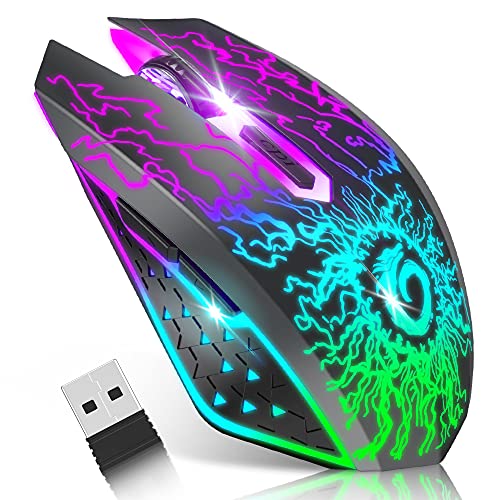
VersionTECH. Wireless Gaming Mouse: For Quiet, Rechargeable Use
This mouse connects over 2.4 GHz through a USB receiver, includes three DPI levels from 800 to 1,600, and has six buttons. Its listing describes rechargeable power, silent left and right clicks, and compatibility with Windows, Mac OS, and Linux.
Pros: Rechargeable wireless operation and quieter main clicks suit shared rooms or work alongside gaming. Cons: Its stated DPI range is limited, and lighting can increase battery use. Who should skip it: Players seeking high DPI settings, Bluetooth, or documented competitive-grade specifications.
The USB receiver is stored beneath the mouse, and USB-C-only devices require a separate USB-C-to-USB-A adapter. The listing also names console compatibility, but confirm the intended games and functions work with the recipient’s console.
VersionTECH. Wireless Gaming Mouse
Redragon S101-3 PRO Gaming Keyboard and Mouse: For a Complete Starter Set
This bundle includes a full-size RGB membrane keyboard and a wired mouse. The mouse offers adjustable sensitivity from 800 to 7,200 DPI, while the keyboard includes five dedicated macro keys and a wrist rest. The listing specifies Windows 10 and 11 compatibility.
Pros: One package supplies both core peripherals, which suits a first PC setup or a recipient replacing basic equipment. Cons: It is not a standalone mouse gift, and the membrane keyboard may not suit someone seeking a different switch type. Who should skip it: Anyone who already owns a keyboard or wants a premium, individually selected mouse.
The set’s stated plug-and-play compatibility covers Windows 10 and 11. Check that these systems match the recipient’s PC before choosing the bundle.
Redragon S101-3 PRO Gaming Keyboard and Mouse
Razer Basilisk V3 Customizable RGB Wired Ergonomic: For Many Assignable Controls
The Basilisk V3 has 11 programmable buttons, a thumb rest, a tilt wheel with free-spin and tactile modes, and a Focus+ 26,000 DPI optical sensor. Its product information lists 11 Chroma lighting zones and Gen 2 optical switches rated for up to 70 million clicks.
Pros: Numerous controls and dual scroll modes support players who assign frequent commands or switch between fast and precise scrolling. Cons: It is wired and its right-handed ergonomic shape may not fit all users. Who should skip it: Left-handed recipients, wireless-only users, or anyone who prefers a simpler mouse.
Razer Synapse supports customization, and the product information recommends disabling Windows “Enhance pointer precision” to optimize mouse accuracy. Consider whether the recipient wants software-dependent configuration before gifting.
Razer Basilisk V3 Customizable RGB Wired Ergonomic
Redragon M617 Ultralight Honeycomb Shell Wired: For Low Weight
Redragon specifies a 41-gram weight, a symmetrical shell, a flexible paracord cable, and five DPI presets up to 10,000. It has six programmable buttons, including two side buttons, and supports five configuration modes through dedicated software.
Pros: Low stated weight and a flexible cable suit players who want a light wired mouse; the symmetrical shape may accommodate different grip preferences. Cons: Its honeycomb shell is not a conventional closed surface, and customization requires software. Who should skip it: Recipients who dislike open-shell designs or want wireless use.
The listing names PC, Mac, and laptop compatibility but does not specify operating-system versions. Check the recipient’s system and software needs before purchase.
Redragon M617 Ultralight Honeycomb Shell Wired
Which Gaming Mouse Makes the Best Gift?
Choose Redragon M901K for a recipient who values MMO shortcuts and detailed customization. Pick either GravaStar M2 variant for tri-mode wireless flexibility, checking exact variant details first. Razer DeathAdder Essential suits straightforward wired use, while Basilisk V3 adds more buttons and a versatile scroll wheel.
For a basic plug-and-play gift, compare SMAIGE and BENGOO while checking operating-system support. VersionTECH adds rechargeable wireless use and quieter clicks. Redragon M617 prioritizes low listed weight, and the S101-3 PRO makes sense when a keyboard is also needed.
Before ordering, verify exact model, connection method, software requirements, and fit preference. A recipient’s existing setup and game habits matter more than the largest DPI number.





Write Your Review
No reviews yet. Be the first to share your experience!