

For gaming and YouTube workloads, choose Acer Nitro V with RTX 4050 for dedicated graphics, or HP Victus for a lower-tier RTX 3050 configuration. If editing, recording, and multitasking matter, plan around memory: both Acer RTX 4050 configurations list 8GB RAM, while KAIGERR and NIMO list 16GB. The latter two use integrated graphics, so they are less suitable for demanding modern games.
This specification-based comparison focuses on graphics hardware, memory, display, and upgrade details supplied for each model. YouTube recording and editing needs vary by software and project, so no frame-rate or rendering estimates are implied.
Pros
- Smooth 165Hz Full HD IPS display
- NVIDIA GeForce RTX 4050 with DLSS 3.5
- Thunderbolt 4 port with charging and display support
- Dual DDR5 slots upgradeable to 32GB
- Fast Wi-Fi 6 and Killer Ethernet networking
Cons
- Base memory limited to 8GB DDR5
- Modest 512GB internal storage capacity

Pros
- Smooth 144Hz Full HD IPS display
- Dedicated NVIDIA RTX 3050 6GB graphics
- Responsive 13th Gen Intel Core i5 processor
- Fast 512GB solid state storage
Cons
- Limited 8GB base memory capacity
- Relatively heavy at over five pounds
- Modest 512GB storage for large game libraries

Pros
- Smooth 144Hz Full HD IPS display
- Dedicated RTX 4050 GPU with DLSS 3 support
- Versatile Thunderbolt 4 connectivity for data and display
- Wi-Fi 6 and Gigabit Ethernet network options
Cons
- 8GB base system memory may limit multitasking
- 512GB SSD storage fills quickly with modern games

Pros
- Eight-core, 16-thread AMD Ryzen 7 processor
- 16GB RAM included
- 512GB NVMe SSD included
- Upgradeable memory and storage
- Wi-Fi 6 connectivity
Cons
- Integrated graphics limit demanding modern gaming
- Display resolution and refresh rate are unspecified
- Battery capacity and runtime are unspecified

Pros
- Eight-core, 16-thread Ryzen 7 processor
- 16GB DDR5 memory
- 1TB NVMe SSD
- Large anti-glare Full HD display
- Fingerprint reader and webcam shutter
Cons
- Integrated graphics, not a dedicated GPU
- Display resolution is Full HD at 17.3 inches
How These Gaming Laptops Differ
| Model | Graphics | Memory and storage | Display | Best fit |
|---|---|---|---|---|
| Acer Nitro V Gaming Laptop | GeForce RTX 4050 Laptop GPU | 8GB DDR5, 512GB Gen 4 SSD | 15.6-inch FHD IPS, 165Hz | Gaming with dedicated graphics; consider a memory upgrade |
| acer Nitro V Gaming Laptop | GeForce RTX 4050 Laptop GPU | 8GB DDR5, 512GB Gen 4 SSD | 15.6-inch FHD IPS, 144Hz | Dedicated graphics and a high-refresh display |
| HP Victus 15.6-inch Full HD 144Hz Gaming Laptop | GeForce RTX 3050 6GB | 8GB DDR4, 512GB SSD | 15.6-inch FHD IPS, 144Hz | Dedicated graphics at a lower GPU tier |
| KAIGERR Gaming Laptop, 15.6inch Laptop Computer | Radeon RX Vega 8 integrated graphics | 16GB DDR4, 512GB NVMe SSD | 15.6-inch IPS; refresh rate not specified | General work and lighter gaming |
| NIMO 17.3-inch FHD IPS Gaming Laptop | Radeon 680M integrated graphics | 16GB DDR5, 1TB NVMe SSD | 17.3-inch FHD IPS | Large-screen work, storage, and casual gaming |
Recommended Gaming Laptops Under $1000 for YouTube
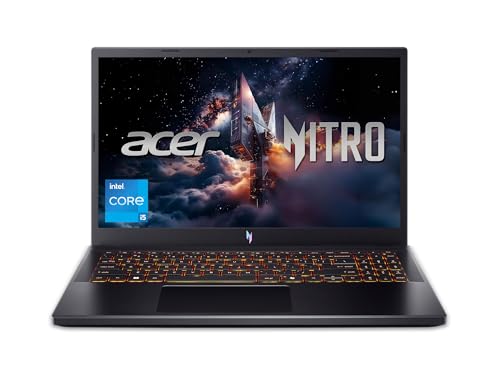
Acer Nitro V Gaming Laptop: RTX 4050 and 165Hz Display
This configuration pairs an Intel Core i5-13420H with an NVIDIA GeForce RTX 4050 Laptop GPU, 8GB DDR5, and a 512GB Gen 4 SSD. Its 15.6-inch Full HD IPS panel runs at 165Hz. The dedicated GPU makes it the strongest graphics option listed here on paper, while the refresh rate describes the display capability, not guaranteed game frame rates.
For YouTube creators who also play GPU-demanding games, the RTX 4050 offers a useful starting point. The listed 8GB memory is a constraint for simultaneous gaming, recording, and editing. Acer specifies two DDR5 slots and a 32GB maximum, so check configuration and upgrade requirements before buying; the provided data does not specify whether memory ships as one or two modules.
Pros: Dedicated RTX 4050 graphics, 165Hz Full HD display, Thunderbolt 4, Wi-Fi 6, and Gigabit Ethernet.
Cons: 8GB RAM may limit heavier multitasking, and 512GB storage may require additional space for a large game or video library. Actual GPU power limits are not provided.
Who should skip it: Skip this configuration if you need 16GB or more memory out of the box and do not want to verify upgrade options.
Product: Acer Nitro V Gaming Laptop
acer Nitro V Gaming Laptop: RTX 4050 With 144Hz Display
This Nitro V also combines the Core i5-13420H and RTX 4050 with 8GB DDR5 and a 512GB Gen 4 SSD. Its 15.6-inch Full HD IPS display is specified at 144Hz, rather than the 165Hz panel on the other listed Nitro V. It also includes Wi-Fi 6, Gigabit Ethernet, and Thunderbolt 4.
The dedicated GPU suits gaming and GPU-accelerated creative workloads, but the supplied details do not establish editing performance or game frame rates. As with the other RTX 4050 Nitro V, 8GB RAM deserves attention before planning to game, record, and run editing software together. Confirm upgrade support for this exact model before purchase because its supplied specifications do not state a memory maximum.
Pros: RTX 4050 graphics, 144Hz Full HD display, Thunderbolt 4, dual-fan cooling system, Wi-Fi 6, and Gigabit Ethernet.
Cons: 8GB memory and 512GB storage are modest for heavier creator workloads. The supplied information does not specify memory upgrade limits or GPU power limits.
Who should skip it: Skip it if you need more memory immediately or if the 165Hz option matters more than the listed 144Hz screen.
Product: acer Nitro V Gaming Laptop
HP Victus 15.6-inch Full HD 144Hz Gaming Laptop: RTX 3050
The Victus pairs a Core i5-13420H with an RTX 3050 laptop graphics card with 6GB GDDR6, 8GB DDR4-3200, and a 512GB SSD. Its 15.6-inch Full HD IPS anti-glare display has a 144Hz refresh rate. The dedicated GPU is suitable for buyers who want discrete graphics, though the RTX 3050 is a different, lower product tier than the RTX 4050 options above.
Its listed memory is limited for demanding gaming and video-editing multitasking. The supplied details do not state memory slots, maximum capacity, or upgrade procedure, so verify those points for this exact configuration before planning an upgrade. The 144Hz specification does not guarantee that games will reach 144 frames per second.
Pros: Dedicated RTX 3050 graphics with 6GB GDDR6, a 144Hz Full HD IPS display, and a 512GB SSD.
Cons: 8GB DDR4 is a modest starting capacity, and the supplied specifications do not describe upgrade support or connectivity details.
Who should skip it: Skip it if you want the RTX 4050 tier or need documented memory-upgrade details before choosing a laptop.
Product: HP – Victus 15.6″ Full HD 144Hz Gaming Laptop
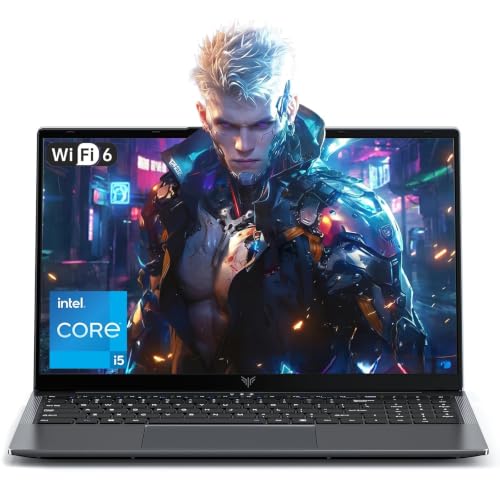
KAIGERR Gaming Laptop, 15.6inch Laptop Computer: 16GB Memory
This laptop lists an AMD Ryzen 7 5700U processor with 8 cores and 16 threads, 16GB DDR4, and a 512GB NVMe SSD. Its Radeon RX Vega 8 graphics are integrated, not a dedicated gaming GPU. The 15.6-inch IPS display is described as high refresh rate, but no refresh-rate figure is supplied.
Sixteen gigabytes of memory can help with everyday multitasking and lighter creator workflows, while integrated graphics are a compromise for demanding games. The listing says memory can expand to 64GB and storage to 2TB, but confirm supported modules and drives before purchasing parts. Connectivity includes USB 3.2, HDMI, a full-function USB-C port, Wi-Fi 6, and a separate USB-C DC jack; USB-C charging or display behavior beyond stated functions should not be assumed.
Pros: 16GB DDR4, stated memory and storage expansion, Wi-Fi 6, and a range of listed ports.
Cons: Radeon RX Vega 8 is integrated graphics, and the display’s refresh rate is not specified. No dedicated GPU is listed.
Who should skip it: Skip it if your priority is demanding modern gaming or a specified high-refresh gaming panel.
Product: KAIGERR Gaming Laptop, 15.6inch Laptop Computer
NIMO 17.3-inch FHD IPS Gaming Laptop: Large Screen and 1TB SSD
NIMO combines a Ryzen 7 7735HS processor with 16GB DDR5, a 1TB NVMe SSD, and integrated Radeon 680M graphics. Its 17.3-inch Full HD IPS screen offers more workspace than the 15.6-inch options, but the listing does not state a refresh rate. The integrated GPU suits casual gaming and general creative tasks better than a dedicated-GPU replacement for demanding games.
The larger SSD provides more listed capacity for applications and media than the 512GB alternatives. The product description also lists Wi-Fi 6E, Bluetooth 5.2, a fingerprint reader, webcam privacy shutter, and a 180-degree hinge. It advertises 100W USB-C PD charging, but confirm charger and laptop compatibility for your intended setup before relying on that feature.
Pros: 16GB DDR5, 1TB NVMe SSD, 17.3-inch Full HD display, and Radeon 680M integrated graphics.
Cons: No dedicated GPU is listed, and display refresh rate and memory-upgrade details are not supplied. Its larger screen may be less suitable for buyers prioritizing a compact laptop.
Who should skip it: Skip it if you need dedicated graphics for demanding games or a documented high-refresh display.
Product: NIMO 17.3″ FHD IPS Gaming Laptop
How to Choose a Laptop for Gaming and YouTube
Prioritize GPU Type for Games
The RTX 4050 Nitro V models and RTX 3050 Victus have dedicated NVIDIA graphics. KAIGERR and NIMO use integrated Radeon graphics. For demanding games, favor a dedicated GPU; exact results depend on each game, settings, cooling, and GPU power configuration, which the supplied listings do not fully establish.
Check Memory for Recording and Editing
Both RTX 4050 Acer listings and the HP Victus specify 8GB RAM. KAIGERR and NIMO list 16GB. Gaming while recording or editing can increase memory demand, so consider capacity and confirmed upgrade support alongside the GPU. Do not assume upgradeability where the exact listing does not document it.
Match the Display and Storage to Your Setup
The two Acer panels are listed at 144Hz and 165Hz, while HP lists 144Hz. These figures describe maximum display refresh rates, not expected game performance. NIMO’s 17.3-inch screen offers more physical workspace, and its 1TB SSD provides more listed capacity than the 512GB drives in the other configurations.
Plan Ports and Network Connections
The Acer Nitro V listings specify Wi-Fi 6, Gigabit Ethernet, and Thunderbolt 4. KAIGERR lists Wi-Fi 6 and USB-C, while NIMO lists Wi-Fi 6E. Check the exact ports and supported functions against your capture devices, external displays, storage, and network setup. A port name alone does not establish every charging or display capability.
Related Gaming Setup Guides
Compare more options in our guides to gaming laptops under $600 and laptops for esports tournaments. For desk accessories, see our comparisons of external SSDs for gaming and affordable gaming keyboards.



Write Your Review
No reviews yet. Be the first to share your experience!