

This is a review article about best gaming mouse for World of Warcraft MMO.
Top Products
1

The Redragon M901K is an ergonomic gaming mouse designed for MMO and MOBA titles, offering 19 programmable buttons and customizable weight tuning for complex command inputs. However, accessing macro editing and lighting controls requires downloading external software.
Pros & Cons
Pros
- 19 programmable buttons for complex macros
- Modular weight tuning with eight removable weights
- Five onboard memory profiles for custom layouts
- Wide DPI adjustment range up to 12400
Cons
- Software download required for macro and lighting customization
2

The Corsair Scimitar RGB Elite features 17 programmable buttons and a repositionable side cluster, making it well-suited for macro-heavy MMO and MOBA titles. However, its sculpted right-hand shape and wired setup offer less flexibility for left-handed users or clutter-free desk configurations.
Pros & Cons
Pros
- 17 fully programmable macro buttons
- Repositionable 12-button side slider system
- Accurate 18,000 DPI PixArt optical sensor
- Durable 50-million-click Omron switches
- Contoured ergonomic shape with a finger rest
Cons
- Tethered wired-only connection
- Right-hand ergonomic design limits ambidextrous use
3
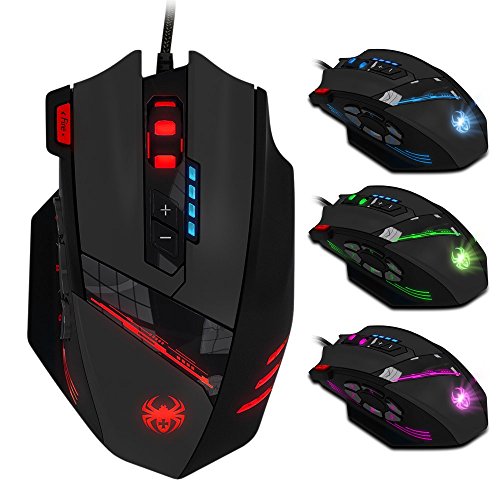
The AFUNTA C12 is a wired gaming mouse featuring 12 programmable buttons and an adjustable 8000 DPI sensor, making it well-suited for macro-heavy MMOs and action titles. However, its contoured shell and left-side thumb cluster strictly limit it to right-handed setups.
Pros & Cons
Pros
- Six dedicated thumb buttons for custom macros
- Four-level DPI adjustments reaching up to 8000 DPI
- Dedicated triple-click fire button
- Customizable balance via eight removable internal weights
- Durable braided cable with gold-plated USB connector
Cons
- Right-handed ergonomic design excludes left-handed users
- Tethered USB connection limits placement flexibility
4

The Redragon M908 is a wired MMO gaming mouse equipped with 18 programmable buttons and modular weight tuning for complex keybind setups. It offers extensive customization for PC gamers, though software button remapping is unsupported on macOS.
Pros & Cons
Pros
- 18 programmable buttons including 12-key side grid
- Pixart PAW3327 sensor with up to 12400 DPI
- Includes eight-piece modular weight tuning set
- Five onboard memory profiles for rapid switching
Cons
- Macro remapping software is incompatible with macOS
- Lacks wireless connectivity options
5

The Redragon M921 is a wired MMO gaming mouse offering 18 programmable buttons and adjustable weights, making it ideal for macro-heavy MMO and MOBA setups. However, extensive key customization depends on dedicated software and the wired setup restricts desk mobility.
Pros & Cons
Pros
- 18 programmable buttons for extensive macro layouts
- Customizable weight tuning system with removable weights
- PAW3327 optical sensor with 1000 Hz polling
- Five onboard memory profiles for preset switching
Cons
- Tethered wired cable limits placement flexibility
- Full button remapping requires proprietary software
6

The Redragon M801 is a wired gaming mouse featuring an adjustable 16000 DPI sensor, nine programmable buttons, and an eight-piece weight tuning set. It suits PC gamers seeking dedicated macro controls and physical balance adjustments, though official operating system support is limited to Windows.
Pros & Cons
Pros
- Adjustable eight-piece weight tuning set
- Nine programmable buttons with macro support
- Five onboard memory profiles
- Durable Omron micro switches and Teflon feet
Cons
- Official operating system support limited to Windows
- Lacks wireless connectivity options
7

The Redragon M913 pairs a 12-button side grid with dual-mode wireless connectivity, making it well suited for MMO players needing extensive macro layouts. However, battery runtime is noticeably reduced when RGB backlighting remains active.
Pros & Cons
Pros
- 12 dedicated programmable side buttons
- Dual 2.4GHz wireless and USB-C wired modes
- Pixart 3335 sensor with adjustable 16000 DPI
- Up to 80 hours of battery in Eco mode
- Full wireless configuration through dedicated software
Cons
- Battery life drops to 45 hours with RGB enabled
- Key remapping requires proprietary driver software
8

The CHONCHOW T10b is an ultra-compact one-handed keyboard and mouse package designed to maximize desk space for action and battle royale games. While its included USB hub simplifies multi-device connectivity, full functionality depends on whether your chosen console or mobile titles natively support keyboard controls.
Pros & Cons
Pros
- Compact footprint saves desk space for mouse movement
- Integrated ergonomic wrist rest reduces hand fatigue
- Includes four-port USB hub and USB-C adapter
- Adjustable mouse tracking up to 7200 DPI
- Driver-free plug-and-play operation across multiple platforms
Cons
- Requires native game support for external keyboard input
- Requires separate adapter purchase for iOS devices
- Limited key count unsuitable for general typing tasks
9

The Razer Naga V2 HyperSpeed delivers 19 programmable buttons and multi-surface optical tracking, making it an effective choice for MMO players managing complex command bars. However, it relies on replaceable batteries rather than an integrated rechargeable system.
Pros & Cons
Pros
- 19 programmable buttons for comprehensive macro control
- Dual 2.4 GHz wireless and Bluetooth connectivity
- Up to 400 hours of battery life
- Focus Pro 30K sensor tracks on glass
- Dual-mode tactile and free-spin scroll wheel
Cons
- Requires replaceable batteries instead of onboard USB recharging
- Advanced tuning requires the Razer Synapse desktop software
10

11

The Redragon M811 provides extensive control with 15 programmable buttons, making it well suited for MMO players and macro-heavy desktop workflows. However, unlocking its full functionality and custom profiles requires proprietary software configuration.
Pros & Cons
Pros
- 15 programmable buttons for complex keybinds
- Dedicated eight-button MMO side panel
- Ergonomic grip shape for extended sessions
- Five onboard DPI switching levels
- Customizable dynamic RGB lighting modes
Cons
- Tethered wired design limits placement flexibility
- Advanced keybinds require dedicated software setup
12

Buying Guide
When choosing best gaming mouse for World of Warcraft MMO, consider the following factors…




Write Your Review
No reviews yet. Be the first to share your experience!