

The best cherry mx keyboards for gaming depend on the switch type, layout, noise level, and features your PC setup requires. The Corsair K100 RGB is the most feature-rich option listed, while the CHERRY XTRFY MX 3.1 and Cherry MX 3.0S offer quieter linear switches with simpler gaming-focused designs.
This comparison uses documented specifications rather than hands-on claims. It includes complete keyboards for gaming, office-oriented models that can still support PC play, a low-profile option, and a set of replacement switches that is not a complete keyboard.
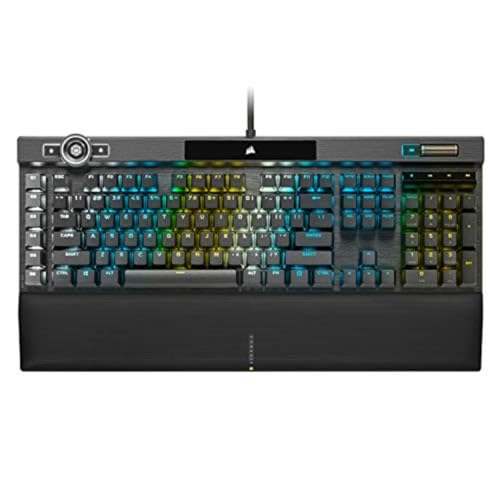
Pros
- Fast-actuating CHERRY MX SPEED Silver switches
- Extensive per-key RGB customization
- Programmable iCUE control wheel
- Aluminum frame construction
- Elgato Stream Deck compatibility
Cons
- QWERTY North American layout limits regional layout choice

Pros
- Quiet MX2A Silent Red linear mechanical switches
- Sturdy anodized metal plate construction
- Full N-key rollover with anti-ghosting
- Dedicated volume and calculator quick-access keys
- Durable laser-etched abrasion-resistant keycaps
Cons
- Restricted to wired connectivity
- Lacks full keyboard backlighting

Pros
- Crisp audible click and tactile feedback
- Transparent housing suits LED backlighting
- Ten switches included
- POM shaft core
- Advertised 50-million-keystroke lifespan
Cons
- Three-pin compatibility may exclude some keyboards
- Blue switches produce audible clicks
- Pins may arrive bent and need correction

Pros
- Quiet linear CHERRY MX2A Silent Red switches
- Durable aluminum housing with sound damping
- Full N-key rollover and anti-ghosting support
- Customizable RGB backlighting via software
Cons
- Tethered USB-A wired connection only
- Software required for in-depth lighting configuration

Pros
- Hot-swappable linear red switches
- Full-key anti-ghosting support
- Software macro editing and remapping
- Includes four spare replacement switches
- Twelve quick-access multimedia shortcuts
Cons
- Backlight LED colors cannot be changed
- Wired-only design without wireless functionality

Pros
- Quiet linear CHERRY MX2A Silent Red switches
- Rigid extruded aluminum chassis without visible screws
- Full N-key rollover and anti-ghosting hardware support
- Detachable cable simplifies packing and transport
- Dedicated Windows key lock mode for gaming
Cons
- Keyboard uses an older micro-USB connection
- Software required for custom RGB lighting configurations
Pros
- Tactile Cherry MX2A Brown switches rated over 100M actuations
- Sturdy anodized metal top plate design
- Full N-key rollover with anti-ghosting
- Dedicated quick-access volume and calculator buttons
- Wear-resistant laser-etched keycaps
Cons
- Restricted to a wired connection
- Lacks full key backlighting beyond basic status LEDs

Pros
- Cherry MX Low Profile Speed switches
- Slim 0.87-inch aluminum chassis
- Customizable RGB backlighting
- Integrated fold-out aluminum stand
How to Choose Among These Cherry MX Keyboards
Switch behavior is the first decision. Linear switches press smoothly without a tactile bump, tactile switches provide noticeable feedback without a click, and clicky switches produce an audible click alongside their tactile response.
- Choose linear switches for smooth repeated inputs in action games, racing games, and general PC use.
- Choose tactile switches if you want feedback while typing without the louder sound associated with clicky designs.
- Choose clicky switches when audible feedback and a pronounced typing rhythm matter more than shared-room noise.
- Check the layout before buying, especially if you need a number pad, dedicated media controls, or a familiar full-size arrangement.
- Check software requirements when lighting, macros, remapping, or advanced controls are important to your setup.
For more context on switch technology, compare these models with the differences discussed in our guide to mechanical keyboards versus Hall effect keyboards. Readers prioritizing smaller layouts can also review our coverage of compact mechanical keyboards for gaming.
Our Specification-Based Picks
Corsair K100 RGB Mechanical Gaming Keyboard: Best for Advanced Features
The Corsair K100 RGB Mechanical Gaming Keyboard uses CHERRY MX SPEED RGB Silver switches with a stated 1.2 mm actuation distance. Its aluminum frame, per-key RGB lighting, three-sided LightEdge, programmable control wheel, and iCUE compatibility suit gamers who want extensive customization.
Corsair AXON provides advertised 4,000 Hz key scanning and 4,000 Hz hyper-polling, along with support for layered lighting effects. The keyboard also supports Elgato Stream Deck integration, which may appeal to streamers and users who assign shortcuts to applications.
- Pros: Fast linear switches, durable aluminum construction, extensive RGB control, programmable wheel, and broad software integration.
- Cons: Its feature set may be unnecessary for users who want a straightforward keyboard, and the short actuation point may feel overly sensitive to some typists.
- Who should skip it: Skip this model if you prefer quiet, restrained lighting or do not need advanced controls and software customization.
CHERRY XTRFY MX 3.1, Wired Mechanical: Best Quiet Gaming Design
The CHERRY XTRFY MX 3.1, Wired Mechanical uses CHERRY MX2A Silent Red switches with linear operation and no click. Its aluminum housing, integrated damping mechanisms, screw-in metal feet, and RGB lighting are appropriate for gaming spaces where reduced keyboard noise matters.
Full N-key rollover, anti-ghosting, programmable keys, and a Windows key lock support common gaming workloads. CHERRY UTILITY software is used for lighting configuration, so buyers should confirm that its software features fit their operating system and workflow.
- Pros: Quiet linear switches, damping features, aluminum housing, adjustable metal feet, RGB lighting, and gaming-specific key functions.
- Cons: Silent Red switches provide less tactile feedback, and the supplied information does not specify wireless operation or a detachable cable.
- Who should skip it: Skip it if you want clicky feedback, a low-profile design, or extensive platform details beyond the listed wired connection.
Cherry MX 3.0S Wired Mechanical Gaming Keyboard: Best Simple CHERRY Gaming Option
The Cherry MX 3.0S Wired Mechanical Gaming Keyboard combines an extruded aluminum housing with CHERRY MX2A Silent Red switches. The linear, quiet switch design is a practical fit for gaming and typing when audible clicks are undesirable.
RGB lighting, full N-key rollover, anti-ghosting, and a Windows key lock cover the core features listed for gaming. Its detachable USB-A to micro-USB cable can simplify cable replacement or storage, although the connector is an older design compared with newer USB interfaces.
- Pros: Aluminum housing, quiet linear switches, programmable RGB effects, detachable cable, full-key rollover, anti-ghosting, and Windows key lock.
- Cons: The micro-USB connection is less current than newer connector designs, and Silent Red switches may feel too light or neutral for tactile-switch users.
- Who should skip it: Skip this keyboard if you specifically want a clicky or tactile switch, wireless operation, or a modern USB-C cable connection.
Cherry MX 10.0N RGB Mechanical Keyboard MX Low: Best for a Slim Profile
The Cherry MX 10.0N RGB Mechanical Keyboard MX Low uses CHERRY MX Low Profile Speed switches described as linear, quiet, and responsive. Its 0.87-inch slim design, aluminum housing, RGB lighting, and integrated stand make it suitable for users who prefer a lower keyboard profile.
Low-profile switches change the key height and typing posture compared with standard mechanical keyboards, so compatibility with existing keycaps or replacement parts should not be assumed. The supplied specifications also do not list N-key rollover, anti-ghosting, macro support, or software features.
- Pros: Slim aluminum construction, low-profile linear switches, RGB lighting, and an integrated support bar for positioning.
- Cons: The listed feature set is less detailed than several competing models, and low-profile switch compatibility differs from standard mechanical keyboard parts.
- Who should skip it: Skip it if you want extensive programmable controls, standard-height switches, or documented gaming rollover features.
Cherry KC 200 MX Wired Mechanical Office Keyboard, Silent Red: Best for Shared Spaces
The Cherry KC 200 MX Wired Mechanical Office Keyboard with CHERRY MX2A Silent Red switches is designed as an office keyboard, but its linear and quiet operation can also suit PC gaming. It includes full N-key rollover, anti-ghosting, white status LEDs, calculator access, and volume controls.
Its anodized metal plate, fold-out feet, and laser-etched keycaps support a durable everyday setup. However, the documented feature list emphasizes office functions rather than RGB lighting, gaming software, dedicated macros, or other advanced gaming controls.
- Pros: Quiet linear switches, full N-key rollover, anti-ghosting, volume controls, calculator access, metal construction, and abrasion-resistant legends.
- Cons: It is an office-oriented design with no listed RGB lighting, dedicated gaming mode, programmable keys, or gaming software.
- Who should skip it: Skip it if lighting customization, macro programming, or a gaming-focused appearance is central to your setup.
Cherry KC 200 MX Wired Mechanical Office Keyboard, Brown: Best for Tactile Typing
The Cherry KC 200 MX Wired Mechanical Office Keyboard with CHERRY MX2A Brown switches provides a noticeable tactile response without a click. That makes it a reasonable choice for users who divide their time between gaming, writing, and general desktop work.
Full N-key rollover and anti-ghosting support simultaneous key recognition, while the metal plate, fold-out feet, and laser-etched keycaps are suited to regular use. Like the Silent Red KC 200 MX, this model does not list RGB lighting, programmable gaming keys, or dedicated gaming software.
- Pros: Tactile MX2A Brown switches, full N-key rollover, anti-ghosting, volume and calculator keys, metal construction, and durable key legends.
- Cons: The office-focused design has fewer gaming controls and lighting features than the Corsair and CHERRY XTRFY models.
- Who should skip it: Skip it if you prefer completely smooth linear switches or need programmable RGB effects and dedicated gaming controls.
Redragon Mechanical Gaming Keyboard Wired: Best Budget-Oriented Feature Set
The Redragon Mechanical Gaming Keyboard Wired uses hot-swappable linear Red switches and includes four spare switches, double-shot ABS keycaps, macro editing, anti-ghosting, multimedia shortcuts, and 11 backlight modes. It is listed for PC and Mac use, making it the most flexible low-cost option for buyers who want basic customization.
Its hot-swap design can simplify switch replacement, but the supplied specifications do not identify the socket type or confirm compatibility with every third-party switch. The lighting can be adjusted for effects, speed, and brightness, but the listed color cannot be changed.
- Pros: Hot-swappable Red switches, spare parts, macro editing, anti-ghosting, multimedia shortcuts, PBT-style double-shot description notwithstanding, and PC and Mac compatibility.
- Cons: The keycap material description identifies double-injection ABS, lighting color is not changeable, and socket compatibility with replacement switches is not fully specified.
- Who should skip it: Skip it if you require individually configurable RGB colors, premium metal construction, or confirmed compatibility with a particular switch family.
BlingKingdom 10 PCS Mechanical Keyboard Switches: Not a Complete Keyboard
The BlingKingdom 10 PCS Mechanical Keyboard Switches are replacement components rather than a complete gaming keyboard. These three-pin MX-style blue switches use a clicky design, transparent housings for LED backlighting, a 4 mm total travel, and an approximate 50-million-keystroke lifespan.
They may suit a repair or switch-customization project, but buyers must confirm that their keyboard accepts three-pin switches and that the plate, socket, keycaps, and soldering requirements match. The supplied information notes that pins can bend during shipment and may need correction before installation.
- Pros: Clicky tactile feedback, transparent housings for lighting, MX-style compatibility claims, and a low-cost way to replace a small number of switches.
- Cons: The package contains only 10 switches, uses three-pin components, and does not provide a complete keyboard or a guaranteed fit for every mechanical board.
- Who should skip it: Skip it if you need a ready-to-use keyboard, quiet operation, linear switches, or a solder-free installation confirmed for your specific board.
Important Compatibility Checks
Most listed products are wired keyboards intended for a desktop setup, but the supplied specifications do not establish universal operating-system software support. The Redragon model specifically lists PC and Mac compatibility, while CHERRY UTILITY and Corsair iCUE features should be checked against the operating system used for configuration.
Do not assume that a keyboard labeled MX accepts every CHERRY or third-party switch. Standard-height, low-profile, three-pin, five-pin, soldered, and hot-swappable designs can differ, so replacement parts require a socket and keycap compatibility check before purchase.
Users who need a smaller footprint should compare the physical layout carefully because the supplied data does not identify every model’s percentage layout or dimensions. Our guide to 75 percent mechanical keyboards may help narrow the layout decision.
Cherry MX Keyboard FAQs
Which switch type is best for PC gaming?
There is no single switch type that suits every player. Linear switches are often the simplest match for repeated game inputs, tactile switches help users who want keypress feedback, and clicky switches suit buyers who accept more audible feedback.
Are office keyboards suitable for gaming?
The two Cherry KC 200 MX models list full N-key rollover and anti-ghosting, which are useful for simultaneous inputs. Their main limitation is the absence of several gaming-oriented features listed on other models, including RGB customization, programmable keys, and dedicated gaming software.
Is the BlingKingdom switch set a keyboard?
No. It is a 10-piece set of three-pin blue mechanical switches for repairs or customization. It requires a compatible mechanical keyboard and may require pin correction or installation work.


Write Your Review
No reviews yet. Be the first to share your experience!