

Mechanical keyboard vs hall effect is mainly a choice between traditional physical switches and magnetic switches with adjustable sensing. For competitive FPS gaming, Hall Effect models offer more control over actuation and reset behavior, while a conventional mechanical keyboard remains a simpler option for general gaming, typing, and broad switch familiarity.
This comparison uses documented specifications rather than independent performance measurements. The NSYCA WIN68 HE Hall Effect Keyboard and AULA WIN68 HE Mechanical Gaming Keyboard 60% both focus on adjustable magnetic input, while the Redragon Mechanical Gaming Keyboard Wired uses hot-swappable red mechanical switches and a more conventional feature set.
- Choose Hall Effect if you want adjustable actuation, Rapid Trigger, SOCD or DKS functions, and a compact keyboard aimed at competitive FPS play.
- Choose traditional mechanical if you prefer a familiar linear red switch, straightforward software features, and a lower-complexity keyboard for general PC use.
- Choose the NSYCA model when Mac compatibility, a wider stated actuation range, per-key customization, and higher advertised scan-rate specifications matter.
- Choose the AULA model when Windows-only web-driver support is acceptable and you want the core Hall Effect features in a compact wired format.
- Choose the Redragon model when hot-swappable red switches, macro support, backlit modes, and full-key anti-ghosting are more important than adjustable magnetic input.
Recommended keyboards for mechanical keyboard vs hall effect buyers

Pros
- Hot-swappable linear red switches
- Full-key anti-ghosting support
- Software macro editing and remapping
- Includes four spare replacement switches
- Twelve quick-access multimedia shortcuts
Cons
- Backlight LED colors cannot be changed
- Wired-only design without wireless functionality

Pros
- Hall Effect switches with adjustable actuation
- Fast 8000Hz polling rate
- Compact 68-key layout preserves arrow keys
- Detachable wired USB connection
- South-facing RGB with web-based configuration
Cons
- Web configuration driver does not support macOS
- Wired-only connection with no wireless functionality

Pros
- Adjustable actuation from 0.01mm to 4.0mm
- Fast 8000Hz polling rate
- Compact layout includes dedicated arrow keys
- Web-based driver eliminates software installations
- Durable shine-through PBT keycaps
Cons
- Hot-swap PCB limited to 3-pin magnetic switches
- Wired-only operation with no wireless functionality
Mechanical keyboard vs hall effect comparison
| Feature | NSYCA WIN68 HE | AULA WIN68 HE | Redragon Mechanical |
|---|---|---|---|
| Switch type | Hall Effect magnetic, linear | Hall Effect magnetic | Linear red mechanical |
| Actuation adjustment | 0.01 mm to 4.0 mm | 0.02 mm to 3.44 mm | Not specified |
| Rapid Trigger | Supported | Supported | Not specified |
| Polling rate | Up to 8,000 Hz | Up to 8,000 Hz | Not specified |
| Layout | 60% with arrow keys | 60% with arrow keys | Not specified |
| Connection | Wired | Wired, detachable USB cable | Wired |
| Driver compatibility | Web-based driver, product listing identifies PC and Mac support | Web driver supports Windows only | Software supports macro and lighting adjustment, operating system details not specified |
| Switch replacement | 3-pin magnetic hot-swap support | Not specified | Hot-swappable red switches |
What changes between mechanical and Hall Effect keyboards?
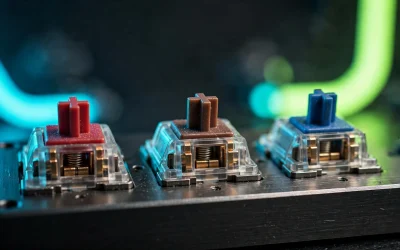
Traditional mechanical switches register a key through physical switch contacts. The Redragon uses linear red switches, which are described as smooth and relatively easy to press, making them suitable for gaming genres and everyday typing when you want a familiar mechanical feel.
Hall Effect switches detect key movement magnetically. That design allows compatible keyboards to adjust the actuation point in software and, on these two WIN68 HE models, use Rapid Trigger behavior that resets based on key movement rather than one fixed reset point.
Those features are most relevant to games that benefit from repeated short movement inputs, especially competitive FPS titles. They do not automatically improve every workload, and the listed polling rates and latency figures are manufacturer specifications rather than independently measured results.
NSYCA WIN68 HE Hall Effect Keyboard: The broader compatibility pick
The NSYCA WIN68 HE Hall Effect Keyboard combines Hall Effect magnetic switches with an adjustable actuation range from 0.01 mm to 4.0 mm. It also lists Rapid Trigger, DKS, SOCD, per-key customization, and a web-based driver, giving competitive players more input settings than the Redragon model.
Its 60% wired layout retains dedicated arrow keys, while the listed 8,000 Hz polling rate, 32K single-key scan rate, and 4K full-key scan rate target fast input transmission. The product listing identifies PC and Mac use, which makes it the more flexible choice of the two Hall Effect keyboards for mixed-device households, although advanced driver behavior should still be confirmed for the operating system being used.
- Pros: Wide 0.01 mm to 4.0 mm actuation range, Rapid Trigger, DKS and SOCD support, arrow keys in a compact layout, 3-pin magnetic hot-swap support, PBT shine-through keycaps, and a one-year limited warranty.
- Cons: It is wired, the 60% layout still relies on function-layer shortcuts for some commands, and the listed advanced response figures are advertised specifications rather than independent measurements.
- Who should skip it: Skip it if you want a full-size layout, wireless connectivity, or a conventional mechanical switch ecosystem instead of magnetic switches.
AULA WIN68 HE Mechanical Gaming Keyboard 60%: A Windows-focused Hall Effect option
The AULA WIN68 HE Mechanical Gaming Keyboard 60% uses Hall Effect magnetic switches with adjustable actuation from 0.02 mm to 3.44 mm. Its documented feature set includes Rapid Trigger, SOCD, DKS, MT, TGL, RGB adjustment, key remapping, and macro editing through a web driver.
AULA lists an 8,000 Hz polling rate and 0.3 ms ultra-low latency, but these should be treated as advertised specifications. The keyboard retains arrow keys in its compact 60% layout and includes a detachable USB cable, which can help with transport and cable replacement compared with a permanently attached design.
The most important limitation is software compatibility. The supplied product information states that the web driver supports Windows systems and does not support Mac, so Mac users should not assume that the advanced customization features will be available.
- Pros: Adjustable magnetic actuation, Rapid Trigger and other gaming functions, 8,000 Hz advertised polling rate, compact arrow-key layout, RGB lighting, and a detachable USB cable.
- Cons: The driver is stated to support Windows only, the keyboard is wired, and the 0.3 ms latency claim is not an independent measurement.
- Who should skip it: Skip it if you use a Mac for configuration, need wireless operation, or prefer a standard mechanical switch design with broader replacement options.
Redragon Mechanical Gaming Keyboard Wired: The simpler mechanical choice
The Redragon Mechanical Gaming Keyboard Wired uses hot-swappable linear red mechanical switches rather than Hall Effect magnetic switches. Its documented features include 11 backlight modes, macro editing, remapping, full-key anti-ghosting, multimedia shortcuts, double-injection keycaps, four spare switches, and a 24-month warranty.
This model suits users who want a conventional mechanical keyboard for gaming and general PC work without configuring adjustable magnetic actuation. The hot-swap design allows supported switches to be replaced without soldering, but the supplied information does not specify a polling rate, Rapid Trigger function, adjustable actuation, or the exact layout.
- Pros: Familiar linear red switch behavior, hot-swappable switches, full-key anti-ghosting, macro and remapping support, multiple backlight modes, spare switches, and a longer stated warranty than the two WIN68 HE models.
- Cons: No documented Hall Effect sensing, adjustable actuation, Rapid Trigger, or polling-rate specification, and the backlight color is stated as fixed rather than fully color-customizable.
- Who should skip it: Skip it if you specifically want adjustable actuation, SOCD, DKS, or magnetic switch features for competitive FPS play.
How to choose between these keyboards
For competitive FPS gaming
Start with a Hall Effect model if your priority is changing actuation depth or using Rapid Trigger. The NSYCA offers the widest stated actuation range and identifies PC and Mac support, while the AULA provides similar core features but limits its web-driver support to Windows.
For general gaming and typing
A traditional mechanical keyboard can be the more practical choice when you do not need magnetic input controls. The Redragon’s linear red switches, anti-ghosting, macro support, and hot-swap design cover common gaming and desktop needs without requiring Hall Effect-specific configuration.
For Mac compatibility
The NSYCA product information identifies both PC and Mac use, while AULA explicitly states that its web driver does not support Mac. The Redragon listing also identifies PC and Mac in its product description, but it does not provide equivalent details about operating system support for every software function.
For compact desk setups
Both WIN68 HE keyboards use a 60% format with arrow keys, making them suitable for users who want more mouse space without giving up dedicated directional keys. The Redragon’s supplied information does not specify its layout, so confirm the physical arrangement before ordering.
For more background on switch feel, see our guide to linear, tactile, and clicky mechanical keyboard switches. Readers comparing compact layouts can also review the compact keyboard category for related options.
Frequently asked questions
Is a Hall Effect keyboard better than a mechanical keyboard?
Neither type is automatically better for every user. Hall Effect keyboards offer adjustable actuation and Rapid Trigger features, while conventional mechanical keyboards can provide a simpler setup and familiar switch behavior.
Do Hall Effect keyboards work on Mac?
Basic keyboard input may depend on the physical connection and operating system support, but advanced configuration requires compatible software. The NSYCA listing identifies PC and Mac use, while AULA states that its web driver supports Windows only.
Does a higher polling rate guarantee faster gaming performance?
No. A higher polling-rate specification indicates more frequent reporting under supported conditions, but it does not by itself establish a particular in-game improvement. System compatibility, game input handling, switch configuration, and the rest of the PC setup also matter.
Final recommendation
In the mechanical keyboard vs hall effect comparison, choose the NSYCA WIN68 HE if you want the broadest stated configuration range and PC and Mac positioning. Choose the AULA WIN68 HE if you use Windows and want similar magnetic gaming controls in a compact wired keyboard. Choose the Redragon if you prefer conventional linear mechanical switches, hot-swap support, and straightforward gaming features over adjustable actuation and Rapid Trigger.



Write Your Review
No reviews yet. Be the first to share your experience!