

The best mouse dpi for gaming is usually the lowest setting that lets you turn comfortably without running out of desk space. Lower DPI can support controlled aiming, while higher DPI suits compact desks, fast cursor movement, and users who prefer smaller physical swipes.
This specification-based roundup compares ten PC gaming mice with adjustable DPI, different connection types, programmable controls, and varying weight or battery requirements. DPI is only one part of the decision, so sensor tracking, polling rate, shape, connectivity, and software support also matter.
Quick Picks for the Best Mouse DPI for Gaming
- Best wireless flexibility: Tri-Mode 58g Wireless Gaming Mouse 32000 DPI, with wired, 2.4GHz wireless, and Bluetooth 5.0 connections.
- Best competitive wireless option: Razer Viper V3 HyperSpeed Wireless PC, with an 82g design, a Focus Pro 30K optical sensor, and on-mouse DPI control.
- Best lightweight budget option: Redragon M730 PRO Wireless Lightweight RGB, offering a 62g design, adjustable DPI up to 10,000, and wired or wireless use.
- Best basic wired choice: BENGOO Gaming Mouse Wired with RGB Backlit, with four DPI stages up to 3,600 and plug-and-play operation.
- Best for programmable controls: Redragon M810 PRO Wireless RGB Gaming Mouse 10000, with eight programmable buttons and adjustable DPI profiles.

Pros
- Up to 7200 adjustable DPI
- Nine programmable buttons with macro editing
- Ergonomic contouring with finger rest design
- Customizable seven-mode RGB backlighting
Cons
- Full macro customization requires separate software download
- Tethered wired connection limits freedom of movement

Pros
- Lightweight 62-gram construction
- Wired and Bluetooth connectivity
- Up to 10000 DPI through software
- 1000Hz polling rate
- Customizable RGB lighting
Cons
- Expanded DPI settings require software
- Battery life is advertised, not independently verified

Pros
- Up to 280 hours of AA battery life
- Accurate Focus Pro 30K sensor tracks on glass
- Fast, stable HyperSpeed Wireless connectivity
- Durable mechanical switches rated for 60M clicks
- Dedicated on-mouse five-stage DPI switch
Cons
- Relies on replaceable AA batteries instead of USB charging
- Heavier than many modern ultralight alternatives at 82g

Pros
- Four on-the-fly DPI speed settings up to 3600
- Driver-free plug-and-play operation
- Six-button design with side navigation controls
- Ergonomic contoured shape suited for palm grip
- Integrated multi-color lighting
Cons
- Sensitivity restricted to four predetermined DPI steps
- Lowest available DPI setting starts at 1200 DPI

Pros
- Selectable polling rates up to 1000Hz
- Dedicated rapid-fire button for FPS titles
- Up to 70 hours of runtime without RGB
- Fully programmable buttons with macro support
- Functional while actively charging
Cons
- Battery life drops to 35 hours with RGB enabled
- Enters auto-sleep after just one minute of inactivity

Pros
- Cable-free 2.4GHz wireless connectivity
- Eight remappable buttons including rapid-fire input
- Adjustable polling rate up to 1000Hz
- Five customizable onboard DPI presets
Cons
- Maximum 45-hour battery life requires eco mode
- Equipped with entry-level PAW3325 optical sensor

Pros
- Six-button layout
- Four adjustable DPI settings
- Plug-and-play USB connectivity
- Multicolor breathing LED lighting
- Broad operating system compatibility
Cons
- Wired connection limits placement flexibility
- Only four preset DPI levels

Pros
- Up to 12800 DPI across six adjustable levels
- Responsive tracking with up to 1000Hz polling rate
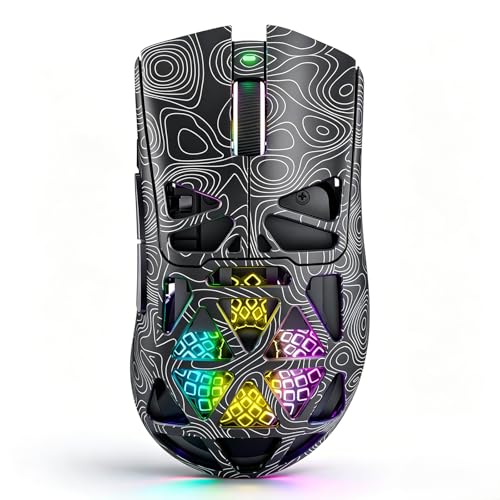
- Breathable honeycomb shell reduces hand fatigue
- Programmable macros and 14 distinct RGB lighting modes
- Plug-and-play USB connectivity across multiple operating systems
Cons
- Gaming mode configuration requires separate macro software setup
- Wired USB connection restricts movement freedom

Pros
- Lightweight 58g construction
- Flexible tri-mode connectivity options
- Sensor supports up to 32,000 DPI
- Responsive 1000Hz polling rate
- Rechargeable battery via USB-C
Cons
- Battery runtime hours are not specified
- Driver software platform compatibility is not detailed

Pros
- Fast 1 ms LIGHTSPEED wireless response time
- Accurate 12,000 DPI optical HERO sensor
- Up to 250 hours continuous runtime per AA battery
- Lightweight 3.4 oz chassis for quick handling
- Built-in internal storage for the USB receiver
Cons
- Requires AA batteries instead of USB recharging
- Extending battery life requires Logitech G HUB configuration
What DPI Should You Use for Gaming?
Many PC players start around 400 to 800 DPI for tactical shooters because the slower cursor movement can make broad, controlled aiming easier. Around 800 to 1,600 DPI is a practical middle range for mixed gaming, desktop work, and games requiring more frequent camera movement.
Higher settings can suit small desks, high-resolution displays, fast camera movement, or players who dislike lifting the mouse. However, a maximum DPI number is not automatically better, and the useful range depends on the game sensitivity setting and the mouse sensor implementation.
Best Mouse DPI for Gaming: Key Specifications Compared
| Mouse | Maximum DPI | Connection | Notable specification | Main limitation |
|---|---|---|---|---|
| Razer Viper V3 HyperSpeed Wireless PC | 30,000 | HyperSpeed wireless | 82g design, five DPI stages, one AA battery rated up to 280 hours | Battery-powered and focused on PC use |
| Redragon M602 Gaming Mouse | 7,200 | Wired | Nine programmable buttons and ergonomic shape | Wired connection and older product design |
| Redragon M730 PRO Wireless Lightweight RGB | 10,000 | Wired and wireless | 62g design, 1,000Hz polling rate, battery rated up to 77 hours | Wireless battery duration depends on use conditions |
| Redragon M810 PRO Wireless RGB Gaming Mouse 10000 | 10,000 | 2.4GHz wireless and wired modes | Eight programmable buttons and 1,000Hz polling rate | Battery rated up to 45 hours in eco mode |
| BENGOO Gaming Mouse Wired with RGB Backlit | 3,600 | Wired | Four DPI stages and plug-and-play setup | Lower maximum DPI and no software requirement for customization |
| Redragon Gaming Mouse, Wireless Mouse | 8,000 | Wireless and wired charging use | 125Hz to 1,000Hz polling options and programmable buttons | Battery rated from 35 to 70 hours depending on RGB use |
| SMAIGE Gaming Mouse Wired,6 Buttons | 3,200 | Wired | Four DPI stages and plug-and-play compatibility | Limited DPI range and no extra software requirement |
| SOLAKAKA SM900 Gaming Mouse Wired | 12,800 | Wired | Six DPI levels, 1,000Hz polling rate, macro support | Requires software for gaming modes and custom profiles |
| Tri-Mode 58g Wireless Gaming Mouse 32000 DPI | 32,000 | Wired, 2.4GHz, Bluetooth 5.0 | 58g design, 1,000Hz polling rate, six DPI levels | Bluetooth and software features may vary by operating system |
| Logitech G305 Lightspeed Wireless Gaming Mouse | 12,000 | LIGHTSPEED wireless | 3.4oz design, 1ms report rate, one AA battery rated up to 250 hours | Uses a replaceable AA battery |
Recommended Mouse DPI Picks by Player Type
Razer Viper V3 HyperSpeed Wireless PC
Razer Viper V3 HyperSpeed Wireless PC suits players who want wireless operation, a moderate weight, and a high-resolution optical sensor. Its Focus Pro 30K sensor, forward sensor placement, five DPI stages, and top-mounted DPI button support quick sensitivity changes without opening software.
The advertised battery life is up to 280 hours from one AA battery, which reduces charging interruptions during extended use. Its main trade-off is that the 82g design is not as light as several newer lightweight options, and wireless operation requires the supplied receiver setup.
Redragon M602 Gaming Mouse
Redragon M602 Gaming Mouse is a wired option for users who want adjustable DPI and many remappable controls without managing a battery. Its sensor supports up to 7,200 DPI, while nine programmable buttons can suit MMO keybinds, productivity shortcuts, and game-specific commands.
The ergonomic shape is intended for longer sessions, but the supplied data does not specify its weight, polling rate, or supported operating systems beyond PC, Windows, laptop, and Mac references. Choose it for its button layout rather than for a lightweight competitive setup.
Redragon M730 PRO Wireless Lightweight RGB
Redragon M730 PRO Wireless Lightweight RGB is a strong fit for players who prefer a lighter mouse and want to alternate between wired and wireless use. The 62g body, PixArt SG8925 optical sensor, adjustable DPI up to 10,000, and 1,000Hz polling rate cover common competitive and everyday settings.
Its rechargeable battery is rated for up to 77 hours, but the product data does not state the exact connection modes beyond wired and wireless use. The default DPI stages are 400, 800, 1,600, 2,400, and 4,000, with additional values available through software.
Redragon M810 PRO Wireless RGB Gaming Mouse 10000
Redragon M810 PRO Wireless RGB Gaming Mouse 10000 suits players who need several programmable buttons alongside adjustable sensitivity. It offers eight editable buttons, five onboard DPI levels, a PAW3325 optical sensor, and a 1,000Hz polling rate in dual mode.
The maximum battery rating is up to 45 hours in eco mode, so frequent users may prefer wired operation or more substantial charging planning. Its default DPI stages range from 500 to 10,000, and the five positions can be customized through the software.
BENGOO Gaming Mouse Wired with RGB Backlit
BENGOO Gaming Mouse Wired with RGB Backlit is aimed at users who want simple DPI switching without installing a driver. Its four settings run from 1,200 to 3,600 DPI, and the six-button layout includes forward, back, and dedicated DPI controls.
This range is suitable for general gaming and everyday PC control, but it does not provide the lower 400 or 800 DPI stages often preferred for slower shooter sensitivity. The listed compatibility includes Windows versions, MacBook, notebooks, and laptops, although operating-system feature support may differ.
Redragon Gaming Mouse, Wireless Mouse
Redragon Gaming Mouse, Wireless Mouse is designed for users who want adjustable DPI, programmable buttons, and multiple polling-rate choices. Its 250 to 8,000 DPI range, 125Hz to 1,000Hz polling options, fire button, and macro support give it flexibility for FPS and general gaming.
The rechargeable battery is rated for 35 hours with RGB enabled or up to 70 hours with RGB disabled. Those figures are advertised capacities rather than independent measurements, and the mouse can also be used while charging when cable operation is acceptable.
SMAIGE Gaming Mouse Wired,6 Buttons
SMAIGE Gaming Mouse Wired,6 Buttons is a straightforward wired choice for users who want four physical DPI settings and no additional software. The available stages are 1,000, 1,600, 2,400, and 3,200 DPI, with a six-button layout and plug-and-play USB connection.
It supports Windows, Mac OS, Linux, and several older Windows versions according to the supplied specifications. The limited DPI range may not suit players who specifically need very low sensitivity or high-resolution settings above 3,200 DPI.
SOLAKAKA SM900 Gaming Mouse Wired
SOLAKAKA SM900 Gaming Mouse Wired offers six DPI levels up to 12,800, a 1,000Hz maximum polling rate, side buttons, and macro configuration. Its perforated shell is designed to reduce weight and improve airflow, although the supplied data does not provide a total mouse weight.
This model fits users who want multiple profiles for games and office work from a wired USB mouse. Custom modes, button functions, DPI, and lighting require the macro software, while the listed operating-system support includes Windows and Mac OS versions.
Tri-Mode 58g Wireless Gaming Mouse 32000 DPI
Tri-Mode 58g Wireless Gaming Mouse 32000 DPI is the most flexible connection option in this group, supporting USB-A wired use, 2.4GHz wireless, and Bluetooth 5.0. Its 58g weight, 1,000Hz polling rate, 1ms stated response time, and six DPI stages suit users who move between gaming PCs, laptops, tablets, and workstations.
The listed DPI stages are 800, 1,600, 2,400, 3,200, 6,500, and 32,000, so it does not include a 400 DPI preset in the documented defaults. The built-in rechargeable battery uses USB-C charging, while software-dependent button customization may vary by operating system.
Logitech G305 Lightspeed Wireless Gaming Mouse
Logitech G305 Lightspeed Wireless Gaming Mouse is a compact wireless option for players who want a replaceable-battery design and a broad DPI range. Its HERO sensor supports up to 12,000 DPI, while LIGHTSPEED wireless provides a stated 1ms report rate for responsive PC gaming.
The 3.4oz body supports easy movement, and the supplied specification rates the AA battery for up to 250 hours of continuous gameplay. Endurance mode can extend battery life for general use, but buyers who prefer rechargeable mice will need to consider that ongoing battery requirement.
How to Choose the Best Mouse DPI for Gaming
Match DPI to Your Game and Sensitivity
Low DPI generally requires larger arm movements but can make fine corrections easier when the game sensitivity is adjusted appropriately. Higher DPI reduces the physical distance needed for cursor movement, which can help on small desks or with fast-paced camera control.
Consider Effective Sensitivity, Not DPI Alone
In-game sensitivity changes how far the camera or cursor moves, so two players using different DPI values can achieve similar control. Keep Windows pointer acceleration disabled if consistent physical movement is important, and use the mouse software to create sensible DPI stages rather than selecting the highest number.
Check Sensor, Polling Rate, and Connection Details
A high DPI ceiling does not prove that a mouse tracks better at every setting. Compare the documented sensor, polling-rate options, connection method, battery arrangement, and software support, then prioritize the specifications that match your games and desk setup.
Choose the Right Weight and Shape
Lightweight designs such as the 58g Tri-Mode model and 62g Redragon M730 PRO can suit players who make frequent broad swipes. Heavier or more structured designs may feel steadier to some users, but shape, grip compatibility, and available desk space remain personal considerations.
Best Mouse DPI for Gaming FAQs
Is 800 DPI good for gaming?
Yes, 800 DPI is a practical starting point for many games because it offers a balance between controlled movement and usable cursor speed. Adjust the in-game sensitivity and mousepad space to determine whether it feels comfortable.
Is higher DPI better for FPS games?
Not necessarily. Higher DPI can reduce the required physical movement, but aiming consistency depends on the combined DPI and game sensitivity settings, sensor behavior, grip, and available desk space.
Does polling rate matter as much as DPI?
Polling rate affects how frequently the mouse reports movement, while DPI affects cursor sensitivity. A mouse with a very high DPI maximum can still be a poor fit if its shape, connection, controls, or software do not suit your setup.




Write Your Review
No reviews yet. Be the first to share your experience!