

The best mouse CPI for gaming is usually a flexible sensor with dependable tracking, not the highest number printed on the box. Most players should prioritize comfortable control, adjustable sensitivity, suitable weight, button layout, and reliable compatibility.
In this specification-based roundup, the listed mice range from basic multi-level sensitivity controls to sensors rated between 8,500 and 26,000 CPI or DPI. The right choice depends on whether you play competitive FPS titles, MMOs, MOBAs, strategy games, or a mixture of workloads.
Best Mouse CPI for Gaming: Product Shortlist

Pros
- Compact footprint saves desk space for mouse movement
- Integrated ergonomic wrist rest reduces hand fatigue
- Includes four-port USB hub and USB-C adapter
- Adjustable mouse tracking up to 7200 DPI
- Driver-free plug-and-play operation across multiple platforms
Cons
- Requires native game support for external keyboard input
- Requires separate adapter purchase for iOS devices
- Limited key count unsuitable for general typing tasks

Pros
- Dual HyperSpeed wireless and Bluetooth connectivity options
- Up to 535 hours of extended battery life
- Nine programmable buttons for custom macro setups
- Durable mechanical switches rated for 60M clicks
- High-precision 18,000 DPI optical sensor
Cons
- Configuration and optimization require Razer Synapse software
- Battery life varies depending on usage conditions

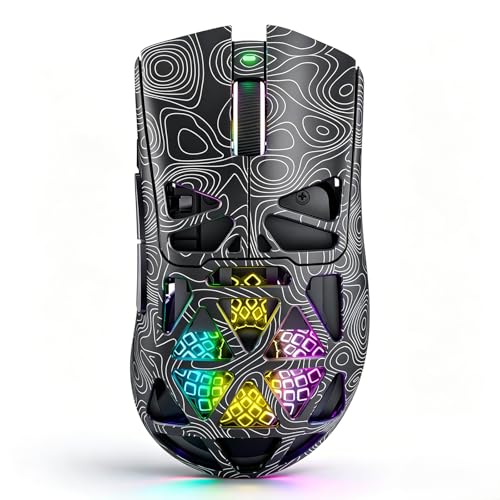
Pros
- Versatile tri-mode wireless and wired connectivity options
- Ventilated lightweight honeycomb shell design
- Rechargeable battery with USB-C play-and-charge support
- Seven programmable buttons for custom macro setups
- Up to 1000Hz polling rate for responsive tracking
Cons
- Open honeycomb design is vulnerable to dust accumulation
- Full macro and button customization requires software installation
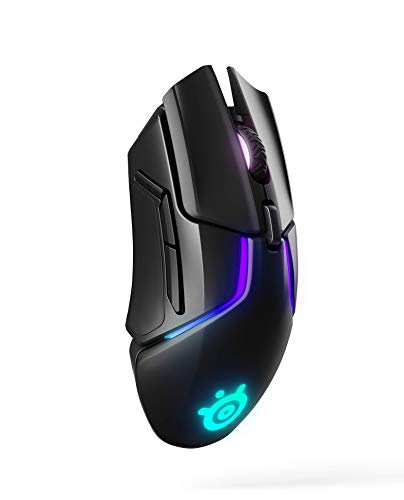
Pros
- Low-latency Quantum Wireless connectivity
- TrueMove3+ dual optical sensor with 12,000 CPI
- Customizable lift-off distance from 0.5 to 2 mm
- 256 center-of-gravity weight tuning options
- Rapid charging provides 10 hours in 15 minutes

Pros
- Lightweight 69g frame
- Optical magnetic switches rated for 100 million clicks
- High-accuracy 18,000 CPI TrueMove Pro sensor
- Comfortable right-handed shape for various grip styles
- Cross-platform compatibility for PC and Mac
Cons
- Right-handed shape excludes left-handed users
- Tethered wired cable lacks wireless portability

Pros
- 19 programmable buttons for complex macros
- Modular weight tuning with eight removable weights
- Five onboard memory profiles for custom layouts
- Wide DPI adjustment range up to 12400
Cons
- Software download required for macro and lighting customization

Pros
- Ultra-lightweight 59g construction
- IP54 water and dust resistance
- 100% virgin-grade PTFE glide skates
- Flexible low-drag Super Mesh cable
- 8,500 CPI optical sensor
Cons
- Wired configuration limits portability
- Renewed rather than factory-new unit

Pros
- 11 programmable buttons for comprehensive macro control
- Dual-mode HyperScroll tilt wheel enhances versatility
- High-resolution 26K DPI optical sensor
- Responsive optical switches rated for 70 million clicks
- 11 independently customizable RGB lighting zones
Cons
- Tethered wired cable restricts cable-free mobility
- Ergonomic thumb rest form factor excludes left-handed users

Pros
- Versatile Bluetooth, 2.4GHz, and USB-C wired connectivity
- Ergonomic contoured shape with dual finger rests
- Rechargeable 1000mAh battery with charge-and-play capability
- Adjustable polling rate up to 1000Hz
- Stores USB receiver inside the mouse body
Cons
- Software configuration requires Windows and wired or 2.4GHz mode
- Bulky ergonomic dimensions are unsuitable for small hands

Pros
- Lightweight 61g frame for fast handling
- Durable optical magnetic switches rated for 100M clicks
- High-precision 18,000 CPI TrueMove Pro sensor
- Supports claw, palm, and fingertip grip styles
- Five programmable buttons for custom bindings
Cons
- Asymmetric shape is unsuitable for left-handed users
- Wired design lacks cordless flexibility
How CPI Affects Gaming Mouse Control
CPI means counts per inch, describing how many sensor counts the mouse reports when it moves one inch. DPI is commonly used for the same setting, although CPI is the more technically precise term for mouse sensor sensitivity.
A higher CPI moves the pointer farther with less physical mouse movement, while a lower CPI requires larger hand movements. Neither setting automatically improves aim, because in-game sensitivity, Windows settings, mousepad space, grip, and personal control remain important.
Many competitive FPS players prefer a lower effective sensitivity because it allows larger arm movements for precise aiming. Higher CPI can be useful for desktop work, high-resolution displays, limited desk space, or players who naturally prefer smaller movements.
Comparison of CPI, Weight, and Connection Features
| Mouse | Advertised sensor or sensitivity | Weight or tuning | Connection | Best suited to |
|---|---|---|---|---|
| One Handed Gaming Keyboard and Mouse Combo | 1,200, 2,400, 4,800, and 7,200 speed levels | Not specified | USB combo with USB A to C adapter | Budget setups and compact gaming stations |
| Razer Basilisk V3 X HyperSpeed Customizable | 18K optical sensor | Not specified | 2.4GHz wireless and Bluetooth | Wireless general gaming and programmable controls |
| SOLAKAKA SM600 Wireless Gaming Mouse,Tri-Modes | 800 to 13,200 DPI across six listed levels | Honeycomb shell, weight not specified | 2.4GHz, Bluetooth, and USB-C wired | Multi-device use and flexible connectivity |
| SteelSeries Rival 650 Quantum Wireless | 12,000 CPI TrueMove3+ sensor | 256 weight configurations | Quantum Wireless | Players who want adjustable balance |
| SteelSeries Esports FPS Gaming Mouse | 18K CPI, 450 IPS, and 50G | 69g | Not specified in supplied data | Right-handed competitive FPS play |
| Redragon Gaming Mouse, MMO Mouse Gaming UP 12400 | 100 to 12,400 DPI | Eight removable weights | Not specified in supplied data | MMO and shortcut-heavy games |
| SteelSeries Aerox 3 – Super Light Gaming Mouse | 8,500 CPI, 300 IPS, and 35G | 59g | USB-C connectivity | Lightweight FPS movement |
| Razer Basilisk V3 Customizable RGB Wired Ergonomic | 26K optical sensor | Not specified | Wired | Programmable PC gaming and mixed workloads |
| Redragon Large Wireless Gaming Mouse for Big | 400 to 3,200 DPI using listed levels, up to 12,800 through driver | Full-size design, weight not specified | Bluetooth, 2.4GHz wireless, and USB-C wired | Medium to larger hands and multi-device setups |
| SteelSeries Esports Mini FPS Gaming Mouse | 18K CPI, 450 IPS, and 50G | 61g | Not specified in supplied data | Smaller hands and right-handed FPS play |
Detailed Buying Advice by Gaming Workload
Competitive FPS Gaming
FPS players should usually compare weight, shape, lift-off behavior, sensor tracking specifications, and cable or wireless interference before chasing maximum CPI. A lightweight mouse can reduce the effort needed for wide swipes, but shape and grip compatibility still determine whether the design feels controllable.
The SteelSeries Esports FPS Gaming Mouse provides a 69g design, an 18K TrueMove Pro sensor, and optical magnetic switches rated for 100 million clicks. Its right-handed shape is a limitation for left-handed users, and the supplied data does not specify its connection type.
The SteelSeries Esports Mini FPS Gaming Mouse offers similar sensor specifications in a 61g body. Its smaller format may suit users with smaller hands, but buyers should confirm dimensions and grip fit because the supplied information does not provide measurements.
The SteelSeries Aerox 3 is the lightest listed standalone mouse at 59g and includes a flexible mesh cable, PTFE skates, and an IP54 water-resistance rating. Its 8,500 CPI sensor is already more than sufficient for ordinary gaming, although it offers less sensitivity range than the high-CPI Razer models.
MMO, MOBA, and Shortcut-Heavy Games
For MMO and MOBA games, programmable buttons may matter more than maximum CPI because abilities, items, and commands can be assigned directly to the mouse. The Redragon Gaming Mouse, MMO Mouse Gaming UP 12400 provides 19 remappable buttons, five memory profiles, polling-rate adjustment, and removable weights.
This layout can reduce keyboard reaching during games with many commands, but a 19-button design is larger and more complex than a conventional FPS mouse. Users should also install the Redragon software for macro editing, lighting control, profiles, and advanced settings.
The Razer Basilisk V3 Customizable RGB Wired Ergonomic is a more moderate alternative with 11 programmable buttons and a thumb rest. Its wired connection avoids battery management, while the ergonomic shape may be less suitable for left-handed users or players seeking an ambidextrous design.
Wireless and Multi-Device Gaming
The Razer Basilisk V3 X HyperSpeed Customizable supports Razer HyperSpeed wireless and Bluetooth, making it useful for users who move between a gaming PC and other compatible devices. Its advertised battery life differs by connection mode, with Bluetooth intended for longer operation than HyperSpeed wireless.
The SteelSeries Rival 650 Quantum Wireless focuses on wireless gaming and adjustable balance rather than a lightweight chassis. Its 12,000 CPI TrueMove3+ sensor, secondary depth sensor, rapid charging feature, and 256 weight configurations suit players who want to tune handling, though it is heavier than the listed FPS-focused models.
The SOLAKAKA SM600 supports 2.4GHz wireless, Bluetooth, and USB-C wired use, with support for saving four devices. Its six listed sensitivity levels run from 800 to 13,200 DPI, but the supplied information does not establish whether every setting is available directly without software.
The Redragon Large Wireless Gaming Mouse for Big is designed for medium to larger hands and supports Bluetooth, 2.4GHz wireless, and USB-C wired connection. Its driver supports up to 12,800 DPI and advanced customization, but the supplied data states that the driver supports Windows systems and specific wireless or wired modes.
Compact and Budget Setups
The One Handed Gaming Keyboard and Mouse Combo is aimed at users who need a compact keyboard and mouse together. Its mouse offers four selectable speed levels, while the package also includes a four-port USB splitter and a USB A to C adapter.
The combo supports Windows, macOS, PS4, Xbox One, and Switch according to the supplied specifications, although game support can depend on each platform and title. The compact keyboard saves desk space, but users wanting a standalone high-end mouse sensor or extensive mouse customization should choose another option.
What CPI Range Should You Choose?
- 800 to 1,600 CPI: Often suitable for deliberate cursor control and lower effective FPS sensitivity, provided you have enough desk space.
- 1,600 to 3,200 CPI: A practical middle range for mixed gaming, desktop navigation, and users who prefer moderate physical movement.
- 3,200 to 8,500 CPI: Useful for quick pointer movement, high-resolution displays, and players who prefer smaller hand motions.
- Above 8,500 CPI: Provides additional adjustment range, but a high maximum does not prove better accuracy or improve aim by itself.
When changing CPI, adjust your in-game sensitivity as well if you want to preserve a similar overall feel. Windows users should also consider disabling Enhance pointer precision when consistent mouse input is more important than automatic pointer acceleration.
Compatibility and Setup Checks
- Confirm whether the mouse requires Windows software for remapping, macros, profiles, lighting, or advanced CPI settings.
- Check whether your computer has the required USB port, wireless receiver support, Bluetooth support, or available adapter.
- Confirm hand orientation and approximate size, especially with the right-handed SteelSeries FPS models and the large Redragon design.
- For wireless mice, check whether the advertised battery life applies to the selected connection mode and usage conditions.
- For console use, verify support for the specific console and game, because general platform compatibility does not guarantee support in every title.
If you are also choosing a mouse for a specific game, our guide to the best gaming mouse for WoT provides a more workload-focused comparison. Users building a compact desk setup can also review these budget gaming keyboard options.
Frequently Asked Questions
Is higher CPI better for gaming?
Higher CPI is not automatically better. It provides more sensitivity range, but accuracy depends on controlled movement, consistent settings, sensor behavior, grip, and the game being played.
What is the best mouse CPI for gaming FPS titles?
There is no universal best setting, but many FPS players prefer lower or moderate CPI combined with lower in-game sensitivity. The lightweight SteelSeries models are worth considering when large swipes and reduced mouse weight are priorities.
Does CPI affect mouse polling rate?
No. CPI controls movement sensitivity, while polling rate describes how often the mouse reports its position. They are separate settings, although both can affect how mouse input feels.




Write Your Review
No reviews yet. Be the first to share your experience!