

The best gaming mouse for osu depends mainly on cursor control, button consistency, comfort, and connection type. High polling-rate specifications can support responsive input, but shape, weight, and grip remain equally important for rhythm-game accuracy.
Among these options, the SOLAKAKA SM900 Gaming Mouse Wired is the simplest fit for players who prefer a wired connection and lightweight honeycomb construction. The Aula SC620 Wireless Gaming Mouse suits players who want a lighter tri-mode design, while the Redragon M801 Gaming Mouse offers adjustable weight and multiple programmable controls.

Pros
- Up to 12800 DPI across six adjustable levels
- Responsive tracking with up to 1000Hz polling rate
- Breathable honeycomb shell reduces hand fatigue
- Programmable macros and 14 distinct RGB lighting modes
- Plug-and-play USB connectivity across multiple operating systems
Cons
- Gaming mode configuration requires separate macro software setup
- Wired USB connection restricts movement freedom

Pros
- Versatile Bluetooth, 2.4GHz, and USB-C wired connectivity
- Ergonomic contoured shape with dual finger rests
- Rechargeable 1000mAh battery with charge-and-play capability
- Adjustable polling rate up to 1000Hz
- Stores USB receiver inside the mouse body
Cons
- Software configuration requires Windows and wired or 2.4GHz mode
- Bulky ergonomic dimensions are unsuitable for small hands

Pros
- Versatile tri-mode wireless and wired connectivity options
- Ventilated lightweight honeycomb shell design
- Rechargeable battery with USB-C play-and-charge support
- Seven programmable buttons for custom macro setups
- Up to 1000Hz polling rate for responsive tracking
Cons
- Open honeycomb design is vulnerable to dust accumulation
- Full macro and button customization requires software installation


Pros
- Adjustable eight-piece weight tuning set
- Nine programmable buttons with macro support
- Five onboard memory profiles
- Durable Omron micro switches and Teflon feet
Cons
- Official operating system support limited to Windows
- Lacks wireless connectivity options

Pros
- 12 dedicated programmable side buttons
- Dual 2.4GHz wireless and USB-C wired modes
- Pixart 3335 sensor with adjustable 16000 DPI
- Up to 80 hours of battery in Eco mode
- Full wireless configuration through dedicated software
Cons
- Battery life drops to 45 hours with RGB enabled
- Key remapping requires proprietary driver software

Pros
- Up to 7200 adjustable DPI
- Nine programmable buttons with macro editing
- Ergonomic contouring with finger rest design
- Customizable seven-mode RGB backlighting
Cons
- Full macro customization requires separate software download
- Tethered wired connection limits freedom of movement
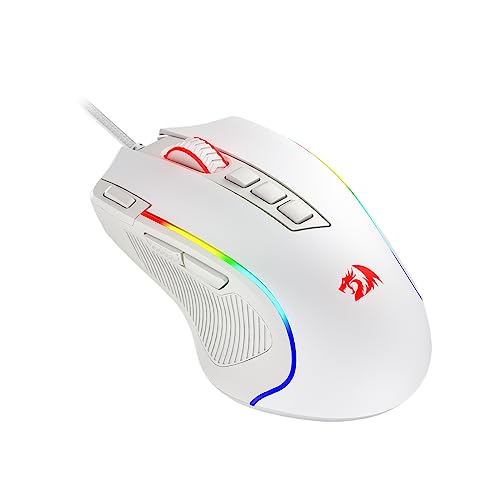
Pros
- 11 fully programmable buttons for macros and bindings
- Dedicated rapid fire and side macro keys
- Customizable sensor sensitivity up to 8000 DPI
- Textured rubber side grip enhances claw grip control
- Five dynamic RGB backlight modes
Cons
- Maximum 8000 DPI requires dedicated software configuration
- Wired design limits placement flexibility compared to wireless
- Ergonomic contouring caters primarily to right-handed claw grips
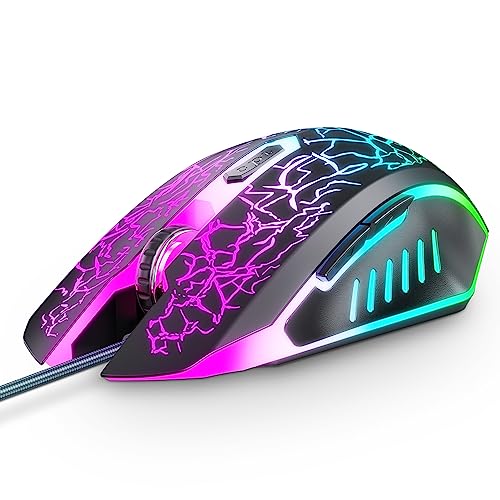
Pros
- Simple plug-and-play USB connectivity without software
- Four quick-switch DPI sensitivity presets
- Dedicated shortcut to disable the LED lighting
- Ergonomic design with rubberized scroll wheel
Cons
- Side navigation buttons do not function on macOS
- DPI settings restricted to four fixed increments

Pros
- Tri-mode 2.4GHz, Bluetooth 5.3, and wired USB-C connectivity
- Lightweight 67-gram build reduces wrist fatigue
- Sensor supports up to 12,000 DPI and 1000Hz polling
- Dedicated rapid-fire button for quick in-game actions
- Can store and switch between four paired devices
Cons
- Configuration software is unavailable when using Bluetooth
- Driver programming features only support Windows systems
How We Assessed the Best Gaming Mouse for Osu
This is a specification-based comparison rather than an independently measured performance test. The supplied product information was assessed for polling rate, connection method, DPI adjustment, programmable controls, shape, and operating-system compatibility.
- Tracking and polling rate: Models advertising up to 1000Hz polling may offer frequent position updates, although the supplied data does not include independent latency measurements.
- Movement freedom: Wired mice avoid battery management, while wireless models can reduce cable drag when their receiver or Bluetooth connection works properly with the computer.
- Shape and grip: Ergonomic, lightweight, honeycomb, and large-hand designs suit different users, so the physical fit should take priority over lighting features.
- Controls: Extra buttons are useful for shortcuts and macros, but a crowded side panel may be unnecessary for players who mainly use standard click inputs.
- Compatibility: Windows software support matters when adjusting DPI, polling rate, lighting, or macros, especially because some features are limited outside Windows.
Best Wired Option: SOLAKAKA SM900 Gaming Mouse Wired
The SOLAKAKA SM900 Gaming Mouse Wired is a practical choice for osu players who want a direct USB connection, adjustable sensitivity, and a lighter honeycomb-style shell. Its listed polling rate reaches 1000Hz, and its six DPI levels can be adjusted up to 12800 through the documented controls.
The perforated housing is described as breathable and designed to reduce weight, which may suit players who make frequent, broad cursor movements. It also includes four modes, programmable buttons, and macro support through software on compatible systems.
The main limitation is the fixed wired design, which means the cable can remain a factor during large swipes. Its software features should also be treated as Windows-dependent unless the operating system support is confirmed before purchase, even though the listing names several supported systems.
See the SOLAKAKA SM900 Gaming Mouse Wired if a wired connection and ventilated shell matter more than wireless flexibility.
Best Lightweight Wireless Option: Aula SC620 Wireless Gaming Mouse
The Aula SC620 Wireless Gaming Mouse stands out for its stated 67g weight, three connection modes, and six DPI settings reaching 12000. Its 2.4GHz, Bluetooth 5.3, and USB modes provide flexibility for a gaming PC, laptop, Mac, or secondary device.
For osu, the lightweight design may be appealing to players who use fingertip or claw grips and frequently reposition the mouse. The advertised 1000Hz polling rate and seven programmable buttons add configuration options, although extra controls are not essential for every rhythm-game setup.
Important software limitations apply: the listing states that the driver supports Windows in wired and 2.4GHz modes, while Bluetooth mode is unavailable in the driver. Buyers using macOS or Linux should therefore confirm which settings can be changed before relying on advanced customization.
Best for Larger Hands: Redragon Large Wireless Gaming Mouse for Big
The Redragon Large Wireless Gaming Mouse for Big is designed for medium to larger hands, with a contoured body, finger rests, and rubber side grips. Its tri-mode connection supports 2.4GHz wireless, Bluetooth, and USB Type-C wired use, making it adaptable for gaming and general computing.
The mouse advertises a 1000Hz polling rate, up to 12800 DPI through its driver, and a 1000mAh rechargeable battery. Those specifications provide useful adjustment and connection choices, while wired operation during charging avoids having to stop using it when the battery needs power.
Its large ergonomic design is the key trade-off for osu. Players with smaller hands or fingertip grips may find a full-size body less suitable, and the driver only supports Windows in 2.4GHz wireless and wired modes.
Best for Extensive Button Mapping: Redragon Wireless Gaming Mouse
The Redragon Wireless Gaming Mouse provides 16 programmable buttons, including 12 side buttons, five memory profiles, and adjustable polling rates from 125Hz to 1000Hz. This is more control than osu normally requires, but it may suit players who also use the mouse for MMO shortcuts, productivity, or custom workflows.
Its adjustable DPI range extends from 100 to 16000, and the built-in battery is specified for more than 70 hours with RGB lighting disabled. It can also be used while charging, reducing disruption during longer sessions.
The 12-button side layout is the important limitation for osu because it can add weight, width, and accidental-input concerns compared with a simpler mouse. Choose it for versatility rather than because more buttons automatically improve rhythm-game performance.
Best Wired Mouse with Adjustable Weight: Redragon M801 Gaming Mouse
The Redragon M801 Gaming Mouse combines a wired connection, a listed 1000Hz polling rate, up to 16000 DPI, and an eight-piece weight-tuning set. Weight adjustment is useful for players who prefer a more planted feel, although osu users seeking effortless repositioning may prefer a lighter design.
It includes nine programmable buttons, five memory profiles, smooth Teflon feet, and a braided cable. These features make it suitable for players who switch between games or want separate control profiles for work and gaming.
The mouse uses a traditional, feature-heavy design rather than a minimal rhythm-game layout. Its software and listed operating-system support focus on Windows versions, so users on other platforms should not assume that every programmable feature will be available.
Other Suitable Options
Redragon M602 Gaming Mouse
The Redragon M602 Gaming Mouse is a conventional ergonomic wired model with adjustable DPI up to 7200, programmable controls, and software-based lighting and macro configuration. It suits users who want a familiar shape and straightforward wired setup, but its supplied specifications do not identify a polling rate or lightweight construction.
Redragon M612 Wired RGB Optical Gaming Mouse 8000
The Redragon M612 Wired RGB Optical Gaming Mouse 8000 offers 11 programmable buttons, five DPI presets, and software adjustment from 500 to 8000 DPI. Its claw-grip-oriented shape and textured side surface may help users who prefer more tactile control, although it remains a wired, multi-button design.
SOLAKAKA SM600 Wireless Gaming Mouse, Tri-Modes
The SOLAKAKA SM600 Wireless Gaming Mouse, Tri-Modes provides 2.4GHz, Bluetooth 5.1, and USB Type-C wired connections, plus seven programmable buttons and a 1000Hz polling rate. Its honeycomb shell and six DPI settings may suit users wanting wireless flexibility without choosing a large MMO mouse.
The listed DPI presets range from 800 to 13200, and the rechargeable battery supports use while charging. However, the supplied information does not specify its weight or independent wireless-latency results, so those factors should not be assumed.
Redragon M913 Wireless RGB MMO Gaming Mouse 16000
The Redragon M913 Wireless RGB MMO Gaming Mouse 16000 offers dual-mode 2.4GHz and USB-C wired operation, 12 side buttons, and a Pixart 3335 sensor. It is a reasonable choice for users who want one mouse for osu and MMO gaming, with five onboard DPI levels and extensive remapping options.
The advertised battery range is specified as 45 hours with backlighting enabled and 80 hours in eco mode. Its larger button array and MMO-oriented design may be less comfortable for players who want a clean, low-distraction control layout.
VersionTECH. Wired Gaming Mouse
The VersionTECH. Wired Gaming Mouse is the simplest budget-oriented option in this group, with plug-and-play USB operation, six buttons, and four DPI settings from 1200 to 3600. It may work for casual osu play when basic tracking and an uncomplicated setup are the priorities.
Its documented limitations include fewer sensitivity choices and no stated polling-rate specification. The listing also notes that the forward and backward buttons are unavailable on operating systems, so platform compatibility should be checked carefully.
Choosing the Best Gaming Mouse for Osu
Wired or Wireless?
A wired mouse provides a continuous USB connection and avoids battery charging, which makes it the simpler choice for a dedicated PC setup. Wireless models can reduce cable interference, but 2.4GHz receiver placement, Bluetooth support, charging requirements, and software limitations deserve attention.
How Much DPI and Polling Rate Do You Need?
Higher DPI settings are not automatically better for osu because practical sensitivity depends on the game configuration, operating system settings, and personal control. A broad adjustable range is useful for experimentation, while a documented 1000Hz polling option provides a clear specification for frequent position reporting.
Does Weight Matter?
Weight affects how easily the mouse starts, stops, and changes direction during repeated movements. The supplied products include a specifically listed 67g Aula model, honeycomb designs, and the adjustable-weight M801, but no universal weight preference applies to every grip or desk setup.
Are Extra Buttons Useful for Osu?
Most osu control layouts do not require a large number of side buttons, so additional controls should be treated as a secondary feature. They become more valuable when the same mouse will also be used for MMOs, productivity macros, or application shortcuts.
Compatibility and Setup Notes
- Use a direct USB connection for wired models and confirm that the computer has a suitable USB port.
- For wireless models, check whether the included receiver, Bluetooth mode, or wired mode is preferred on the gaming PC.
- Install the manufacturer software only when you need DPI, polling, button, macro, or lighting changes.
- Do not assume that Windows-only driver features work on macOS, Linux, Chrome OS, Android, or iOS.
- For osu, prioritize a stable pointer setup and comfortable grip before assigning extra macros or lighting effects.
Frequently Asked Questions
What is the best gaming mouse for osu for most PC players?
The SOLAKAKA SM900 Gaming Mouse Wired is the most straightforward choice for players who prefer wired USB operation, adjustable DPI, and a honeycomb shell. The Aula SC620 is a better match when low listed weight and wireless flexibility are more important.
Is a wireless mouse suitable for osu?
Yes, a wireless mouse can be suitable when its connection works reliably with the PC and its battery remains charged. Players who want fewer variables can choose a wired model, while those who dislike cable drag may prefer a 2.4GHz wireless option.
Do I need programmable buttons for osu?
No. Programmable buttons are optional for osu and may be more useful when the mouse also serves other games or desktop tasks. A comfortable shape and consistent primary-click operation are usually more relevant to a simple rhythm-game setup.
Final Recommendation
Choose the SOLAKAKA SM900 Gaming Mouse Wired for a direct wired setup with a lightweight honeycomb design. Pick the Aula SC620 Wireless Gaming Mouse for a listed 67g wireless option, the Redragon Large Wireless Gaming Mouse for Big for larger hands, or the Redragon M801 Gaming Mouse when adjustable weight and extra controls matter.
For MMO-focused versatility, the Redragon Wireless Gaming Mouse and Redragon M913 Wireless RGB MMO Gaming Mouse 16000 offer extensive button mapping. The VersionTECH. Wired Gaming Mouse remains appropriate when basic plug-and-play functionality is more important than advanced sensitivity and software features.
For more PC setup guidance, compare these mouse options with the recommendations in our gaming mouse guide for League of Legends and our coverage of laptop keyboards for gaming.


Write Your Review
No reviews yet. Be the first to share your experience!