

Gaming monitor vs 4k tv is mainly a choice between desktop responsiveness and large-screen viewing. For PC gaming at a desk, a monitor usually offers more suitable refresh-rate options, adaptive synchronization, ergonomic mounting, and clearer pixel density at close range.
A 4K TV can make more sense when you sit several feet away, share the screen, watch movies, or connect multiple living-room devices. The products in this guide are gaming monitors rather than televisions, so they are useful reference points for deciding which monitor specifications matter before comparing them with a 4K TV.
Choose a gaming monitor for competitive PC games, desk use, high refresh rates, DisplayPort connectivity, and adjustable positioning. Choose a 4K TV when screen size, couch distance, streaming, and shared entertainment matter more than desktop ergonomics.
Among the listed displays, the Gaming Monitors category includes options ranging from Full HD 240Hz models to 4K OLED displays. The right choice depends on your graphics hardware, preferred games, connection standards, and distance from the screen.
Recommended Products

Pros
- Sharp 4K UHD resolution with smooth 160Hz refresh rate
- Deep 3000:1 static contrast ratio
- AMD FreeSync reduces visual stutter and tearing
- Modern HDMI 2.1 and DisplayPort 1.4 connectivity
- Immersive 1500R curvature
Cons
- Modest 320 cd/m² peak brightness rating
- Uses smaller 75x75mm VESA mount instead of standard 100x100mm
- Stand ergonomic adjustments are not documented

Pros
- Smooth 240Hz refresh rate via DisplayPort and HDMI
- Immersive 1500R curved 32-inch screen
- High 3500:1 contrast ratio
- Built-in FreeSync support
- DisplayPort cable included in the box
Cons
- Low pixel density with 1080p at 32 inches
- No integrated speakers
- Stand adjustment limited strictly to tilt

Pros
- Sharp 4K UHD resolution across a large 37-inch screen
- Fluid 165Hz refresh rate for fast-paced gaming
- Rapid 1ms GtG response time reduces motion blur
- Immersive 1000R curved profile
- VESA DisplayHDR 600 delivers enhanced dynamic range
Cons
- Deep 12-inch footprint requires considerable desk space
- Substantial 24.7-pound weight requires a sturdy mounting surface
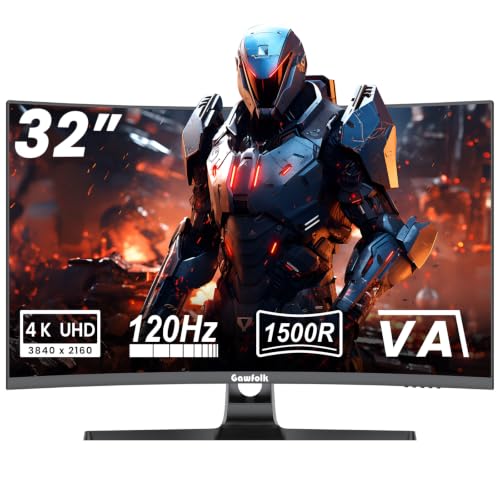
Pros
- Crisp 3840x2160 4K resolution
- Smooth 120Hz refresh rate
- Deep 3000:1 static contrast ratio
- G-Sync and FreeSync adaptive sync support
- Standard VESA 100x100mm mounting interface
Cons
- Gamut limited to 85% NTSC coverage
- Stand ergonomic adjustability is not documented

Pros
- Ultrawide 3440 x 1440 resolution with immersive 1500R curvature
- High refresh rate up to 240Hz
- 1ms response time with blur reduction
- Versatile dual HDMI and dual DisplayPort video inputs
- Built-in speakers for clutter-free desktop audio

Pros
- Dual-mode switching between 4K 165Hz and FHD 330Hz
- Near-instantaneous 0.03ms GtG response time
- Certified for both G-SYNC Compatible and FreeSync Premium Pro
- Ergonomic stand with pivot, tilt, swivel, and height adjustment
- Glossy OLED panel with MLA+ enhances clarity
Cons
- Typical brightness is relatively modest at 275 nits
- Glossy screen surface can reflect ambient light

Pros
- Sharp 4K resolution paired with 160Hz refresh rate
- Fast IPS panel offers a 1ms response time
- HDMI 2.1 enables 4K 120Hz console gaming
- NVIDIA G-SYNC Compatible and AMD FreeSync Premium support
- Wide 95% DCI-P3 color gamut coverage
How Monitors and 4K TVs Differ for PC Gaming
| Factor | Gaming monitor | 4K TV |
|---|---|---|
| Typical use | Desk-based PC gaming and productivity | Couch gaming, movies, streaming, and shared viewing |
| Resolution options in this guide | 1920 x 1080, 3440 x 1440, and 3840 x 2160 | Not specified for a particular TV model |
| Refresh-rate examples | 120Hz, 160Hz, 165Hz, and 240Hz | Not specified for a particular TV model |
| PC connections | DisplayPort and HDMI are documented on the listed monitors | Connection support depends on the exact TV |
| Positioning | Monitor stands, VESA mounts, and desk placement are common | Stand or wall mounting depends on the TV |
| Close viewing | Generally better suited to desk distance | Requires suitable scaling and viewing distance |
The table shows why specifications should be compared carefully rather than assuming that every 4K display behaves the same way. A TV may have a large, attractive image, but its exact refresh rate, input behavior, adaptive sync support, and PC compatibility must be confirmed from its model information.
Product-by-Product Buying Advice
New! Sceptre Curved 34-inch Prime Gaming Monitor
This 34-inch ultrawide uses a 3440 x 1440 resolution, a 240Hz refresh rate, a 1500R curve, and a stated 1ms response time. Two HDMI ports and two DisplayPort inputs provide flexible PC and device connectivity, while built-in speakers reduce the need for separate desktop audio.
- Pros: Ultrawide workspace, high refresh rate, 100% sRGB coverage, two HDMI ports, two DisplayPort inputs, and integrated speakers.
- Cons: The 3440 x 1440 format requires a compatible ultrawide game configuration, and the supplied data does not specify HDR or adaptive synchronization support.
- Who should skip it: Skip it if you specifically want native 4K detail, a standard 16:9 layout, or a large-screen TV experience from across the room.
Samsung 37” Odyssey G7 (G75F)
The Samsung combines a 37-inch 1000R curved screen with 4K UHD resolution, a 165Hz refresh rate, 1ms GtG response time, and VESA DisplayHDR 600. It suits players who want more 4K image detail than a 1440p display while retaining a refresh rate designed for fast PC gameplay.
- Pros: Native 4K UHD resolution, 165Hz refresh rate, 1000R curvature, 1ms GtG response time, and a stated DisplayHDR 600 certification.
- Cons: The strong 1000R curve may not suit every desk layout, and 4K gaming places greater demands on the graphics card than lower resolutions.
- Who should skip it: Skip it if you prefer a flat screen, need a compact desk display, or prioritize 240Hz competitive gaming over 4K resolution.
SANSUI 32 Inch Curved 240Hz Gaming Monitor
The SANSUI uses a 32-inch curved 1920 x 1080 panel with a 240Hz refresh rate, 1ms MPRT response time, and built-in FreeSync. Its HDMI and DisplayPort inputs are both specified for up to 240Hz, making it a straightforward option for fast games when Full HD resolution is acceptable.
- Pros: 240Hz refresh rate, FreeSync support, 1500R curvature, 125% sRGB coverage, 300-nit brightness, and VESA 100 x 100mm mounting.
- Cons: Full HD is less detailed than the 4K options, and the monitor has no built-in speakers according to the supplied specifications.
- Who should skip it: Skip it if you want sharp 4K text, detailed single-player visuals, or integrated speakers for a simpler desk setup.
ASUS TUF Gaming VG27UQ1A 27 Inch 4K 160Hz G-SYNC
This 27-inch Fast IPS monitor pairs 3840 x 2160 resolution with a 160Hz refresh rate, 1ms response time, ELMB Sync, G-SYNC compatibility, and AMD FreeSync Premium. HDMI 2.1 support is specified for up to 4K 120Hz without chroma subsampling, which is relevant for compatible PCs and consoles.
- Pros: 4K resolution, 160Hz refresh rate, Fast IPS viewing angles, multiple synchronization technologies, and documented HDMI 2.1 console support.
- Cons: Its 27-inch screen provides less physical viewing area than the larger curved choices, and the supplied data does not specify built-in speakers.
- Who should skip it: Skip it if you want a very large screen, an ultrawide aspect ratio, or OLED contrast rather than a compact 4K desktop display.
CRUA 32" 4K UHD 160Hz Curved Gaming Monitor
The CRUA offers a 32-inch 3840 x 2160 curved panel, 160Hz refresh rate, AMD FreeSync, HDMI 2.1, DisplayPort 1.4, and integrated speakers. Its 1500R curve and larger panel favor immersive games, video playback, and multitasking, while the 120% sRGB claim targets vivid color.
- Pros: 4K resolution, 160Hz refresh rate, 1500R curvature, AMD FreeSync, HDMI 2.1, DisplayPort 1.4, built-in speakers, and VESA mounting support.
- Cons: The supplied specifications do not identify a particular HDR certification or provide independent motion and color measurements.
- Who should skip it: Skip it if you need OLED black levels, a compact flat IPS panel, or independently verified image-quality performance.
Gawfolk 4K Curved Monitor 32 Inch
The Gawfolk is a 32-inch 1500R VA monitor with 3840 x 2160 resolution, a native 120Hz refresh rate, 1ms advertised response time, and support for both G-SYNC and FreeSync adaptive synchronization. Its stated 3000:1 contrast ratio is relevant for darker scenes, while VESA 100 x 100mm support helps with arm or wall installation.
- Pros: 4K resolution, 120Hz refresh rate, VA contrast characteristics, dual adaptive-sync support, 1500R curvature, and VESA compatibility.
- Cons: The listed refresh rate is lower than the 160Hz and 240Hz alternatives, and its 85% NTSC coverage is less expansive than some listed gamut claims.
- Who should skip it: Skip it if competitive gaming requires the highest refresh rate available in this group or if wide-gamut creative work is a priority.
LG 32GX850A-B 32" UltraGear 4K UHD (3840 x 2160)
The LG uses a 32-inch glossy OLED panel with 4K UHD resolution, a 165Hz mode, 0.03ms GtG response time, G-SYNC compatibility, and FreeSync Premium Pro. Its dual-mode feature switches between 4K at up to 165Hz and Full HD at up to 330Hz, making it the most flexible choice here for users who alternate between visual detail and high-refresh competitive play.
- Pros: OLED contrast, 4K resolution, 165Hz gaming mode, 330Hz Full HD mode, 0.03ms stated response time, adaptive-sync support, and a height-adjustable stand with tilt, swivel, and pivot adjustments.
- Cons: OLED displays require more careful consideration for long-term static desktop content, and the glossy finish may reflect room lighting.
- Who should skip it: Skip it if you want a lower-cost display, prefer a matte screen, or primarily use static productivity applications for extended periods.
Which Specifications Matter Most?
Resolution and Viewing Distance
At desk distance, 4K resolution can make text and fine game details appear sharper, particularly on 27-inch and 32-inch screens. A 4K TV may provide a more cinematic image across a room, but its practical sharpness depends on screen size, seating distance, operating-system scaling, and the exact TV model.
Refresh Rate and Graphics Hardware
A 240Hz monitor can display more refresh opportunities than a 120Hz or 165Hz model, but the PC must produce suitable frame rates for the benefit to appear. Refresh rate is not the same as guaranteed gaming performance, so match the display to the games and graphics hardware you actually use.
Adaptive Synchronization
FreeSync and G-SYNC-compatible features can help align display refresh behavior with variable GPU output. Confirm the required connection and graphics hardware support before purchase, because the supplied specifications do not establish identical behavior across every input or operating mode.
Connectivity and Installation
DisplayPort is common for high-refresh PC use, while HDMI 2.1 can be important for compatible 4K 120Hz console connections. Check the exact port capabilities, cable requirements, stand adjustments, and VESA pattern before planning a monitor arm or wall-mounted setup.
When a 4K TV Makes More Sense
A 4K TV is worth considering when gaming takes place from a couch, several people watch together, or the display also serves movies and streaming. TV-specific features, input modes, remote control behavior, and console support vary by model, so compare those details instead of relying only on the 4K label.
For broader TV guidance, see our comparisons of LCD TVs for gaming and large-screen 4K gaming TVs. Those articles are more relevant when your setup is centered on room-scale viewing rather than a conventional PC desk.
Frequently Asked Questions
Is a gaming monitor better than a 4K TV for a PC?
A monitor is usually better for desk-based PC gaming because high refresh rates, DisplayPort, adaptive synchronization, and ergonomic adjustment are common priorities. A 4K TV may be better for couch gaming, movies, and shared viewing when its input and refresh specifications meet your requirements.
Is 4K or 240Hz more important for gaming?
Choose 4K when image detail and single-player visuals matter most, and choose 240Hz when fast competitive play is the priority. Your graphics hardware and game settings must also support the chosen display mode for its advantages to be useful.
Can these monitors replace a 4K TV?
Several can replace a TV for personal viewing if their size, speakers, inputs, and viewing distance suit your room. They do not automatically provide TV tuner, remote, smart-platform, or living-room features, so verify those requirements separately.
Final Recommendation
For a high-refresh Full HD setup, choose the SANSUI. For ultrawide PC gaming, consider the Sceptre. The ASUS is a compact 4K option, while the Samsung, CRUA, and Gawfolk target larger curved 4K setups with different refresh rates and panel characteristics.
The LG is the strongest specification match for readers who want 4K OLED image quality plus a 330Hz Full HD mode, provided its glossy OLED design suits the room and workload. If your priority is couch distance, shared viewing, and entertainment features, compare an appropriately equipped 4K TV instead of choosing a monitor solely by resolution.





Write Your Review
No reviews yet. Be the first to share your experience!