

The best low sensitivity gaming mouse pad for PC gaming is usually a wide cloth mat that gives your mouse room for broad arm movements. Among these options, the SteelSeries QcK XXL offers the most stated coverage, while the DIGSOM and AREYLO mats provide large surfaces at a simpler specification level.
Low sensitivity players should prioritize usable width, a stable rubber base, and a surface that supports repeatable tracking. A compact pad can work for a high-control setup, but it may force you to lift and reposition the mouse more often during large horizontal swipes.


Pros
- Large keyboard and mouse coverage
- Non-slip rubber backing
- Reinforced stitched edges
- Easy spill cleanup
- Rollable for transport
Cons
- Requires a sufficiently wide desktop
- Water protection details focus on spill resistance

Pros
- Consistent hard tracking surface
- Stable non-slip base
- Supports rapid low-DPI movements
- Designed for Logitech G sensor accuracy
- Durable multi-layer construction
Cons
- Hard surface lacks soft-pad cushioning
- May not suit users preferring plush mouse pads

Pros
- Broad XXL surface fits keyboard and mouse
- Micro-woven cloth optimized for various mouse sensors
- Non-slip rubber base stays firmly in place
- Low-profile design minimizes edge elevation
Cons
- Large footprint requires substantial desk space
- Thin 0.08-inch profile provides minimal wrist cushioning

Pros
- Room for keyboard and mouse
- Non-slip rubber base
- Smooth fabric surface
- Stitched edges
- Japanese wave design
Cons
- Large footprint may not suit smaller desks
- No specific mouse sensor compatibility listed
Comparison Table
| Model | Stated size | Surface | Base or edge details | Best fit |
|---|---|---|---|---|
| SteelSeries QcK XXL | 35 x 16 x 0.08 inches | Micro-woven cloth | Non-slip rubber base | Maximum desk coverage |
| AREYLO Large Gaming Mouse Pad | 31.5 x 15.7 inches | Smooth cloth | Stitched edges, rubber base | Wide cloth coverage with spill resistance |
| DIGSOM Gaming Mouse Pad | 31.5 x 11.8 inches, 3 mm thick | Smooth fabric | Spill-proof coating, rubber base | Keyboard and mouse coverage on narrower desks |
| Yuhijoy Desk Mat | 31.5 x 11.8 x 0.12 inches | Smooth fabric | Precision stitching, rubber base | Extended horizontal movement |
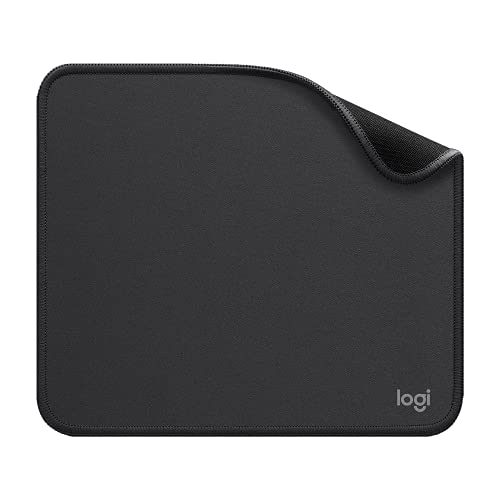
| Logitech G440 | 340 x 280 x 5 mm | Hard, low-friction surface | Rigid polymer core, no-slip base | Compact, fast hard-surface control |
| Logitech Studio Series Small | 9 x 8 inches | Smooth fine-weave cloth | Flat-stitched edges, rubber base | Small desks and portable use |
How to Choose the Best Low Sensitivity Gaming Mouse Pad
Start With Available Desk Space
Width is the first selection factor because low sensitivity settings often require more physical mouse travel. Measure the usable area beside or below your monitor and keyboard, then compare it with the pad’s stated width and depth.
The QcK XXL provides the most listed coverage, while the AREYLO offers a deep 15.7-inch surface. The DIGSOM and Yuhijoy mats are narrower front to back, and the Logitech models are better for compact layouts.
Choose Cloth or Hard Surface Glide
Cloth pads generally make sense when you want a softer surface, keyboard coverage, and broad arm movement. The listed cloth options differ mainly in dimensions, edge construction, thickness, and cleaning features rather than in independently measured glide speed.
The Logitech G440 is the only hard pad in this group. Its documented low-friction surface and consistent texture may suit players who prefer quick starts and stops, but its compact dimensions limit long swipes.
Check Base Stability and Edge Construction
A non-slip rubber base helps reduce movement when the mouse reaches the edge of a wide swipe. Stitched edges can also help protect cloth pads from fraying, as specified for the AREYLO, Yuhijoy, and Logitech Studio Series models.
Not every product lists the same construction details, so avoid treating unspecified features as included. If a stable keyboard position matters, choose a mat whose dimensions cover both devices and whose base matches your desk surface.
Consider Cleaning and Desk Protection
The DIGSOM and AREYLO pads specify spill-resistant or waterproof-style coatings, while the Yuhijoy and Logitech Studio Series pads describe wipe-clean surfaces. These features can help with routine maintenance, but they do not establish resistance to every liquid or cleaning chemical.
For more guidance on comfort and desk coverage, see our comparisons of large desk mats for gaming mice and keyboards and mouse pads for wrist comfort.
Frequently Asked Questions
What size mouse pad is best for low sensitivity?
A wide pad is usually the safer choice because it provides more room for arm movement before the mouse reaches an edge. In this selection, the QcK XXL and AREYLO offer the most front-to-back coverage, while the DIGSOM and Yuhijoy emphasize horizontal width.
Is a hard mouse pad suitable for low sensitivity gaming?
It can be suitable if you prefer low friction and a consistent rigid surface, but dimensions matter more for long swipes. The Logitech G440 supports this style of movement through its surface design, yet its smaller footprint may require more frequent repositioning.
Do extended mouse pads work with any gaming mouse?
The listed extended mats are passive surfaces, so they do not require software, drivers, or a special connection. Mouse sensor behavior still depends on the mouse and its firmware, while the pad mainly provides the physical tracking surface.
Final Recommendation
The SteelSeries QcK XXL is the most complete choice for low sensitivity players who have room for a 35 by 16 inch cloth mat. Choose the AREYLO if you want similarly broad movement space with stated stitched edges and spill-resistant construction.
The DIGSOM and Yuhijoy options suit narrower desks that still need extended horizontal coverage. Choose the Logitech G440 when a compact hard surface and low-friction movement matter more than keyboard coverage, and choose the Logitech Studio Series Small only when portability or limited desk space takes priority.
These recommendations are based on the supplied dimensions, materials, construction details, and intended use. For additional options, browse the Mouse Pads category or compare related gaming mice for a complete pointing setup.




Write Your Review
No reviews yet. Be the first to share your experience!