

The best desks for gaming small spaces should fit your room first, then support your monitor, PC tower, accessories, and preferred gaming posture. Among these options, the 33.7-inch Jakyitvi desk is the most compact choice, while the L-shaped models make better use of corners and the 47-inch desks provide more room for larger setups.
This is specification-based research rather than hands-on testing. The main differences are desk footprint, reversible layouts, monitor stands, storage, built-in outlets, USB ports, and the amount of desktop space available for gaming or home office work.


Pros
- Integrated 7-port power strip with USB-C
- Two-height adjustable monitor riser
- App- and controller-managed RGB lighting
- Accommodates PC towers up to 21.7 inches tall
- Reinforced steel frame with dual X-braces
Cons
- Narrow 18.9-inch depth limits primary workspace
- Fabric storage drawer lacks rigid construction

Pros
- Built-in 3 AC outlets and 2 USB charging ports
- Integrated 22-mode RGB light strip
- Full-coverage elevated monitor shelf
- Reversible five-drawer storage layout
- Adjustable leveling feet and steel frame
Cons
- Drawers are non-woven fabric rather than solid materials
- Shallow 18.5-inch desktop depth limits workspace

Pros
- Integrated power strip with seven charging ports
- Reversible L-shaped layout fits varied room corners
- Adjustable pegboard mounts in horizontal or vertical orientations
- Dedicated CPU stand elevates PC towers off floors
- App-controlled LED strip with music synchronization modes

Pros
- Space-saving L-shaped corner footprint
- Reversible two-tier storage shelves
- Adjustable feet for uneven floors
- 150-pound rated weight capacity
- Lightweight frame is easy to move
Cons
- Compact 39-inch size limits large multi-monitor setups
- Constructed with particleboard rather than solid wood
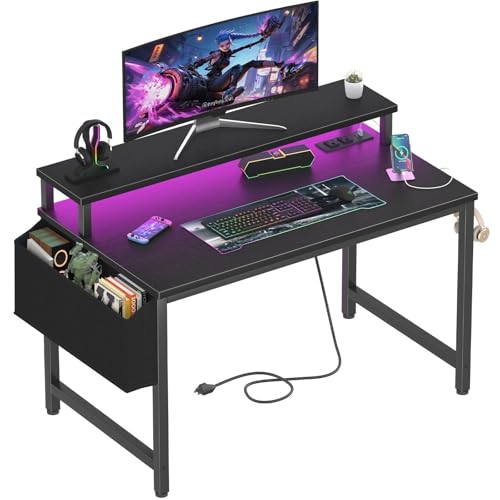
Pros
- Built-in AC outlets and USB charging ports
- Elevated monitor shelf improves viewing posture
- Includes removable storage bag and headphone hooks
- Compact footprint ideal for small spaces
- Customizable integrated RGB lighting system
Cons
- Small 31.5-inch surface limits multi-display configurations
- Particle board tabletop provides entry-level material build

Pros
- Reversible layout fits various corner room configurations
- Included CPU stand lifts tower off the floor
- Integrated side pocket adds accessible storage
- Adjustable leveling feet improve stability on uneven floors
- Scratch-resistant and water-resistant desktop finish
Cons
- Total weight capacity is limited to 176 pounds
- Compact 50-inch footprint limits large multi-monitor setups

Pros
- Built-in power outlets and USB ports reduce cable clutter
- Reversible shelf installation accommodates different room layouts
- Includes dedicated lower shelf for desktop PC towers
- Compact footprint easily fits small rooms and corners
- Adjustable leveling feet compensate for uneven flooring
Cons
- Shallow 15.75-inch desktop depth restricts usable gear space
- Fabric drawers provide less rigidity than solid materials


Pros
- Integrated three AC outlets and two USB charging ports
- Reversible configuration supports left or right orientation
- Includes dedicated CPU stand, storage bag, and headphone hook
- Adjustable RGB lighting strip with multiple dynamic modes
- Sturdy steel X-frame with adjustable leveling feet
Cons
- Narrow 18.9-inch desktop depth limits peripheral clearance
- Assembly required with numerous individual components
Quick Buying Advice
- For the smallest footprint: Choose the 33.7-inch Jakyitvi desk or the 32-inch Lufeiya desk. Both prioritize compact dimensions, monitor elevation, and built-in power access.
- For a corner setup: The PayLessHere 39-inch desk uses an L-shaped layout with reversible shelves, while the PRAISUN, SageNest, and ODK models provide larger corner work areas.
- For multiple monitors: Look at the 47-inch PRAISUN, 47-inch Korfile, 48-inch Korfile, or 53-inch ODK desks. Their wider surfaces are more suitable than the compact models, although exact monitor compatibility depends on stand width and monitor bases.
- For storage: The Korfile 47-inch desk has five fabric drawers, while the Jakyitvi model combines drawers, shelves, a storage bag, and hooks in a compact layout.
- For built-in charging: The PRAISUN desks offer four AC outlets, two USB ports, and one USB-C port. The supplied specifications do not state what charging standard or output the USB-C port supports.
Best Desks for Gaming Small: Product Analysis
PRAISUN 47.2 Inch Gaming Desk with LED Lights: Best for Power Access and Storage
PRAISUN 47.2 Inch Gaming Desk with LED Lights is a strong fit for gamers who want a relatively compact desk with extensive built-in power access. Its charging station includes four AC outlets, two USB ports, and one USB-C port, giving you centralized access for a PC, monitor, phone, headset, or speakers.
The desk also includes a fabric drawer, open shelf, under-desk PC shelf, elevated platform, and removable S-hooks. Its dedicated PC display area is specified for towers up to 21.7 inches high, but you should confirm your tower dimensions and ventilation clearance before installation. The two-position monitor stand can raise the screen and free some desktop space.
The main limitation is that a 47.2-inch surface is compact compared with a full-size workstation, especially if you use large monitor stands, speakers, and a broad mousepad together. The product listing also does not specify the USB-C charging or data standard.
Lufeiya Gaming Desk with Power Outlets and LED: Best Value-Oriented 40-Inch Option
Lufeiya Gaming Desk with Power Outlets and LED suits a small bedroom, study corner, or basic gaming setup that needs a monitor riser and convenient charging. Its built-in strip provides two power outlets and two USB charging ports, while the monitor stand is described as suitable for two monitors or laptops.
The carbon-fiber-style surface is described as scratch-resistant, impact-resistant, and waterproof. A removable storage bag and two removable headphone hooks help keep small accessories off the main work area. The desk’s 40-inch width is easier to place than a large L-shaped model, but the available surface may feel limited with two monitors, a full-size keyboard, and a wide mousepad.
Korfile 47 Inch Gaming Computer Desk with Power: Best for Drawer Storage
Korfile 47 Inch Gaming Computer Desk with Power is aimed at users who need more organized storage than a simple tabletop provides. It has five non-woven fabric drawers with four installation options, allowing the storage arrangement to be adapted to different room layouts.
The desk includes three AC outlets, two USB charging ports, RGB lighting with 22 effects, a high-rise monitor stand, and an under-desk storage structure. Its powder-coated steel frame, crossbar support, and adjustable legs are useful specifications for stability on uneven floors.
Its storage-focused design also introduces more assembly decisions and may reduce open legroom compared with a simpler desk. The supplied information does not provide the exact desktop depth, so check that measurement before planning a large monitor arrangement.
PRAISUN L Shaped Gaming Desk with LED Lights: Best for Small Room Corners
PRAISUN L Shaped Gaming Desk with LED Lights is designed for corner placement and has stated dimensions of 39.4 inches deep by 51.2 inches wide by 29.5 inches high. Its reversible layout lets you position the short side according to the room, which is useful when a door, bed, or wall limits the available orientation.
This model combines four AC outlets, two USB ports, and one USB-C port with a three-level adjustable pegboard, a top shelf, a side fabric bag, dual headphone hooks, and a three-position CPU stand. The pegboard is particularly useful for controllers and headsets, while the corner shape provides more usable surface than a narrow rectangular desk in some rooms.
Although it is described as space-saving, the 51.2-inch width and 39.4-inch depth still require careful measuring. The reversible design helps with orientation but does not remove the need to check wall clearance and the placement of nearby furniture.
PayLessHere 39 Inch L-Shaped Computer Desk: Best Budget-Sized Corner Design
PayLessHere 39 Inch L-Shaped Computer Desk,Gaming focuses on basic corner functionality rather than integrated electronics. Its L-shaped design, reversible storage shelves, adjustable feet, and metal frame make it suitable for a simple PC, console, study, or laptop station.
The listing states a 150-pound load capacity and uses CARB P2 particleboard with a metal frame. The reversible shelves can hold books, accessories, or office supplies, and the lightweight construction may make the desk easier to reposition than larger storage-heavy models.
There are no stated LED lights, built-in outlets, or USB ports, so you will need a separate power strip for a gaming PC and peripherals. This is a better match for buyers who value a small corner footprint and low complexity over integrated gaming features.
Lufeiya Small Desk with Power Outlets and LED: Best for Very Tight Spaces
Lufeiya Small Desk with Power Outlets and LED is the most compact rectangular option in this group, with a 32-inch format intended for bedrooms, study areas, and teen workstations. It includes two power outlets, two USB charging ports, RGB lighting, a monitor stand, a storage bag, and two removable headphone hooks.
The monitor stand can help place a screen at a more comfortable height while leaving space below for a keyboard or small accessories. The particleboard surface is described as scratch-resistant, impact-resistant, and waterproof, which supports everyday study and light gaming use.
The 32-inch width is also the key limitation. It is unlikely to provide comfortable room for a large dual-monitor setup, large speakers, and broad mouse movement at the same time, so it is best for one monitor or a laptop-centered setup.
SageNest L Shaped Desk, 50 Inch Reversible: Best for Flexible Corner Layouts
SageNest L Shaped Desk, 50 Inch Reversible provides a reversible 50-inch corner layout, allowing the short side to be assembled on the left or right. That flexibility is useful in dorms, bedrooms, and home offices where the usable corner changes depending on furniture placement.
The reinforced steel frame, X-shaped crossbars, adjustable leg pads, and stated 176-pound support capacity are relevant for a desktop PC, monitor, and common accessories. A CPU stand raises the tower from the floor, while the side bag provides storage for controllers, books, or office supplies.
This desk does not list built-in power outlets, USB ports, or LED lighting. Buyers wanting those features will need external accessories, and the L-shaped footprint should be measured as a complete corner arrangement rather than by width alone.
Korfile 48" Gaming Desk with Power Outlet, LED: Best for a Clean Rectangular Setup
Korfile 48" Gaming Desk with Power Outlet, LED combines a 48-inch rectangular work surface with three AC outlets, one USB-A port, and one Type-C port. As with other desks in this group, the listing does not specify the Type-C port’s charging, data, or video capabilities, so it should not be treated as a monitor connection without confirmation.
Its carbon-fiber-textured MDF surface, three fabric drawers, four side hooks, and reversible PC shelf provide a practical mix of organization and desktop space. The stated 220-pound load capacity and adjustable non-slip feet are useful on paper for a heavier PC and monitor setup, although the actual arrangement must still stay within the manufacturer’s installation guidance.
The 48-inch width is compact enough for many rooms but may not suit users who need a deep desk for monitor arms or extensive peripheral space. Confirm the desktop depth and clamp clearance before using a third-party monitor arm.
33.7 Inch Small Gaming Desk Table with LED Lights: Best Compact Storage Layout
33.7 Inch Small Gaming Desk Table with LED Lights is built for tight corners and small bedrooms. Its 33.7-inch width is paired with a reversible upper shelf, a lower CPU or console shelf, two foldable fabric drawers, a dual-layer storage bag, two hooks, and additional vertical shelving.
The integrated power strip provides two AC outlets and two USB ports, with a stated 6.6-foot power cord. RGB lighting has seven color options and 20 dynamic modes controlled by buttons or a mobile app. This makes the desk suitable for a compact single-monitor gaming station where vertical storage matters more than a wide mouse surface.
The narrow desktop will limit large keyboards, wide mousepads, speakers, and multiple monitors. The lower shelf also needs to be checked against the dimensions and airflow needs of your PC tower or console.
ODK 53" L Shaped Gaming Desk with Shelves: Best for a Larger Corner Workstation
ODK 53" L Shaped Gaming Desk with Shelves is the largest listed option and provides a 53-inch-wide L-shaped workspace with a stated height of 29.8 inches and depth of 18.9 inches. The reversible side modules allow left or right placement, while dual shelves, a CPU stand, accessory hook, and tool bag provide additional organization.
Its three AC outlets and two USB ports centralize power, and the RGB strip offers preset colors, brightness levels, dynamic modes, and memory functionality. The L-shaped surface is the most suitable option here for users who need separate areas for a monitor, keyboard, writing, streaming controls, or a laptop.
The 53-inch format is not the best choice for every small room, despite the corner-friendly design. Its listed 18.9-inch depth is relatively shallow for some monitor arms or large accessories, so check clamp clearance and the exact dimensions of your equipment before buying.
How to Choose the Best Desks for Gaming Small Rooms
Measure the Full Footprint, Not Just the Width
Measure the available wall length, depth, chair clearance, and space needed to open drawers or reach shelves. L-shaped desks can use corners efficiently, but their total depth may be greater than a narrow rectangular model. Leave room for cables, ventilation, and normal chair movement.
Match the Desk to Your Monitor and PC
A single monitor and compact PC can work well on a 32-inch or 33.7-inch desk. Dual monitors, speakers, a large mousepad, and a desktop tower generally benefit from a 47-inch or wider surface, but monitor stand dimensions and desktop depth remain important. A monitor riser is not the same as a VESA monitor arm, and none of these listings should be assumed to include VESA support.
Check Power and Cable Requirements
Built-in AC outlets can reduce cable clutter, but the desk does not replace a correctly rated wall outlet or surge-protection plan. Confirm the total power requirements of your PC and monitor, and avoid assuming that a listed USB-C port supports video output, fast charging, or laptop power delivery.
Consider Storage Versus Legroom
Drawers, shelves, hooks, and CPU stands help keep a small room organized, but they can reduce open legroom or make cable routing more complicated. If you frequently change your setup, a simpler desk such as the PayLessHere model may be easier to move and reconfigure.
Frequently Asked Questions
What is the smallest desk suitable for PC gaming?
The Lufeiya Small Desk has a 32-inch format, while the Jakyitvi desk measures 33.7 inches. These models are best for one monitor, a compact keyboard, and limited accessories. Measure your monitor stand and mousepad before choosing either one.
Are L-shaped desks better for small rooms?
An L-shaped desk can use an otherwise wasted corner and provide more working surface along two walls. It is not automatically smaller, however, so compare the full width and depth with your room layout. Reversible models are especially useful when the available corner orientation is uncertain.
Do these gaming desks include a monitor arm?
The supplied specifications describe monitor stands or risers on several models, but they do not establish VESA monitor-arm compatibility. A third-party arm may require a suitable clamp area, sufficient desktop thickness, and clearance from shelves or frame supports.





Write Your Review
No reviews yet. Be the first to share your experience!