

The best arms chairs for gaming depend primarily on armrest design, seat support, weight capacity, and desk compatibility. This specification-based roundup includes compact flip-up models, adjustable mesh chairs, reclining options, and heavy-duty seating for PC gaming and work.
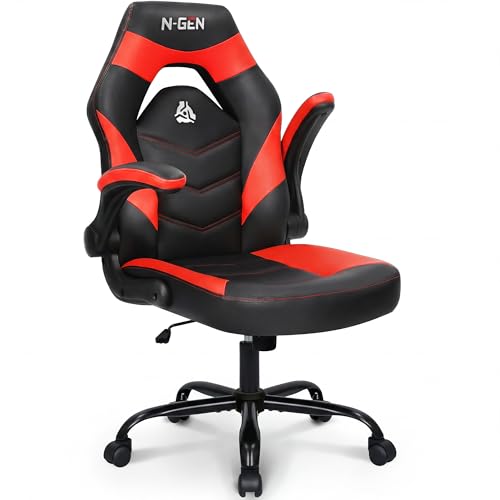
Pros
- Space-saving flip-up armrests
- Ergonomic S-curved backrest with dense cushioning
- Durable and easy-to-clean PU leather
- Adjustable seat height and tilt tension
- FSC-certified internal wood support

Pros
- High 600-pound capacity with sturdy steel frame
- Inflatable lumbar cushion for customizable back support
- Flip-up armrests enable easy desk clearance
- Quiet rubber casters protect hard floor surfaces
- Extra-wide seat with high-density spring padding
Cons
- Heavy 61.7-pound build complicates transport and setup
- Large footprint requires substantial floor space
- PU leather material breathes less than mesh alternatives

Pros
- High 400-pound maximum weight capacity
- Eight-stage adjustable lumbar support
- Space-saving 90-degree flip-up armrests
- Breathable mesh back and seat cushion
- Floor-friendly silent PU wheels
Cons
- Recline is limited to three preset angles
- Manufacturer sizing targets users between 5'5" and 6'2"

Pros
- Space-saving flip-up armrests
- BIFMA-certified gas lift and metal base
- Easy-to-clean scratch-resistant PU leather
- Ergonomic S-curved backrest and dense cushions
- Adjustable seat height and tilt tension
Cons
- Maximum weight capacity capped at 275 pounds
- Armrests lack height and angle adjustments

Pros
- Integrated retractable footrest for extended relaxation
- Adjustable 90° to 135° reclining backrest
- Includes dedicated neck and lumbar support cushions
- Durable steel frame with SGS-certified gas lift
- Easy-to-clean PU leather upholstery
Cons
- Linkage armrests lack independent 3D or 4D adjustments
- Maximum recline angle limited to 135 degrees

Pros
- Space-saving 92-degree flip-up armrests
- Durable 275-pound capacity chrome-plated metal base
- Adjustable seat height between 18 and 22 inches
- Rocking motion with 90 to 122-degree tilt
Cons
- Mid-back design lacks dedicated head and neck support
- Armrests do not offer height or angle adjustments
- Maximum weight capacity capped at 275 pounds

Pros
- Versatile 5D flip-up armrests optimize desk space
- Integrated 18-inch extendable footrest with angle adjustment
- Highly adjustable dynamic 3D lumbar support system
- Breathable full-mesh upholstery improves ventilation
- Robust Grade-4 gas cylinder for reliable height adjustment
Cons
- 300-pound limit restricts true big and tall suitability
- Utilizes a nylon base rather than metal construction

Pros
- 330-pound weight capacity with reinforced steel frame
- Wide 90- to 155-degree backrest recline
- Configurable 3D adjustable armrests
- Integrated retractable footrest for leg support
- Includes dedicated headrest and lumbar support pillows

Pros
- Space-saving 90-degree flip-up armrests
- Three-level height-adjustable lumbar support
- Breathable mesh back promotes air circulation
- Thick high-density foam padded seat
- Stated 330-pound weight capacity
Cons
- Cannot lock into a reclined position
- Not recommended for users under 5'5" or over 6'2"

Pros
- Space-saving flip-up armrests
- BIFMA-certified gas lift and hardware
- Easy-to-clean scratch-resistant PU leather
- Ergonomic S-curved lumbar backrest
- Sturdy metal base with smooth-rolling casters
Cons
- Maximum weight capacity limited to 275 pounds
- Armrests lack height or angle adjustments
For larger users, the 600LBS Large Big and Tall Office Chair offers the highest published capacity and an inflatable lumbar cushion. The CAPOT Ergonomic Mesh Office Chair is better suited to cooler long sessions, while the ELABEST X100 adds extensive adjustment and a footrest.
Budget-focused buyers can consider the N-GEN Gaming Gaming Chair, Lumbar, PU Leather or Sweetcrispy Computer Gaming Desk Chair. If reclining and leg support matter most, the LUCKRACER Gaming Chair with Footrest and N-GEN GAMING Gaming Chair with Footrest provide more relaxation-oriented features.
How to Choose Among the Best Arms Chairs for Gaming
Match Capacity and Seat Design to Your Body
Start with the published weight limit, then check seat width, depth, and height before ordering whenever those measurements are available. Capacity alone does not confirm that the seat will provide sufficient hip room or comfortable leg support.
The 600LBS Large Big and Tall Office Chair is the clearest heavy-duty choice, followed by the 400-pound CAPOT model. The 275-pound N-GEN and Sweetcrispy chairs require more careful matching to the user and should not be selected solely by appearance.
Choose Mesh or PU Leather for Your Room
Mesh backs and seats can improve airflow during long sessions, making the CAPOT, ELABEST, and Synorla chairs better candidates for warmer rooms. PU leather is easier to wipe clean, but it may feel warmer and less breathable during extended use.
Check Armrest Movement and Desk Clearance
Flip-up arms help the chair slide under a desk and can reduce interference with keyboard or controller positions. Multi-directional arms, such as the 3D and 5D designs, provide more positioning options but add adjustment complexity.
Measure the underside of the desk and the chair’s arm height before buying, especially when using a fixed-height gaming desk. A chair can have useful flip-up arms yet still fail to fit beneath a desk if its seat or armrests remain too tall.
Decide Whether You Need Reclining or a Footrest
A reclining backrest and footrest are useful for reading, watching media, or relaxing between games, but they require additional floor space. The LUCKRACER reaches a documented 155-degree recline, while the N-GEN footrest model reaches 135 degrees.
For focused keyboard and mouse work, lumbar adjustability and stable arm support usually matter more than maximum recline. Avoid paying for a footrest if your desk layout does not leave enough room to extend it safely.
Consider Assembly and Long-Term Support
All chairs require assembly, so confirm that the package includes installation hardware and instructions before beginning. The supplied information lists approximately 15 to 30 minutes for several models, but actual assembly time can vary by user and workspace.
CAPOT lists a five-year parts warranty, while the N-GEN footrest model lists a one-year warranty. These are manufacturer-provided terms, not independent durability results, so retain documentation and verify the current conditions before purchase.
Frequently Asked Questions
Are flip-up arms useful for PC gaming?
Yes, flip-up arms can improve desk clearance and make it easier to move between keyboard, controller, and relaxed positions. They are especially useful in compact rooms, but they do not automatically provide height, width, or depth adjustment.
Which of the best arms chairs for gaming is better for hot rooms?
The CAPOT Ergonomic Mesh Office Chair, ELABEST X100 Ergonomic Mesh Office Chair, and Office Chair, Ergonomic Desk Chairs 330LBS use mesh in their documented designs. Mesh may improve airflow compared with PU leather, although comfort still depends on the user’s clothing, room temperature, and preferred cushioning.
Do gaming chairs with footrests need more space?
Yes, retractable footrests need clear space in front of the chair and may conflict with desk supports or nearby furniture. Measure the open area before choosing the LUCKRACER Gaming Chair with Footrest or N-GEN GAMING Gaming Chair with Footrest.
Final Verdict
The best arms chairs for gaming are not identical because users prioritize different combinations of capacity, ventilation, arm adjustment, recline, and desk clearance. Choose the 600LBS Large Big and Tall Office Chair for maximum published capacity, CAPOT for breathable ergonomic support, or ELABEST for the broadest documented adjustment range.
For a simpler and more compact setup, the N-GEN or Sweetcrispy chairs provide flip-up arms and basic positioning. Select the LUCKRACER or N-GEN footrest model when relaxation features are more important than compact desk clearance.




Write Your Review
No reviews yet. Be the first to share your experience!