

The best TKL keyboards for gaming remove the number pad, creating more room for mouse movement while retaining function keys and navigation controls. The right choice depends mainly on switch design, wired or wireless connectivity, customization, and whether you need console support.
This specification-based roundup includes quiet membrane-style switches, mechanical and low-profile options, Hall Effect adjustment, and several wireless layouts. Product information comes from the supplied specifications, not independent laboratory testing or hands-on use.
- Best budget all-rounder: SteelSeries Apex 3 TKL RGB Gaming Keyboard combines quiet switches, dedicated media controls, RGB lighting, and stated console compatibility.
- Best entry-level mechanical option: Logitech G413 TKL SE Mechanical Gaming Keyboard uses tactile mechanical switches, PBT keycaps, and a rigid aluminum-magnesium top case.
- Best adjustable-action model: SteelSeries Apex Pro TKL Gen 3 Gaming Keyboard offers Hall Effect switches with 40 actuation levels, Rapid Trigger, and onboard configuration controls.
- Best low-profile choice: Razer Ornata V3 TKL Gaming Keyboard suits players who prefer shorter keys, mecha-membrane feedback, and a magnetic wrist rest.
- Best competitive wireless option: Logitech G PRO X TKL Lightspeed Wireless adds LIGHTSPEED, Bluetooth, wired operation, GX Red linear switches, and dual-shot PBT keycaps.
- Best slim wireless option: Logitech G515 Lightspeed TKL Wireless combines a low-profile tactile layout with tri-mode connectivity and a stated battery life of up to 36 hours.

Pros
- Space-saving tenkeyless design
- IP32 spill and dust resistance
- Quiet keystrokes for shared spaces
- Dedicated media buttons and volume roller
- Wide PC and console compatibility
Cons
- Non-mechanical switches lack distinct mechanical tactile response
- RGB illumination is limited to 8 zones instead of per-key

Pros
- Sturdy aluminum-magnesium alloy top plate
- Durable wear-resistant PBT keycaps
- Space-saving tenkeyless layout
- Integrated FN media and lock shortcuts
- Tactile switches provide clear physical feedback
Cons
- Single-color white LED backlighting without RGB
- Rollover limited to 6 keys instead of full NKRO
- Fixed wired connection lacks a detachable cable

Pros
- Adjustable actuation from 0.1mm to 4.0mm
- Rapid Trigger enables faster repeated keypresses
- Built-in OLED display for direct onboard adjustments
- Protection Mode prevents accidental key activations
- Space-saving tenkeyless form factor
Cons
- Tenkeyless layout lacks a dedicated numeric keypad
- Substantial 3.53-pound weight limits easy portability

Pros
- OmniPoint 3 switches with 0.1mm to 4.0mm actuation
- Rapid Trigger and Rapid Tap for responsive inputs
- Built-in OLED screen for onboard configuration changes
- Protection Mode minimizes accidental keystrokes
- Compact tenkeyless layout maximizes mouse space
Cons
- Tenkeyless layout lacks a dedicated numeric keypad
- Relatively heavy build at 3.53 pounds

Pros
- Compact tenkeyless footprint frees up desktop space
- Low-profile switches reduce wrist strain
- Detachable magnetic soft-touch wrist rest included
- UV-coated keycaps resist fading and wear
- Dedicated backlit media controls
Cons
- Mecha-membrane switches instead of fully mechanical switches
- Chroma RGB limited to 8 zones
- Snap Tap feature requires Razer Synapse 4

Pros
- Low-latency LIGHTSPEED wireless, Bluetooth, and USB connectivity
- Smooth GX Red linear mechanical switches
- Durable dual-shot PBT keycaps
- Space-saving tenkeyless form factor
- Dedicated media buttons with an analog volume roller
Cons
- Lacks a dedicated numeric keypad for productivity tasks
Pros
- Space-saving tenkeyless design frees mouse room
- Tactile, audible GX Blue clicky mechanical switches
- Detachable 1.8-meter cable ensures easy transport
- Onboard memory stores static LIGHTSYNC profiles
- Three-step tilt adjustment provides stable ergonomics
Cons
- Key and lighting programming requires Logitech G HUB
- Macro assignments are restricted to F1 through F12
- Equipped with an older Micro USB connection

Pros
- Low-profile design with factory-lubed tactile switches
- Versatile tri-mode wireless and wired connectivity
- Durable double-shot PBT keycaps resist shine
- Extensive key remapping with KEYCONTROL support
- Supports 2:1 receiver pairing with compatible mice
Cons
- Wireless runtime is limited to 36 hours
- Tenkeyless layout excludes a dedicated numeric keypad
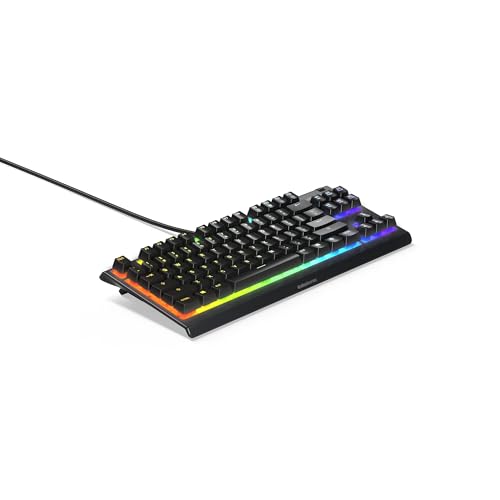
Pros
- Compact space-saving tenkeyless layout
- IP32 water and dust resistance
- Whisper-quiet switches rated for 20 million presses
- Dedicated volume roller and media buttons
- Gaming-grade anti-ghosting technology
Cons
- Sold as a renewed unit
- Zoned RGB illumination instead of per-key lighting
Pros
- Versatile LIGHTSPEED, Bluetooth, and wired connectivity options
- Durable oil-resistant double-shot PBT keycaps
- Slim low-profile tenkeyless footprint frees mouse space
- Tactile switches deliver clear keystroke feedback
- Extensive lighting and key customization via G HUB
Cons
- Advertised wireless battery life tops out at 36 hours
- Renewed product rather than brand-new factory unit
- Tenkeyless layout lacks a dedicated number pad
How These TKL Keyboards Differ
| Keyboard | Switch or key design | Connectivity | Notable feature |
|---|---|---|---|
| SteelSeries Apex 3 TKL | Whisper-quiet gaming switches | Wired; Windows, Mac OS X, Xbox Series S/X, PS4, and PS5 listed | IP32 protection, 8-zone RGB, media roller |
| Logitech G413 TKL SE | Tactile mechanical switches | Wired | PBT keycaps and 6-key rollover anti-ghosting |
| SteelSeries Apex Pro TKL Gen 3 | OmniPoint 3 Hall Effect switches | Not specified | 40 actuation levels, Rapid Trigger, OLED display |
| Razer Ornata V3 TKL | Low-profile mecha-membrane switches | Not specified | Razer Snap Tap, media keys, wrist rest |
| Logitech G PRO X TKL Lightspeed Wireless | GX Red linear mechanical switches | LIGHTSPEED, Bluetooth, or USB | Dual-shot PBT keycaps and volume roller |
| Logitech G515 Lightspeed TKL Wireless | Low-profile GL Brown tactile switches | LIGHTSPEED, Bluetooth, or wired | Up to 36 hours stated battery life |
SteelSeries Apex 3 TKL RGB Gaming Keyboard
SteelSeries Apex 3 TKL RGB Gaming Keyboard is a sensible choice when quiet operation and broad device compatibility matter more than mechanical switch customization. Its whisper-quiet switches are specified for more than 20 million keypresses, while anti-ghosting supports simultaneous gaming inputs.
The keyboard includes a clickable volume roller, dedicated media keys, 8-zone PrismSync RGB lighting, and IP32 water and dust resistance. It is listed as compatible with Windows, Mac OS X, Xbox Series S and X, PS4, and PS5, although the supplied specifications do not describe console setup requirements.
Logitech G413 TKL SE Mechanical Gaming Keyboard
Logitech G413 TKL SE Mechanical Gaming Keyboard targets players who want a straightforward wired mechanical keyboard with tactile feedback. Its PBT keycaps resist heat and wear better than many standard keycap materials, according to the supplied specifications.
A brushed aluminum-magnesium alloy top case provides the stated structural backbone, and 6-key rollover anti-ghosting supports reliable multi-key input. The white backlight and function-layer media controls are relatively simple, so this model is less suitable for buyers seeking per-key RGB lighting or extensive onboard controls.
SteelSeries Apex Pro TKL Gen 3 Gaming Keyboard
SteelSeries Apex Pro TKL Gen 3 Gaming Keyboard is designed for competitive players who want adjustable actuation rather than one fixed switch response. Its OmniPoint 3 Hall Effect switches provide 40 actuation levels from 0.1mm to 4.0mm, with a stated 45g bottom-out force.
Rapid Trigger, Rapid Tap, Protection Mode, QuickSet presets, an OLED smart display, and onboard configuration storage add substantial software and control functionality. These features make the keyboard more complex and specialized than budget models, while the supplied data does not specify its connection type or supported operating systems.
White Variant
SteelSeries Apex Pro TKL Gen 3 Gaming Keyboard in white lists the same OmniPoint 3 Hall Effect system, 40 actuation levels, Rapid Trigger, Rapid Tap, Protection Mode, OLED display, and QuickSet features. Choose this version when the finish better matches your setup, but confirm the listing details before purchase because color is the primary distinction supplied here.
Razer Ornata V3 TKL Gaming Keyboard
Razer Ornata V3 TKL Gaming Keyboard fits users who prefer a low-profile layout and a hybrid key feel. Its mecha-membrane switches are specified to combine mechanical-style clicky feedback with the familiar feel of a conventional keyboard.
UV-coated keycaps, dedicated backlit media keys, 8-zone Razer Chroma RGB, and a magnetic soft-touch wrist rest support frequent desktop use. Razer Snap Tap requires Synapse 4 and is off by default, so buyers should account for software installation and configuration if they want that feature.
Logitech G PRO X TKL Lightspeed Wireless
Logitech G PRO X TKL Lightspeed Wireless is suited to players who want a portable tournament-style keyboard without a permanent cable. This version uses GX Red linear mechanical switches, dual-shot PBT keycaps, a volume roller, media controls, and game mode control.
LIGHTSPEED wireless, Bluetooth, and USB modes provide flexibility for gaming and general computer use. The supplied information identifies a LIGHTSPEED adapter and possible two-device pairing with a compatible mouse, but buyers should verify receiver contents and platform support for their particular setup.
Logitech G PRO Mechanical TKL Tenkeyless
Logitech G PRO Mechanical TKL Tenkeyless uses GX Blue click switches for audible feedback and a more pronounced tactile typing style. Its detachable Micro USB cable, three-step angle adjustment, rubber feet, and compact layout support transport between desks or tournaments.
LIGHTSYNC lighting can be stored onboard for systems where Logitech G HUB is unavailable. F-key programming requires G HUB, and the supplied specifications correctly note that macros may not be permitted in tournaments, making this a poor fit for users who need silent or wireless operation.
Logitech G515 Lightspeed TKL Wireless
Logitech G515 Lightspeed TKL Wireless combines a slim tenkeyless profile with GL Brown tactile low-profile mechanical switches. The switches are factory-lubricated according to the supplied data, and double-shot PBT keycaps add a durable keycap material.
LIGHTSPEED, Bluetooth, and wired data modes make it adaptable across desk setups, while the stated battery life reaches up to 36 hours depending on use conditions. KEYCONTROL can assign up to 15 functions per key, but its customization depends on the relevant Logitech software and configuration support.
Other Versions Worth Considering
Renewed SteelSeries Apex 3 TKL
SteelSeries Apex 3 TKL RGB Gaming Keyboard in renewed form retains the listed quiet switches, anti-ghosting, IP32 protection, 8-zone RGB, and media controls of the standard model. Its renewed status means buyers should review the seller’s condition and warranty information carefully, since those details are not provided here.
Renewed Logitech G515 Wireless Gaming Keyboard TKL
Logitech G515 Wireless Gaming Keyboard TKL lists the same broad G515 design characteristics, including low-profile mechanical switches, tri-mode connectivity, PBT keycaps, RGB lighting, and up to 36 hours of stated battery life. As a renewed product, its condition and included accessories should be checked before ordering.
How to Choose Among the Best TKL Keyboards for Gaming
Choose the switch feel first
Linear switches such as the Logitech GX Red are usually selected for smooth, consistent presses, while tactile switches provide a noticeable bump. Clicky GX Blue switches are more audible, and quiet or mecha-membrane designs may suit shared rooms better.
Check connectivity and software needs
Wired keyboards avoid battery management, while wireless models add desk flexibility but require a receiver, Bluetooth pairing, or charging depending on the mode. Confirm operating-system support, included adapters, software requirements, and available USB ports before purchase.
Match advanced controls to your games
Hall Effect adjustment, Rapid Trigger, Snap Tap, macros, and per-key assignments can be useful for specific competitive workloads. They also add configuration complexity, and tournament rules may restrict macros or other input features.
Consider the complete desk setup
A TKL layout keeps function and navigation keys while freeing space beside the mouse. Low-profile models may suit users seeking a flatter hand position, while dedicated media controls can be more convenient than function-layer shortcuts.
Frequently Asked Questions
Are TKL keyboards good for PC gaming?
Yes. TKL keyboards retain the main gaming keys and function row while removing the number pad, which can leave more room for mouse movement. They are less suitable for users who frequently enter numeric data or require a dedicated number pad.
Which TKL keyboard is best for quiet gaming?
The SteelSeries Apex 3 TKL is the clearest quiet-use choice from the supplied specifications because its switches are explicitly described as whisper quiet. Mechanical, clicky, and tactile models may produce a different sound profile, so room-sharing requirements should guide the decision.
Do all TKL keyboards work with consoles?
No. The Apex 3 TKL specifically lists Windows, Mac OS X, Xbox Series S and X, PS4, and PS5 compatibility. For the other products, console support is not established by the supplied specifications and should be confirmed before purchase.
Final Recommendation
For quiet PC and console gaming, the SteelSeries Apex 3 TKL is the most practical specification-based pick. Choose the Logitech G413 TKL SE for basic tactile mechanical operation, the Apex Pro TKL Gen 3 for adjustable Hall Effect input, or the Razer Ornata V3 TKL for a low-profile hybrid feel.
Wireless buyers should compare the Logitech G PRO X TKL Lightspeed Wireless with the slimmer Logitech G515 Lightspeed TKL Wireless. The first emphasizes GX Red linear switches and competitive portability, while the second emphasizes low-profile tactile input, tri-mode connectivity, and configurable controls.







Write Your Review
No reviews yet. Be the first to share your experience!