

For computer-aided design, a headset is mainly for listening to tutorials, joining calls, or working with audio while you design. None of the supplied listings documents CAD software compatibility, so choose by connection type and the features actually stated.
The CAD Audio MH210 is the clearest specification-led choice here: it has closed-back construction, 40 mm drivers, and a stated 15 Hz to 22 kHz frequency response. For calls, consider a model with a microphone, but confirm its connection works with your computer before buying.
Headset and Headphone Picks for CAD Work

CAD Audio MH350 Headset w/Microphone for

BT4500 Trucker Bluetooth Headset
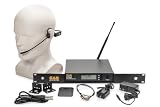
CAD Audio WX1000HW Wireless Headworn Microphone

CAD Audio MH400 Foldable Studio Headphones

Telephone-Headset with Noise-Cancelling Microphone

CAD Audio MH210 Closed-back Studio Headphones-40mm

CAD Audio Sessions MH510 Closed-Back Headphones

CAD Audio Studio Headphones, Red (MH100R)

CAD Audio U37 USB Studio Condenser Recording

CAD Audio U2 USB Stereo Headphones with Cardioid

CAD Audio E19CD Replacement cable for E19

CAD Audio DH100 Drummer Isolation Headphones

CAD Audio MH200 Closed‑Back Studio Headphones
CAD Audio Earworn Omni Minature Mic

CAD WX1000BP Wireless Bodypack Mic System

CAD Audio BODYPACK SYSTEM (GXLVBBJ)

CAD Audio MH100 Closed‑Back Studio Headphones

CAD Audio USB U1 Dynamic Recording Microphone

CAD Audio 1600 Wireless Microphone System

CAD Audio StageSelect WX1610 Wireless Bodypack

CAD Audio WX1000BP Wireless Bodypack Microphone

CAD Audio U9 USB Mini Condenser Microphone

Oliver's Labels GW and Headset by CAD Designs

CAD Audio ZOE USB Recording Microphone

CAD STAGE7 Audio 7-Piece Drum Microphone Pack

CAD U3 Limited Edition USB Studio Recording

Stupell Industries Gaming Dog Headset Cartoon

Classical Gentleman with Headset

Classical Gentleman Headset

Ink5pire Threads CAD Designer Gift T-Shirt Retro
As an Amazon Associate we earn from qualifying purchases. Product prices and availability are accurate as of the date/time indicated.
How to Choose for CAD
CAD applications do not require a special headset. Decide first whether you need a microphone for meetings, isolation from surrounding sound, or simply headphones for audio. Then verify the connector and operating-system support in the full listing, since those details are not supplied for most products here.
- For focused listening: Closed-back models are identified in the MH210 and MH510 listings. The available information does not quantify their isolation.
- For online meetings: The U2 listing specifies USB stereo headphones with a cardioid condenser microphone. Check that your computer and conferencing software support the device.
- For a telephone rather than a PC: The VT headset is described as a quick-disconnect model with RJ09 cables for named desk-phone brands. That does not establish direct PC compatibility.
- For minimal uncertainty: Prefer a model whose listing clearly states the connector, microphone arrangement, and computer compatibility you need.
Product Notes
CAD Audio MH210 Closed-Back Headphones
The supplied specifications identify 40 mm drivers, closed-back construction, and a 15 Hz to 22 kHz frequency response. These details make the MH210 a reasonable option for listening at a workstation, while the closed-back design may suit people who prefer headphones that cover the ears rather than an open design.
Pros: The driver size, frequency range, and closed-back design are documented. Cons: The supplied information does not specify a microphone, connector, comfort details, or computer compatibility. Who should skip it: Anyone who needs a confirmed microphone or a particular PC connection.
CAD Audio MH400 Foldable Studio Headphones
The product name identifies foldable construction and swivel cups, features that may help with storage and positioning. The provided data does not state its connector, microphone, acoustic design, or compatibility, so confirm those details if the headphones must serve for calls or a specific workstation.
Pros: Folding construction and swivel cups are stated. Cons: No technical audio or connection specifications are included in the supplied information. Who should skip it: Buyers who need a documented microphone, frequency response, or confirmed PC connection.
CAD Audio Sessions MH510 Closed-Back Headphones
The supplied title confirms a closed-back design, which can be a useful starting point for a desk where you want an over-ear listening option. No driver measurements, microphone, connector, or computer support details are provided, so this model is difficult to assess beyond its construction type.
Pros: Closed-back construction is specified. Cons: The available data leaves connection, microphone, and audio specifications unclear. Who should skip it: People choosing primarily by detailed acoustic specifications or needing a headset microphone.
CAD Audio MH100R Studio Headphones
The supplied listing identifies the MH100R as studio headphones, but gives no technical specifications beyond the model name and color. It may be worth considering only after checking the complete listing for the connection and features required by your PC setup.
Pros: It is identified as a studio headphone model. Cons: The supplied evidence does not establish its design, microphone, connector, or compatibility. Who should skip it: Buyers who need clear specifications before choosing equipment.
CAD Audio U2 USB Stereo Headphones with Microphone
The listing specifies USB stereo headphones and a cardioid condenser microphone on a gooseneck, with a 10-foot cable. This makes the U2 the most clearly described option here for someone seeking both listening and voice input, provided their computer supports the device over USB.
Pros: USB connection, stereo headphones, cardioid condenser microphone, and cable length are stated. Cons: The supplied data does not specify operating-system support, audio measurements, or whether the microphone can be repositioned or muted. Who should skip it: Anyone who needs wireless use or verified compatibility with a particular computer.
CAD Audio MH350 Gaming and Broadcasting Headset
The product name describes the MH350 as a headset with a microphone for gaming, streaming, and broadcasting. Those intended uses may make it relevant to CAD users who also want a microphone, but no connector, driver, microphone, or PC compatibility specifications are included in the supplied data.
Pros: The listing identifies a microphone and names gaming, streaming, and broadcasting as intended uses. Cons: The available specifications do not confirm its connection or technical performance. Who should skip it: Buyers who cannot verify that its connection suits their PC.
Telephone-Headset with Noise-Cancelling Microphone
This mono headset is described as a quick-disconnect telephone model with RJ09 cables and compatibility with specified Yealink, Grandstream, Polycom, Snom, Fanvil, and Mitel phones. It is intended for compatible desk phones, not established as a direct PC headset by the supplied information.
Pros: The listing names its RJ09 connection and supported telephone brands. Cons: It is mono and PC compatibility is not stated. Who should skip it: Anyone seeking stereo PC audio or a headset for CAD software without a compatible telephone setup.
Frequently Asked Questions
Do CAD programs need a special headset?
No special CAD headset requirement is established by the information here. Choose based on your listening and call needs, then check that the computer supports the headset’s connection.
Which option has the clearest stated PC-oriented connection?
The U2 listing specifies USB headphones and a microphone. That does not confirm support for every operating system or computer, so check the complete product information before purchase.
Final Recommendation
Choose the MH210 if its documented closed-back design and audio specifications meet your listening needs and you do not require a confirmed microphone. The U2 is the more relevant pick for a USB-connected headset with a stated microphone, subject to PC compatibility checks. Consider the telephone model only for its named desk-phone systems, and verify missing details for the other options before deciding.
For more general headset comparisons, see our guide to headsets for casual gaming or browse the Gaming Headsets category.





Write Your Review
No reviews yet. Be the first to share your experience!