

For a straightforward, right-handed gaming mouse, start with the Razer DeathAdder Essential Ergonomic Wired. The Redragon M602 offers more programmable buttons, while the ASUS TUF Gaming M3 Gen II emphasizes a lightweight design and protective features.
For a lower-cost basic setup, compare the BENGOO and MANHATTAN models, keeping their stated features and software requirements in mind. This guide evaluates the supplied specifications, not measured performance, so treat advertised DPI as a sensitivity range rather than proof of tracking quality.
Quick Picks for Budget Wired Gaming

BENGOO Wired RGB Gaming Mouse


As an Amazon Associate we earn from qualifying purchases. Product prices and availability are accurate as of the date/time indicated.
BENGOO Wired RGB Gaming Mouse
As an Amazon Associate we earn from qualifying purchases. Product prices and availability are accurate as of the date/time indicated.
BENGOO Wired RGB Gaming Mouse
As an Amazon Associate we earn from qualifying purchases. Product prices and availability are accurate as of the date/time indicated.
BENGOO Wired RGB Gaming Mouse
As an Amazon Associate we earn from qualifying purchases. Product prices and availability are accurate as of the date/time indicated.
BENGOO Wired RGB Gaming Mouse
As an Amazon Associate we earn from qualifying purchases. Product prices and availability are accurate as of the date/time indicated.
BENGOO Wired RGB Gaming Mouse
As an Amazon Associate we earn from qualifying purchases. Product prices and availability are accurate as of the date/time indicated.
Recommended Budget Wired Gaming Mice
Razer DeathAdder Essential Ergonomic Wired: A Simple All-Round Choice
The DeathAdder Essential has a 6,400 DPI optical sensor, five programmable buttons, and a ridged rubberized scroll wheel. Its dedicated DPI buttons allow sensitivity changes during use, and Razer Synapse supports button remapping and macro assignments.
Pros: Straightforward five-button layout, adjustable sensitivity, and stated mechanical switch durability of up to 10 million clicks. Cons: The supplied specifications do not state weight, dimensions, or compatibility details beyond its wired gaming-mouse positioning.
Who should skip it: Shoppers who need a documented lightweight mouse, extensive MMO-style controls, or software-free customization should compare other options.
See more keyboard and mouse options for gaming PCs if you are choosing a full desktop setup.
Redragon M602 Gaming Mouse: More Buttons and Software Options
The M602 pairs an adjustable sensor rated up to 7,200 DPI with nine programmable buttons and RGB lighting. Redragon software supports button remapping, speed adjustments, lighting changes, and macro editing, making it suitable for players who want configurable controls.
Pros: More programmable buttons than the simpler picks, adjustable DPI, and lighting that can be turned off. Cons: Customization depends on downloading software from Redragon, and the supplied details do not give dimensions or weight.
Who should skip it: Choose a simpler mouse if you do not need macros or extra buttons, or prefer not to install configuration software.
ASUS TUF Gaming M3 Gen II: Lightweight Design and Protection
ASUS lists this right-handed wired mouse at 59 grams, with an 8,000 DPI optical sensor and six programmable buttons. Its IP56 dust and water resistance and antibacterial surface treatment are notable features, while PTFE feet are specified for smooth gliding.
Pros: A stated 59-gram weight, four selectable sensitivity levels, and documented dust and water resistance. Cons: The shape is designed for right-handed use, and the supplied information does not describe software features or cable construction.
Who should skip it: Left-handed users and anyone seeking a symmetrical design should look elsewhere. The IP56 rating is a protection specification, not a reason to expose the mouse deliberately to liquids.
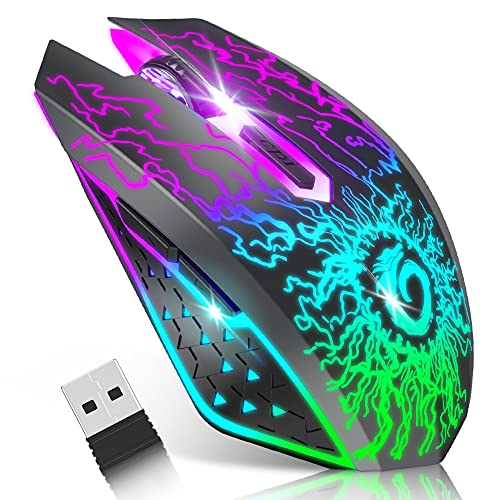
BENGOO Gaming Mouse Wired with RGB Backlit: Basic Plug-and-Play Controls
The BENGOO offers four selectable DPI settings from 1,200 to 3,600, six buttons, and multicolor lighting. Its listing describes direct plug-and-play use without a driver, which may appeal to buyers who want basic controls without extra configuration.
Pros: Simple setup, selectable sensitivity, and forward and back buttons for navigation. Cons: Its maximum stated DPI is lower than several alternatives here, and the compatibility information specifically names older Windows versions, Linux, and Apple laptops without detailing current operating-system support.
Who should skip it: Avoid assuming compatibility with a particular current system unless the seller confirms it, and consider another pick if you need software-based button remapping.
MANHATTAN RGB LED Wired USB Gaming Mouse: Practical Everyday Controls
This right-handed, full-size mouse lists a sensor resolution up to 12,800 DPI, five buttons, and a braided 5-foot USB-A cable. Its back and forward thumb buttons, switchable lighting, and stated plug-and-play compatibility across Windows, macOS, Linux, and Chrome OS make it useful for mixed work and gaming.
Pros: Broad stated operating-system support, a cable length specification, and lighting that can be turned off. Cons: Its full-size shape is intended for right-handed users, and the supplied details do not specify programmable buttons or dedicated gaming software.
Who should skip it: Left-handed users or players who want a configurable macro setup should compare a different model. Confirm that your computer has an available USB-A port.
Redragon M801 Gaming Mouse: Extensive Controls for Button-Heavy Games
The wired M801 lists nine programmable buttons, five memory profiles, and a sensor resolution up to 16,000 DPI. Its specifications also include adjustable weights, a rapid-fire button, and software customization, features that may suit players who want to tailor multiple game profiles.
Pros: Multiple profiles, configurable buttons, and an included weight-tuning set are documented. Cons: The added controls and tuning options may be unnecessary for everyday play, and the listed compatibility focuses on Windows versions rather than a broader set of systems.
Who should skip it: Skip this more configurable layout if you prefer a lightweight, minimal mouse or need clearly documented macOS compatibility.
How to Choose a Budget Wired Gaming Mouse
Prioritize Shape and Handedness
Shape affects how naturally you can reach the buttons, but the supplied data only identifies the ASUS and MANHATTAN models as right-handed designs. If hand fit is a priority, check the seller’s current dimensions and return terms before choosing.
Choose DPI for Adjustability, Not as a Quality Score
DPI indicates how far the pointer moves relative to mouse movement, and higher maximum values do not by themselves establish better tracking. Consider whether selectable sensitivity levels meet your preferences; the BENGOO specifies four settings, while the ASUS also lists four selectable levels.
Match Button Count to Your Games
Extra buttons can provide shortcuts or macros, but they are useful only if you will configure and reach them comfortably. The M602 and M801 list nine programmable buttons, while the DeathAdder Essential offers five and supports remapping through Razer Synapse.
Check Connection and Software Needs
These recommendations use wired USB connections, but connector type and software support are not stated for every model. The MANHATTAN specifically lists USB-A and broad operating-system support, while the BENGOO describes plug-and-play use and names several systems.
For software-dependent customization, verify that the utility supports your operating system before buying. Redragon directs M602 owners to its website for software, and Razer Synapse is listed for the DeathAdder’s remapping and macro features.
Frequently Asked Questions
Is a higher DPI always better for gaming?
No. Maximum DPI is a sensitivity specification, not an independent measure of precision or sensor quality. Choose a mouse with adjustments that suit your preferences and games.
Which option is simplest to set up?
The BENGOO listing explicitly describes driver-free plug-and-play use. The MANHATTAN also specifies plug-and-play support, but confirm that your computer has a compatible USB-A port.
Which mouse suits games that use many commands?
The Redragon M602 and M801 both list nine programmable buttons. The M801 also specifies five memory profiles, while software is needed for the M602’s stated remapping and macro functions.




Write Your Review
No reviews yet. Be the first to share your experience!