

For most Roblox players, a compact keyboard frees mouse space, while full-size options preserve dedicated arrows and number pads. Choose based on layout, switch feel, and whether you need a bundled mouse.
This specification-based comparison focuses on listed layouts, connection types, key rollover claims, and compatibility. It does not establish measured latency or real-world durability.
Pros
- Compact 61-key keyboard layout
- No drivers or software required
- Adjustable keyboard typing angle
- Ambidextrous wired optical mouse
- Keyboard and mouse included
Cons
- Compact layout has fewer keys than full-size keyboards
- Wired connection requires available USB ports
- Specifications omit switch type and key rollover details

Pros
- Full-size keyboard layout
- Adjustable keyboard lighting modes
- Four selectable mouse DPI levels
- Two mouse side buttons
- USB plug-and-play connection
Cons
- Wired connection only
- Keys are mechanical-feeling, not specified as mechanical

Pros
- Compact 61-key layout maximizes desk space
- Tactile and clicky mechanical switch feedback
- Detachable USB-C cable simplifies transport
- Full-key anti-ghosting prevents input conflicts
- Double-shot keycaps provide clear legend backlighting
Cons
- Lacks dedicated arrow and navigation keys
- Fixed rainbow lighting lacks full RGB customization

Pros
- 19-key anti-ghosting for gaming inputs
- Adjustable mouse DPI up to 4800
- Integrated multimedia shortcut combinations
- Bundled with a mousepad included
- Broad compatibility with PC and consoles
Cons
- Keyboard lighting restricted to rainbow mode only
- Simulated mechanical feel instead of true mechanical switches

Pros
- Compact layout frees up significant mouse space
- Detachable Type-C cable aids portability
- Quiet membrane typing with simulated mechanical feel
- Retains dedicated physical arrow keys
Cons
- Uses membrane switches instead of true mechanical switches
- Anti-ghosting is limited to 26 keys
- Lacks a dedicated numeric keypad

Pros
- Compact 68-key layout saves desktop space
- Detachable USB Type-C cable aids portability
- Integrated RGB lighting with 10 dynamic modes
- Broad plug-and-play compatibility across PCs and consoles
Cons
- Uses crater membrane keys instead of mechanical switches
- Compact footprint lacks a dedicated numeric keypad

Pros
- Quiet, responsive key design
- IP53 dust and water protection
- Included detachable palm rest
- Customizable 10-zone RGB lighting
- Convenient media dial
Cons
- Wired connection limits cable-free placement
- Full-size design requires more desk space
- US QWERTY layout may not suit other layouts

Pros
- Versatile tri-mode wireless and wired connectivity
- Space-saving 96% layout retains numeric keypad
- Convenient dual-mode rotary control knob
- Full-key macro customization support
- Two-stage adjustable feet for ergonomic positioning
Cons
- Uses membrane switches instead of mechanical switches
- Does not support hot-swappable switches

Pros
- Up to 8000 Hz polling rate
- Rapid trigger with 0.02mm step distance
- Hall Effect magnetic switches avoid mechanical wear
- Browser-based configuration requires no local software installation
- Compact 60 percent layout saves desk space
Cons
- Compact 60 percent layout lacks dedicated arrow and navigation keys
- Restricted to a wired connection

Pros
- Driver-free plug-and-play installation
- Double-shot keycaps prevent legend wear
- Six dedicated mouse DPI preset levels
- Multiple onboard RGB lighting modes
- Broad compatibility across major operating systems
Cons
- Mouse sensitivity peaks at 3200 DPI
- Full-size footprint requires substantial desktop space
- Wired design requires two open USB ports
How these keyboards differ
Layout matters most for Roblox: 60% and 65% models reduce desk footprint, while full-size and near-full-size boards retain more dedicated keys. Combo packages add a mouse, but compare their included mouse features with your current setup before choosing.
Compact picks for more mouse room
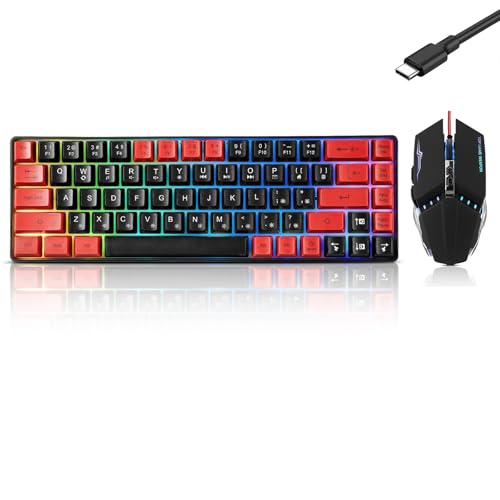
Guiheng Wired 60% Gaming Keyboard and Mouse Combo pairs a 61-key compact board with a wired mouse. It is a practical option when a player needs both devices and wants a small keyboard; the listing does not specify mouse DPI or rollover.
Pros: Compact layout, wired USB connection, included mouse, and compatibility listed for Windows and Mac. Cons: Only 61 keys, and the supplied details do not document dedicated arrow keys or keyboard rollover. Who should skip it: Players who need a full layout or want detailed mouse specifications.
60% Wired Mechanical Gaming Keyboard with Blue has 61 keys, blue mechanical switches, a detachable Type-C cable, and full-key anti-ghosting according to its listing. Fn+Space switches to direction keys, so arrow access uses a function layer rather than dedicated keys.
Pros: Mechanical click-and-tactile feedback, compact footprint, and stated simultaneous-key support. Cons: Blue switches are explicitly clicky, and the 60% layout lacks dedicated arrow keys. Compatibility is listed for Windows and Mac, with no driver required. Who should skip it: Players who prefer quiet keystrokes or frequent dedicated arrow-key access.
CHONCHOW Mini RGB 60% Gaming Keyboard uses a 68-key layout, detachable Type-C cable, and customizable lighting. Its 68-key count offers a compact alternative, but the supplied information does not confirm dedicated arrow keys or anti-ghosting.
Pros: Small footprint, adjustable RGB effects, and compatibility listed for Windows, Mac, and several consoles. Cons: Arrow-key availability and key rollover are not specified. Who should skip it: Players who require documented anti-ghosting or a full-size layout.
GEODMAER 65% Gaming Keyboard keeps separate arrow keys while omitting the number pad. Its listing states 26-key no-conflict support, a detachable Type-C cable, and Windows-key lock, useful for compact play where accidental Windows-key presses are a concern.
Pros: Dedicated arrows, stated 26-key rollover, and compact wired design. Cons: No number pad, and the described switches provide mechanical feel through membrane construction, not mechanical switches. Compatibility details focus on PC and laptop use. Who should skip it: Players seeking a true mechanical switch board or wireless connection.
Aula WIN60 HE – 60% Mechanical Gaming Keyboard uses magnetic Hall effect switches, adjustable actuation, Rapid Trigger, and an advertised polling rate up to 8000 Hz. These are specialist control features, not requirements for ordinary Roblox play; the 60% layout also means no dedicated arrow-key cluster.
Pros: Adjustable actuation, Rapid Trigger, compact size, and web-based customization for remapping and macros. Cons: Listed software features require internet access to use the web driver, and the product description emphasizes FPS use rather than Roblox-specific benefits. Who should skip it: Players who want a straightforward board, dedicated arrows, or no configuration step.
Full-size keyboards and bundled mouse options
Keyboard and Mouse Gaming LED Wired Combo includes a 104-key keyboard, a mouse with adjustable DPI up to 4800, and stated 19-key non-conflict support. It suits a new PC setup needing both wired peripherals, though the keys imitate mechanical feel rather than using documented mechanical switches.
Pros: Full-size layout, bundled mouse, and stated 19-key rollover. Cons: The keyboard is described as mechanical-feeling, not a mechanical switch model; compatibility listing names Windows and Mac, with no Roblox-specific certification. Who should skip it: Players who already own a suitable mouse or require true mechanical switches.
CHONCHOW Gaming Keyboard and Mouse Led Backlit USB offers 104 keys, 19-key simultaneous operation, multimedia combinations, and a mouse with adjustable DPI up to 4800. Its quiet mechanical-feel keys may suit shared rooms better than the blue-switch compact option, based on the product description.
Pros: Full-size layout, bundled mouse and mousepad, and stated rollover support. Cons: Keys are not specified as mechanical switches, and the mouse DPI figure is a listed feature rather than a measured accuracy result. The listing names PC and Mac compatibility. Who should skip it: Players who want a compact keyboard or verified mechanical switches.
Gaming Keyboard and Mouse Combo is a 104-key wired set with a number pad, RGB lighting, and a mouse with six listed speed settings up to 3200 DPI. It fits players who want standard full-size keys and a mouse together, with no additional driver listed as necessary.
Pros: Full-size layout, bundled mouse, and compatibility listed for Windows, Mac, and Linux. Cons: The supplied details do not specify rollover or switch type, so do not assume mechanical switches. Who should skip it: Players who need a compact board or documented multi-key rollover.
AULA S99 Gaming Keyboard combines a 99-key layout with a number pad, programmable keys, and Bluetooth, 2.4 GHz, or USB-C connectivity. It suits players who also want a multi-device keyboard, but its membrane construction is not hot-swappable and wireless use depends on selecting the matching connection mode.
Pros: Three connection modes, programmable macros, number pad, and compatibility listed for Windows, Mac, Android, and iOS. Cons: Membrane switches, no hot-swap support, and no supplied battery-life figure. Who should skip it: Players who insist on mechanical switches or prefer a wired-only setup.
Corsair Skiff 100 Quiet RGB Wired Gaming Keyboard provides a full-size layout, low-noise keys, an included detachable palm rest, 10-zone RGB, and a media dial. It suits players who value quiet operation and extended typing comfort, though the provided compatibility details do not name supported operating systems.
Pros: Quiet-key design, palm rest, media dial, and stated IP53 dust and water protection. Cons: Connection and operating-system compatibility are not specified in the supplied details; confirm both for your PC before purchase. Who should skip it: Buyers who need documented compatibility or a compact layout.
How to choose a Roblox keyboard
Pick layout by key access. A 60% board saves desk space but may place arrows on a function layer. A 65% board such as the GEODMAER keeps separate arrow keys, while full-size boards retain number pads and function rows.
Match switch feel to your room. The CACKBIRD model explicitly uses clicky blue mechanical switches. Several combo models describe mechanical-feeling keys, which does not mean they contain mechanical switches. Quiet-key and membrane options may suit shared spaces or users who favor softer sound.
Check rollover claims. The CACKBIRD listing claims all-key anti-ghosting; CHONCHOW combo listings state 19-key non-conflict support, and GEODMAER states 26-key no-conflict support. These advertised specifications differ, and they do not establish measured input latency.
Confirm connection and compatibility. Most listed choices use wired USB, while AULA S99 adds Bluetooth and 2.4 GHz. Check the exact operating-system support and available USB ports; Roblox compatibility does not guarantee every extra lighting or macro feature works on every platform.
For a deeper explanation of switch trade-offs, read our guide to mechanical versus membrane keyboards for gaming.








Write Your Review
No reviews yet. Be the first to share your experience!