

The best compact wireless gaming keyboard for PC in this comparison is the DIERYA DK63 if you want mechanical switches, three connection modes, and a compact layout. The Womier DK75 is better for quieter everyday typing, while the RedThunder combo suits buyers who also need a wireless mouse.
This is a specification-based comparison, not a report of independent performance measurements. The product data also includes several wired compact keyboards, so those models are identified as alternatives rather than wireless recommendations.
| Keyboard | Connection | Layout | Key technology | Best suited to |
|---|---|---|---|---|
| DIERYA DK63 60% Wireless Mechanical | 2.4G, Bluetooth 5.0, wired USB | 60%, 63 keys | Red mechanical switches | Flexible PC gaming and multi-device use |
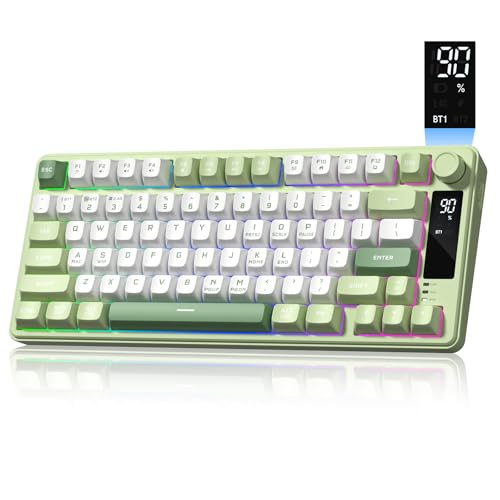
| Womier DK75 75% Wireless Gaming Keyboard | Bluetooth 5.0, 2.4GHz, USB wired | 75% | Silent membrane switches | Quiet work and gaming setups |
| RedThunder 60% Wireless Gaming Keyboard and Mouse | 2.4G shared receiver | 60% | Mechanical-feel keyboard | Low-cost keyboard and mouse bundles |
| Logitech K400 Plus Wireless Touch TV Keyboard | 2.4GHz Unifying receiver | Compact keyboard with touchpad | Quiet conventional keys | PC-connected TV control |
| Aula WIN60 HE – 60% Mechanical Gaming Keyboard | Wired USB | 60% | Hall effect magnetic switches | Rapid-trigger gaming where wireless is not required |
Wired Compact Keyboards Worth Considering
Wireless convenience is not always the deciding factor. These wired models can be suitable when a direct USB connection, lower setup complexity, or gaming-focused switch technology matters more than cable-free use.
Aula WIN60 HE – 60% Mechanical Gaming Keyboard: Best Wired Performance Feature Set
Aula WIN60 HE – 60% Mechanical Gaming Keyboard is wired, so it does not meet the wireless requirement, but its Hall effect magnetic switches and advertised rapid-trigger settings make it relevant for competitive PC gaming. The product data lists adjustable actuation, a 0.02mm rapid-trigger step, and polling rates up to 8000Hz.
- Pros: Hall effect switches, adjustable actuation, advertised rapid trigger, 60% layout, hot-swappable magnetic switches, and web-based customization.
- Cons: It requires a wired USB connection and therefore cannot provide wireless desk flexibility.
- Who should skip it: Skip it if wireless operation is essential or if you want Bluetooth or 2.4G connectivity.
MageGee Portable 60% Mechanical Gaming Keyboard: Best Simple Wired Mechanical Alternative
MageGee Portable 60% Mechanical Gaming Keyboard uses a 68-key compact layout with separate arrow keys and red mechanical switches. Its detachable USB cable, anti-ghosting design, and compatibility with Windows, Linux, and Mac make it a straightforward wired option.
- Pros: Red linear switches, separate arrow keys, detachable USB cable, 16 backlight modes, full-key anti-ghosting, and broad computer compatibility.
- Cons: It is wired, uses blue LED backlighting rather than stated RGB lighting, and does not list wireless connectivity.
- Who should skip it: Skip it if you need a rechargeable battery, Bluetooth, 2.4G wireless, or customizable RGB color effects.
RedThunder 60% Gaming Keyboard and Mouse Combo: Wired Budget Alternative
RedThunder 60% Gaming Keyboard and Mouse Combo is a wired keyboard and mouse set with a 61-key compact layout, RGB lighting, and a mouse rated up to 7200 DPI. The keyboard also lists water-resistant construction and a braided USB cable.
- Pros: Compact footprint, included mouse, RGB lighting, water-resistant keyboard design, braided cable, and a mouse with adjustable sensitivity up to the stated rating.
- Cons: It is wired, the keyboard switch type is not clearly identified, and the product is less suitable for buyers seeking a wireless-only setup.
- Who should skip it: Skip it if you want a wireless keyboard, Bluetooth pairing, or a documented mechanical or Hall effect switch system.
GEODMAER 65% Gaming Keyboard: Best Low-Complexity Wired Layout
GEODMAER 65% Gaming Keyboard provides a wired Type-C connection, separate arrow keys, 26-key anti-ghosting, and a compact 65% layout. Its membrane construction is described as offering mechanical feel while remaining quieter than many mechanical designs.
- Pros: Detachable Type-C cable, compact layout, separate arrows, media buttons, backlighting controls, and a stated lifespan exceeding 10 million keystrokes.
- Cons: It is wired, uses membrane technology, and the product data does not specify wireless or Bluetooth support.
- Who should skip it: Skip it if you want actual mechanical switches, wireless freedom, or a full-size keyboard.
Redragon K521 Upgrade Rainbow LED Gaming Keyboard: Best Full-Size Wired Alternative
Redragon K521 Upgrade Rainbow LED Gaming Keyboard is not compact or wireless, with 104 keys and a wired connection. It may still suit users who value dedicated multimedia controls, broad console compatibility, and a conventional full-size layout.
- Pros: Full-size 104-key layout, 12 multimedia combinations, 19-key anti-ghosting, adjustable rainbow backlighting, and compatibility listed for Windows, MacOS, PS4, PS5, and Xbox.
- Cons: It is wired and full-size, while the product data describes mechanical-feeling keys rather than confirmed mechanical switches.
- Who should skip it: Skip it if desk space, wireless connectivity, or a compact mouse area is your main priority.
How to Choose the Best Compact Wireless Gaming Keyboard for PC
Choose the Connection Before the Switch Type
A 2.4G receiver usually requires a free USB port, while Bluetooth can be more convenient for laptops and mobile devices. Wired USB remains the simplest fallback, but it does not satisfy a wireless setup requirement.
The DIERYA DK63 and Womier DK75 offer the broadest connection flexibility among the wireless options. The RedThunder models use a shared 2.4G receiver, and the Logitech K400 Plus uses a Unifying receiver.
Match the Layout to Your Workload
60% keyboards save the most desk space, but they move navigation, function-row, and media commands behind Fn combinations. A 75% keyboard preserves more dedicated navigation access without adding a number pad.
For couch use, the K400 Plus adds a touchpad that can replace a separate mouse. For desktop gaming, the DIERYA DK63, Womier DK75, and RedThunder designs leave more room for mouse movement than full-size boards.
Separate Mechanical, Membrane, Mechanical-Feel, and Hall Effect Claims
Mechanical switches are documented for the DIERYA DK63 and MageGee keyboard, while the Womier DK75 uses silent membrane switches. The RedThunder wireless keyboard is described as mechanical-feel, which should not be treated as confirmation of mechanical switch construction.
The Aula WIN60 HE uses Hall effect magnetic switches and advertises adjustable actuation and rapid trigger. Those features may appeal to competitive players, but the model is wired and therefore belongs among alternatives here.
Check Battery and Charging Expectations
Battery figures vary substantially by lighting, connection mode, and usage pattern. The DIERYA DK63 lists approximately 90 hours with backlighting off, while the RedThunder wireless models list approximately eight hours with lighting.
The Womier DK75 includes a 4000mAh rechargeable battery and USB-C charging, but the supplied data does not provide a precise runtime figure. The Logitech K400 Plus uses a stated battery life of up to 18 months rather than a rechargeable battery system.
Compatibility and Setup Notes
- Confirm that your PC has an available USB port before choosing a receiver-based model.
- For the RedThunder wireless combos, the keyboard and mouse share one receiver stored in the mouse.
- The Logitech K400 Plus requires its Unifying receiver and is listed for Windows, Android, and Chrome OS versions in the supplied specifications.
- The DIERYA DK63 and Womier DK75 provide multiple connection modes, but the exact PC Bluetooth hardware requirement still applies when using Bluetooth.
- Wired alternatives require a USB connection and may be preferable when battery management is undesirable.
Frequently Asked Questions
Is a 60% keyboard suitable for PC gaming?
Yes, a 60% keyboard can suit gaming when you are comfortable using Fn combinations for functions that lack dedicated keys. It also leaves more desk space for mouse movement, but may be less convenient for productivity.
Which wireless keyboard here is quietest?
The Womier DK75 is the clearest choice for quiet use because its supplied specifications identify silent membrane switches. The Logitech K400 Plus also lists quiet keys, but it is designed primarily for media control.
Which option is best for competitive FPS gaming?
The Aula WIN60 HE advertises Hall effect switches, adjustable actuation, and rapid trigger, but it is wired. Among the wireless models, the DIERYA DK63 offers mechanical switches and 2.4G connectivity, although the supplied data does not establish independently measured latency.
Final Recommendation
Choose the DIERYA DK63 if you want the strongest combination of compact mechanical typing, 2.4G wireless, Bluetooth, and wired connectivity. Choose the Womier DK75 if quiet typing, a 75% layout, and multi-device flexibility matter more than mechanical switches.
The RedThunder wireless combo makes sense when you need both a keyboard and mouse from one receiver, while the Logitech K400 Plus is better for PC-connected TV control. If wireless is optional, the Aula WIN60 HE is the most feature-focused gaming alternative, and the MageGee or GEODMAER models offer simpler wired compact layouts.
For related setup decisions, compare the differences in mechanical and Hall effect keyboards before selecting a switch type. A suitable wireless gaming mouse for FPS games can also affect how much value you get from a smaller keyboard footprint.
Products Included in This Comparison

Pros
- Integrated keyboard and touchpad
- Long advertised battery life
- Quiet keys for media spaces
- Spill-resistant construction
- Broad listed platform compatibility
Cons
- Wireless connection relies on a USB receiver
- Not designed for separate mouse control

Pros
- Up to 8000 Hz polling rate
- Rapid trigger with 0.02mm step distance
- Hall Effect magnetic switches avoid mechanical wear
- Browser-based configuration requires no local software installation
- Compact 60 percent layout saves desk space
Cons
- Compact 60 percent layout lacks dedicated arrow and navigation keys
- Restricted to a wired connection

Pros
- Compact layout retains dedicated arrow keys
- Smooth linear red mechanical switches
- Full anti-ghosting across all keys
- Detachable cable simplifies transport
- Dual adjustable kickstands for ergonomics
Cons
- Single-color blue lighting without RGB customization
- Lacks wireless connectivity options

Pros
- Single shared 2.4GHz USB receiver saves ports
- Compact 60% footprint frees up mouse space
- Lightweight 65g honeycomb mouse structure
- Rechargeable battery power via USB
- Double-shot ABS keycaps resist legend fading
Cons
- Advertised continuous battery life is only eight hours with lighting
- Simulated mechanical feel rather than genuine mechanical switches
- Compact layout omits dedicated numeric keypad and arrow cluster
Pros
- Versatile Bluetooth, 2.4GHz wireless, and wired connectivity
- Quiet membrane switches ideal for shared spaces
- Integrated status screen and multipurpose rotary knob
- Durable, shine-resistant PBT keycaps
- Generous 4000mAh rechargeable battery capacity
Cons
- Uses membrane switches instead of true mechanical switches
- No dedicated software for advanced mapping or lighting customization

Pros
- Space-saving 60 percent layout maximizes desk space
- Single shared 2.4GHz receiver for both devices
- Lightweight 65-gram honeycomb shell mouse
- Rechargeable batteries with auto-sleep power saving
- Durable double-shot injection keycaps resist fading
Cons
- Lacks a dedicated numeric keypad and arrow cluster
- Membrane construction rather than genuine mechanical switches
- Mouse scroll wheel LED only illuminates while charging

Pros
- Compact 60% layout retains dedicated arrow keys
- Flexible 2.4GHz, Bluetooth 5.0, and wired connections
- Light and quiet 45g linear red switches
- Large 3000mAh rechargeable battery capacity
- Customizable 16.8-million-color RGB backlighting
Cons
- Battery life drops significantly with full RGB enabled
- Compact layout requires FN key combos for standard functions

Pros
- Compact 61-key layout maximizes mouse room
- Lightweight 65g honeycomb mouse chassis
- Spill-resistant keyboard build
- Fast optical sensor up to 7200 DPI
- Durable braided USB cables
Cons
- Lacks dedicated numeric keypad and arrow keys
- Fully wired setup requires available USB ports

Pros
- Dedicated one-touch lighting toggle button
- 19-key anti-ghosting for essential gaming inputs
- Full 104-key layout with multimedia shortcuts
- Plug-and-play setup across PC and consoles
- Adjustable backlighting brightness and breathing modes
Cons
- Simulates mechanical feel rather than true mechanical switches
- Anti-ghosting is limited to 19 keys

Pros
- Space-saving 68-key layout with dedicated arrows
- Detachable Type-C cable for easy travel
- Quiet membrane operation suitable for shared rooms
- 26-key anti-ghosting for accurate key registration
Cons
- Uses membrane switches instead of authentic mechanical switches
- No integrated number pad for data entry





Write Your Review
No reviews yet. Be the first to share your experience!