

The best gaming mouse for claw grip small hands should let your fingers stay arched while your palm remains lightly supported. Shape and weight matter more than a high DPI number, so this comparison prioritizes documented grip support, size guidance, weight, connection options, programmable controls, and compatibility.
Among the listed options, the Redragon M617 Ultralight Honeycomb Shell Wired is the clearest budget-oriented match because it has a medium symmetrical design and weighs 41g. The Aula SC620 Wireless Gaming Mouse is another strong candidate because its specifications explicitly support claw, palm, and fingertip grips, while the Pulsar Gaming Gears X3 LHD Crazylight is the most specialized option for left-handed users who want a mini, lightweight palm-claw shape.
- Best documented fit for claw grip: Aula SC620 Wireless Gaming Mouse, with explicit support for claw, palm, and fingertip grips and a 67g design.
- Best lightweight wired option: Redragon M617 Ultralight Honeycomb Shell Wired, with a 41g body, medium sizing, and a symmetrical shape.
- Best left-handed small-hand option: Pulsar Gaming Gears X3 LHD Crazylight, with a mini format, 43g weight, and palm-claw design.
- Best established ergonomic alternative: Razer DeathAdder Essential Ergonomic Wired, if your hand prefers a right-handed contour over a symmetrical shell.
- Most versatile connection options: Aula SC620 Wireless Gaming Mouse or Redragon Large Wireless Gaming Mouse for Big, although the latter is aimed at larger hands.

Pros
- Lightweight 41g honeycomb shell
- Five selectable DPI settings
- Flexible paracord cable
- Software-based control customization
Cons
- Wired connection is not wireless
- Medium symmetrical shape may not suit every grip

Pros
- Up to 532 hours of Bluetooth battery life
- High-precision 26,000 DPI Marksman sensor
- Ten programmable buttons for custom keybinds
- Comfortable asymmetric shape for larger hands
- Versatile 2.4GHz and Bluetooth dual-mode wireless
Cons
- Asymmetric shape restricted to right-handed users
- Bulky profile unsuitable for smaller hands or fingertip grips

Pros
- Up to 7200 adjustable DPI
- Nine programmable buttons with macro editing
- Ergonomic contouring with finger rest design
- Customizable seven-mode RGB backlighting
Cons
- Full macro customization requires separate software download
- Tethered wired connection limits freedom of movement

Pros
- Versatile Bluetooth, 2.4GHz, and USB-C wired connectivity
- Ergonomic contoured shape with dual finger rests
- Rechargeable 1000mAh battery with charge-and-play capability
- Adjustable polling rate up to 1000Hz
- Stores USB receiver inside the mouse body
Cons
- Software configuration requires Windows and wired or 2.4GHz mode
- Bulky ergonomic dimensions are unsuitable for small hands

Pros
- Tri-mode 2.4GHz, Bluetooth 5.3, and wired USB-C connectivity
- Lightweight 67-gram build reduces wrist fatigue
- Sensor supports up to 12,000 DPI and 1000Hz polling
- Dedicated rapid-fire button for quick in-game actions
- Can store and switch between four paired devices
Cons
- Configuration software is unavailable when using Bluetooth
- Driver programming features only support Windows systems

Pros
- Slip-resistant DuraSoft Polymer surface
- Ultra-thin 0.5mm profile maintains ergonomic shape
- Included grid transfer sheet for precise cutting
- Lightweight construction adds negligible mass
- Universal design fits any mouse model
Cons
- Requires manual tracing and cutting before installation
- Not pre-cut for specific mouse models

Pros
- Cable-free 2.4GHz wireless connectivity
- Eight remappable buttons including rapid-fire input
- Adjustable polling rate up to 1000Hz
- Five customizable onboard DPI presets
Cons
- Maximum 45-hour battery life requires eco mode
- Equipped with entry-level PAW3325 optical sensor
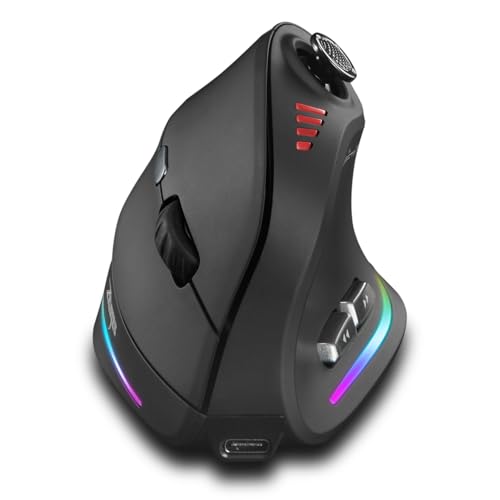
Pros
- Ergonomic vertical grip reduces wrist fatigue
- Integrated 5-way joystick for directional control
- Flexible Bluetooth, 2.4G, and wired connectivity
- High sensitivity reaching up to 24000 DPI
- Twelve customizable buttons for extensive macros
Cons
- Heavier build at approximately 0.66 pounds

Pros
- Ergonomic right-handed shape for comfortable handling
- On-the-fly DPI sensitivity adjustment buttons
- Five fully programmable buttons via Razer Synapse
- Ridged rubber scroll wheel provides tactile grip
- Reliable high-precision 6,400 DPI optical tracking
Cons
- Tethered wired cable limits placement flexibility
- Mechanical switch lifespan limited to 10 million clicks
- Button remapping depends on Razer Synapse software

Pros
- Extremely lightweight 43-gram construction
- Dedicated ergonomic contour for left-handed users
- High-end 32,000 DPI optical sensor
- Optical switches minimize double-click issues
- Includes durable UHMW-PE dot skates
Cons
- Asymmetrical design is unsuitable for right-handed players
- Mini size may feel cramped for larger hands
How To Choose A Claw Grip Mouse For Small Hands
Claw grip usually benefits from a mouse that does not force the palm to lie flat. A shorter or smaller shell can make it easier to arch the fingers, lift the rear of the palm, and control movement with the fingers and wrist.
Prioritize Shape Before DPI
DPI describes sensitivity settings, not physical fit or tracking quality by itself. For small hands, a medium or mini design is generally more relevant than a very high DPI ceiling, especially when the product also documents a symmetrical or claw-compatible shape.
Consider Weight And Cable Behavior
A lower listed weight can reduce the effort required for repeated aiming movements, but shell shape and grip friction still affect control. The Redragon M617 lists a 41g weight and a lightweight paracord, while the Pulsar X3 LHD lists 43g and includes low-friction dot skates.
Check The Handedness And Grip Direction
Most ergonomic gaming mice in this group are designed for right-handed use or do not specify handedness. The Pulsar X3 LHD is specifically left-handed, so it is the most relevant choice for left-handed small-hand users, but right-handed players should exclude it.
Match Connection Type To Your Setup
Wired mice avoid battery management but require room for a cable, while wireless models provide a cleaner desk and more flexible positioning. The Aula SC620 supports 2.4GHz, Bluetooth 5.3, and USB modes, although its software customization is limited to Windows in 2.4GHz wireless and wired modes.
Product-by-Product Analysis
Redragon M617 Ultralight Honeycomb Shell Wired
The Redragon M617 is one of the most relevant choices for small-hand claw grip because it is described as medium-sized, symmetrical, and only 41g. Its 10,000 DPI sensor setting, five programmable buttons, five DPI levels, and lightweight paracord support a simple wired setup for FPS games and general PC use.
- Pros: Low listed weight, medium symmetrical shape, flexible paracord, programmable controls, and Windows software support.
- Cons: It is wired, the product data does not provide exact dimensions, and the honeycomb shell may not suit users who prefer a closed surface.
- Who should skip it: Skip it if you need wireless operation, a right-handed ergonomic contour, or a mouse with documented small-hand measurements.
Aula SC620 Wireless Gaming Mouse
The Aula SC620 is the strongest all-around fit on the supplied evidence because it explicitly supports claw, palm, and fingertip grips. Its 67g body, seven programmable buttons, 12,000 DPI maximum, 1,000Hz polling rate, and three connection modes make it suitable for users who want one mouse for gaming and office devices.
- Pros: Documented claw-grip support, moderate listed weight, 2.4GHz, Bluetooth, and wired connectivity, seven programmable buttons, and compatibility with Windows, Mac OS, Linux, and Android.
- Cons: The driver supports Windows for 2.4GHz and wired modes, Bluetooth is unavailable in the driver, and the product data does not provide exact shell dimensions.
- Who should skip it: Skip it if you want a very small or ultralight mouse, or if you need full software customization on macOS or Linux.
Pulsar Gaming Gears X3 LHD Crazylight
The Pulsar X3 LHD is a specialized left-handed option with a mini format, a listed 43g weight, and a hybrid palm-claw design. Its 32,000 DPI XS-1 sensor, optical switches, and included dot skates target users who want a lightweight pointing device with a left-handed shape.
- Pros: Mini size, very low listed weight, left-handed construction, palm-claw shape, optical switches, and low-friction dot skates.
- Cons: It is not suitable for right-handed users, and the product data does not specify wireless connectivity, programmable button count, or operating-system compatibility.
- Who should skip it: Skip it if you use your right hand, prefer a conventional symmetrical claw mouse, or require clearly documented wireless and software features.
Razer DeathAdder Essential Ergonomic Wired
The Razer DeathAdder Essential is a right-handed wired mouse with a 6,400 DPI optical sensor, five programmable buttons, mechanical switches rated for up to 10 million clicks, and a rubberized scroll wheel. Its ergonomic contour may suit small hands that prefer a supported right-handed shape, although the supplied information does not give exact dimensions or confirm claw-grip compatibility.
- Pros: Simple wired connection, programmable buttons, dedicated DPI controls, textured scroll wheel, and Synapse support for remapping and macros.
- Cons: The shape is ergonomic rather than symmetrical, its listed sensor resolution is lower than several alternatives, and small-hand fit is not specifically documented.
- Who should skip it: Skip it if you need wireless connectivity, a mini shell, or a mouse explicitly designed for claw grip.
Redragon M810 PRO Wireless RGB Gaming Mouse 10000
The Redragon M810 PRO combines 2.4GHz wireless operation with a wired mode, eight programmable buttons, a PAW3325 optical sensor, and a 1,000Hz polling rate in dual mode. Its advertised battery life reaches up to 45 hours in eco mode, giving it a practical role for users who want wireless freedom and multiple remappable controls.
- Pros: Wireless and wired operation, eight programmable buttons, five customizable DPI levels, 1,000Hz polling in dual mode, and a rechargeable battery.
- Cons: The product data does not provide exact dimensions, weight, handedness, or a specific claw-grip recommendation.
- Who should skip it: Skip it if small-hand fit is your primary requirement and you want documented size information before choosing.
Redragon M602 Gaming Mouse
The Redragon M602 is a wired ergonomic mouse with adjustable sensitivity up to 7,200 DPI, nine programmable buttons, software-based macro editing, and seven RGB modes. Its dedicated finger positions may help users who prefer an ergonomic design, but the product data does not establish that the shape is suitable for small hands or claw grip.
- Pros: Nine programmable buttons, adjustable DPI, software macros, wired simplicity, and compatibility claims covering PC, Windows, laptop, and Mac.
- Cons: Exact dimensions and weight are not specified, and the ergonomic shape may limit finger placement for users seeking a compact claw-grip shell.
- Who should skip it: Skip it if you want a lightweight symmetrical design or minimal button layout for competitive FPS play.
Razer DeathAdder Essential Ergonomic Wired
The Razer DeathAdder Essential is listed once in the supplied product set and is best treated as a traditional right-handed alternative rather than a dedicated small-hand claw mouse. Its five programmable buttons and tactile scroll wheel may work for users who value familiar ergonomic control over low weight or a compact shell.
- Pros: Right-handed ergonomic design, five programmable buttons, adjustable sensitivity, mechanical switches, and a ridged scroll wheel.
- Cons: The product information does not state its dimensions, weight, or claw-grip suitability, and its wired design offers no wireless flexibility.
- Who should skip it: Skip it if your hand is very small or you want a low-profile symmetrical mouse designed around fingertip and claw movement.
Corsair IRONCLAW Wireless SE Gaming Mouse, Black
The Corsair IRONCLAW Wireless SE is the least suitable main recommendation for this keyword because Corsair describes its asymmetric shape as designed for larger hands and palm grip. It does offer a 26,000 DPI MARKSMAN sensor, ten programmable buttons, 2.4GHz and Bluetooth battery-life claims, and iCUE customization, but those features do not overcome the stated size and grip mismatch.
- Pros: Ten programmable buttons, high-resolution sensor, surface calibration, 2.4GHz and Bluetooth operation, and extensive iCUE customization.
- Cons: The documented shape targets larger hands and palm grip, making it a poor fit for most small-hand claw users.
- Who should skip it: Skip it if you have small hands, use claw grip, or need a compact mouse that does not encourage a palm position.
Redragon Large Wireless Gaming Mouse for Big
This Redragon model is explicitly intended for medium to larger hands and uses a full-size contoured shell with finger rests and rubber side grips. It supports Bluetooth, 2.4GHz wireless, and wired USB Type-C connections, plus programmable controls and a rechargeable battery, but its intended size makes it a poor match for this search.
- Pros: Three connection modes, support for multiple devices, programmable controls, a 1,000Hz polling rate, rechargeable battery, and broad operating-system compatibility claims.
- Cons: The full-size shape is designed for medium to larger hands, and the software is limited to Windows for 2.4GHz and wired modes.
- Who should skip it: Skip it if you have small hands or want a compact claw-grip mouse with minimal palm contact.
TKMARS Wireless Ergonomic Vertical Gaming Mouse
The TKMARS mouse uses a vertical shape, a five-way joystick, 12 programmable buttons, dual wireless connectivity, and sensitivity settings up to 24,000 DPI. Its design targets a natural wrist position rather than the conventional low-profile shape most claw-grip players expect, so it belongs on the exclusion list for this particular search.
- Pros: Vertical ergonomic design, joystick, 12 programmable buttons, Bluetooth and 2.4GHz connectivity, USB-C cable support, and compatibility claims for PC, Mac, and laptops.
- Cons: The vertical shell is not a conventional claw-grip shape, and the product data does not specify small-hand dimensions or gaming software compatibility details.
- Who should skip it: Skip it if you want a standard low-profile mouse for rapid claw-grip aiming or if you are not comfortable adapting to a vertical design.
Lizard Skins DSP Computer Mouse Grip for PC
The Lizard Skins DSP Computer Mouse Grip for PC is an accessory, not a gaming mouse. Its 0.5mm DSP polymer material is intended to add slip resistance and can be traced and cut to fit a compatible mouse, which may help users refine grip control after choosing the correct shell.
- Pros: Cut-to-fit installation, textured polymer surface, lightweight construction, and compatibility with gaming and everyday mouse use.
- Cons: It does not change the mouse’s dimensions, shape, buttons, sensor, or grip angle, and it requires careful cutting and installation.
- Who should skip it: Skip it if you still need to choose a mouse or if added surface material could make the shell feel too thick for your hand.
Which Mouse Fits Which Small-Hand Claw User?
Choose the Redragon M617 if low weight, a medium symmetrical design, and a wired connection are more important than wireless convenience. Choose the Aula SC620 if you want explicit claw-grip support, three connection modes, and several programmable controls in one device.
Left-handed users should focus on the Pulsar X3 LHD, provided its missing connectivity and software details fit the setup. Users who prefer a supported right-handed contour can consider the Razer DeathAdder Essential, but should verify the physical fit because small-hand dimensions are not supplied.
The Corsair IRONCLAW Wireless SE and Redragon Large Wireless Gaming Mouse for Big are better excluded because their documented shapes target larger hands or palm grip. The TKMARS vertical mouse and Lizard Skins grip accessory solve different problems, so neither should be the first purchase for a conventional small-hand claw setup.
Frequently Asked Questions
Is A Lightweight Mouse Always Better For Small Hands?
No. A low listed weight can make movement easier, but a poor shell shape can still force awkward finger placement. The 41g Redragon M617 and 43g Pulsar X3 LHD are attractive for weight, while the 67g Aula SC620 has the stronger documented grip compatibility.
Should Small-Hand Claw Players Choose A Symmetrical Mouse?
A symmetrical shape can make left and right finger placement more predictable, but it is not required. The Redragon M617 uses a symmetrical design, while the Aula SC620 and Razer DeathAdder Essential offer different ergonomic approaches.
Is A High DPI Rating Important For Claw Grip?
Not by itself. DPI gives you sensitivity options, but it does not confirm sensor quality, physical comfort, or small-hand fit. Shape, weight, button placement, and the ability to maintain consistent control should carry more weight in the decision.
Final Recommendation
The Redragon M617 Ultralight Honeycomb Shell Wired is the most straightforward choice for small-hand claw users who want a lightweight, medium, symmetrical mouse and do not mind a cable. The Aula SC620 Wireless Gaming Mouse is the better flexible option when explicit claw-grip support, programmable controls, and multi-device connectivity matter more than ultralight weight.
For left-handed users, the Pulsar Gaming Gears X3 LHD Crazylight is the most purpose-built option because it combines a mini format with a palm-claw shape. Treat the larger Corsair and Redragon models as poor matches for this keyword, and consider the Razer only after confirming that its right-handed ergonomic contour suits your hand.
For additional context on button layouts, compare this guide with our coverage of gaming mice with side buttons for MMO use and our research on the best wireless gaming mice for FPS games.





Write Your Review
No reviews yet. Be the first to share your experience!