

The best gaming mouse for wot depends mainly on comfortable aiming, dependable tracking, and whether extra controls improve your World of Tanks setup. Most players do not need an MMO-style button grid, but programmable side buttons, adjustable sensitivity, and a suitable grip can make vehicle controls and shortcuts easier to manage.
This guide compares the listed models using their documented specifications rather than hands-on testing. The Corsair Scimitar RGB Elite is the strongest choice for extensive customization, while the Razer Basilisk V3 X HyperSpeed offers a more balanced wireless design.
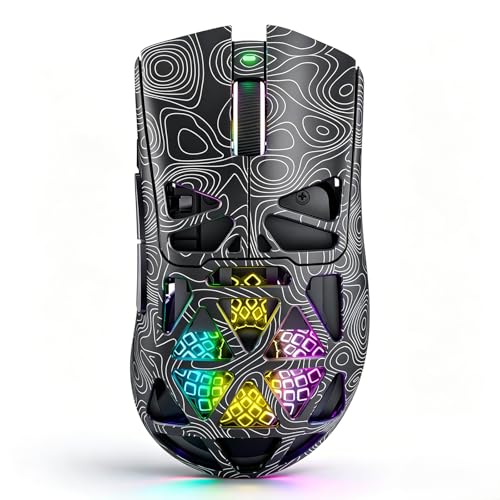
Pros
- Tri-mode wireless and USB-C wired connectivity
- Lightweight breathable honeycomb shell design
- Fast Trigger button for rapid shooting commands
- Up to 1000Hz polling rate for low latency
- Play-while-charging support via USB-C
Cons
- Honeycomb openings expose internal components to dust
- Configuration software requires downloading via external shortlink

Pros
- 17 fully programmable macro buttons
- Repositionable 12-button side slider system
- Accurate 18,000 DPI PixArt optical sensor
- Durable 50-million-click Omron switches
- Contoured ergonomic shape with a finger rest
Cons
- Tethered wired-only connection
- Right-hand ergonomic design limits ambidextrous use

Pros
- Adjustable eight-piece weight tuning set
- Nine programmable buttons with macro support
- Five onboard memory profiles
- Durable Omron micro switches and Teflon feet
Cons
- Official operating system support limited to Windows
- Lacks wireless connectivity options

Pros
- Dual HyperSpeed wireless and Bluetooth connectivity options
- Up to 535 hours of extended battery life
- Nine programmable buttons for custom macro setups
- Durable mechanical switches rated for 60M clicks
- High-precision 18,000 DPI optical sensor
Cons
- Configuration and optimization require Razer Synapse software
- Battery life varies depending on usage conditions

Pros
- Nine programmable buttons
- Adjustable DPI up to 16000
- Wired and wireless connectivity
- 1000Hz polling rate support
- Rechargeable battery
Cons
- RGB-enabled battery life rated at 13 hours

Pros
- Ergonomic vertical shape reduces wrist strain
- Versatile tri-mode wireless and wired connectivity
- Five-direction thumb rocker expands input options
- Onboard memory stores button assignments across PCs
- Twelve fully programmable macro buttons
Cons
- Right-handed design excludes left-handed users
- Software installation may trigger OS security warnings

Pros
- Up to 7200 adjustable DPI
- Nine programmable buttons with macro editing
- Ergonomic contouring with finger rest design
- Customizable seven-mode RGB backlighting
Cons
- Full macro customization requires separate software download
- Tethered wired connection limits freedom of movement

Pros
- Eleven programmable buttons
- Adjustable sensitivity up to 8000 DPI
- Dedicated fire and sniper buttons
- Seven RGB lighting modes
- Wider ergonomic design
Cons
- Driver software supports Windows only
- Requires a wired connection
- Configuration depends on software

Pros
- Ergonomic right-handed shape for comfortable handling
- On-the-fly DPI sensitivity adjustment buttons
- Five fully programmable buttons via Razer Synapse
- Ridged rubber scroll wheel provides tactile grip
- Reliable high-precision 6,400 DPI optical tracking
Cons
- Tethered wired cable limits placement flexibility
- Mechanical switch lifespan limited to 10 million clicks
- Button remapping depends on Razer Synapse software

Pros
- Versatile tri-mode wireless and wired connectivity options
- Ventilated lightweight honeycomb shell design
- Rechargeable battery with USB-C play-and-charge support
- Seven programmable buttons for custom macro setups
- Up to 1000Hz polling rate for responsive tracking
Cons
- Open honeycomb design is vulnerable to dust accumulation
- Full macro and button customization requires software installation
The product cards above summarize the available models. The sections below explain which specifications matter for WoT and where each mouse has practical limitations.
How to Choose the Best Gaming Mouse for WoT
Prioritize shape and control over maximum DPI
World of Tanks benefits more from predictable cursor movement and a comfortable grip than from extremely high sensitivity settings. Every mouse in this selection offers adjustable DPI, but the maximum figure should not be treated as a measure of accuracy by itself.
Decide how many programmable buttons you actually need
Two side buttons may be sufficient for commonly used commands, while MMO-style models provide room for larger control schemes. Extra buttons are useful only when their position is comfortable and the supporting software works with your PC.
Choose wired or wireless connectivity
Wired mice avoid battery charging and pair directly with a USB port. Wireless models reduce cable clutter, but their battery, receiver, Bluetooth support, and charging behavior should be considered before purchase.
Check operating-system and software requirements
Button remapping, macros, DPI profiles, and lighting often require manufacturer software. The Redragon M614 specifically lists Windows-only driver compatibility, while other products may require downloading their respective configuration utilities.
Comparison of the Best Gaming Mouse for WoT Options
| Model | Connection | Programmable controls | Maximum DPI | Best suited to |
|---|---|---|---|---|
| Corsair Scimitar RGB Elite Wired MMO MOBA PC | Wired | 17 buttons | 18,000 | Many shortcuts and macro-heavy layouts |
| NSYCA G11 Lightweight Wireless Gaming Mouse | Bluetooth, 2.4GHz, USB-C wired | 6 customizable buttons | 22,000 | Flexible wireless and wired setups |
| Razer Basilisk V3 X HyperSpeed Customizable | HyperSpeed wireless and Bluetooth | 9 controls | 18,000 | Wireless play with an ergonomic shape |
| Redragon M801 Gaming Mouse | Wired | 9 buttons | 16,000 | Adjustable wired control layouts |
| Attoe Gaming Mouse with 5 D Rocker | Bluetooth, 2.4GHz, USB-C wired | 12 buttons and five-direction rocker | 24,000 | Vertical ergonomic designs and many inputs |
| Redragon Wireless Gaming Mouse | 2.4GHz wireless and wired | 9 buttons | 16,000 | Wireless control with onboard DPI options |
| Razer DeathAdder Essential Ergonomic Wired | Wired | 5 buttons | 6,400 | Simple, familiar control layouts |
| Redragon M602 Gaming Mouse | Wired | Not specified | 7,200 | Basic wired gaming and office use |
| SOLAKAKA SM600 Wireless Gaming Mouse,Tri-Modes | Bluetooth, 2.4GHz, USB-C wired | 7 buttons | 13,200 | Lightweight multi-device setups |
| Redragon Wired Gaming Mouse | Wired | 11 buttons | 8,000 | Wired users wanting extra controls |
Recommended Picks by Player and Setup
Corsair Scimitar RGB Elite Wired MMO MOBA PC: best for extensive customization
The Corsair Scimitar RGB Elite Wired MMO MOBA PC has 17 fully programmable buttons, including 12 side buttons that can be repositioned using its Key Slider system. Its 18,000 DPI PixArt PMW3391 sensor supports one-DPI adjustment steps, giving users detailed control over sensitivity.
This is a strong fit for WoT players who want many commands available without reaching for the keyboard. Its main limitation is the larger MMO-style control layout, which may feel excessive for players who prefer a lightweight, uncluttered mouse.
Our gaming mouse guide for RPG play may also help readers deciding whether they need extensive programmable controls.
Razer Basilisk V3 X HyperSpeed Customizable: best balanced wireless option
The Razer Basilisk V3 X HyperSpeed Customizable combines a shaped ergonomic body with nine customizable controls, an 18,000 DPI optical sensor, and two wireless modes. HyperSpeed wireless is intended for low-latency gaming, while Bluetooth is available when longer battery endurance is more important than the primary gaming connection.
Razer lists up to 285 hours on HyperSpeed wireless and up to 535 hours on Bluetooth, with actual results varying by use. This model suits players who want extra commands without adopting a full MMO mouse, although it does not provide the same number of buttons as the Corsair.
For more ergonomic options aimed at reducing hand and wrist strain, compare the considerations in our guide to gaming mice for RSI.
NSYCA G11 Lightweight Wireless Gaming Mouse: best for connection flexibility
The NSYCA G11 Lightweight Wireless Gaming Mouse supports Bluetooth 5.1, 2.4GHz wireless, and USB-C wired operation. It includes six customizable buttons, a PAW3311 optical sensor rated up to 22,000 DPI, and a stated polling rate of up to 1,000Hz.
Its 500mAh rechargeable battery supports play while charging, which is useful when wireless power runs low. The honeycomb shell may appeal to users who prefer a lighter design, but the product depends on dedicated driver software for full macro, DPI, polling-rate, and lighting customization.
Redragon M801 Gaming Mouse: best wired value for multiple controls
The Redragon M801 Gaming Mouse provides nine programmable buttons, five memory profiles, adjustable DPI presets up to 16,000, and a 1,000Hz polling rate. Its wired connection removes battery management, while the adjustable weight system lets users change the mouse weight.
This model fits players who want a configurable wired mouse for WoT and general PC use. The included software and driver support are listed for Windows operating systems, so users on other platforms should not assume that remapping features will be available.
Attoe Gaming Mouse with 5 D Rocker: best for vertical ergonomics and unusual controls
The Attoe Gaming Mouse with 5 D Rocker uses a vertical, right-handed shape and includes 12 programmable buttons. Its thumb-operated rocker supports five directions, while Bluetooth, 2.4GHz wireless, and USB-C wired modes provide broad connection flexibility.
This design may suit users who specifically prefer a handshake-style grip or want directional commands under the thumb. It is less appropriate for players seeking a conventional low-profile aiming mouse, and its vertical shape may require an adjustment period.
Redragon Wireless Gaming Mouse: best for long battery claims and macro controls
The Redragon Wireless Gaming Mouse offers 2.4GHz wireless and wired operation, nine programmable buttons, a PAW3335 optical sensor, and a 1,000Hz polling rate in dual mode. Its advertised battery range is up to 170 hours with RGB disabled and substantially shorter with RGB enabled.
It is a practical choice for users who want wireless movement, onboard DPI levels, and a rapid-fire button. The battery figure is a manufacturer claim that depends on lighting and usage, so it should not be treated as a guaranteed session length.
Razer DeathAdder Essential Ergonomic Wired: best for a simple layout
The Razer DeathAdder Essential Ergonomic Wired has five programmable buttons, a 6,400 DPI optical sensor, and a wired connection. Its simpler control arrangement is suitable for players who want a familiar ergonomic mouse without a large side-button panel.
It has fewer controls and a lower maximum DPI than the other Razer model in this selection. Those differences are not necessarily disadvantages for WoT, where comfortable handling and consistent sensitivity may matter more than specification maximums.
Redragon M602 Gaming Mouse: best basic budget-oriented wired option
The Redragon M602 Gaming Mouse is a wired model with an ergonomic shape, adjustable sensitivity up to 7,200 DPI, programmable software, and multiple RGB modes. It supports PC, Windows, laptop, and Mac use according to the supplied product information.
This mouse is suitable when the priority is straightforward wired gaming and office use. Its listed specifications provide less control flexibility than the nine-button or 11-button Redragon alternatives, and the supplied data does not specify its programmable button count.
SOLAKAKA SM600 Wireless Gaming Mouse,Tri-Modes: best for lightweight multi-device use
The SOLAKAKA SM600 Wireless Gaming Mouse,Tri-Modes supports 2.4GHz wireless, two Bluetooth connections, and USB-C wired operation. It has seven programmable buttons, a stated polling rate up to 1,000Hz, adjustable DPI up to 13,200, and a rechargeable 600mAh battery.
Its honeycomb shell and ability to save four devices make it appealing for users moving between a gaming PC and other equipment. The product data does not provide a specific battery-runtime figure, so endurance should not be compared directly with models that list hours.
Redragon Wired Gaming Mouse: best for extra buttons and dedicated controls
The Redragon Wired Gaming Mouse provides 11 redefinable buttons, DPI adjustment up to 8,000, and dedicated fire and sniper buttons. Its wider ergonomic design is intended to support the hand during extended use, while the wired connection avoids charging requirements.
This model can suit players who want several shortcuts at a lower level of complexity than an MMO mouse. The dedicated fire and sniper functions are promoted for FPS use, so WoT players should confirm that these controls fit their preferred bindings rather than assuming every feature is useful.
Which Mouse Is Best for Your WoT Setup?
- Choose the Corsair Scimitar if you want the largest number of programmable controls and adjustable side-button positioning.
- Choose the Razer Basilisk V3 X if you want a conventional ergonomic shape with wireless flexibility and nine controls.
- Choose the NSYCA G11 or SOLAKAKA SM600 if Bluetooth, 2.4GHz wireless, and wired modes are all important.
- Choose the Redragon M801 or Redragon Wireless Gaming Mouse if you want nine programmable buttons and DPI profiles.
- Choose the Attoe if wrist posture and a vertical grip matter more than conventional mouse handling.
- Choose the DeathAdder Essential, M602, or Redragon Wired Gaming Mouse if you prefer a wired design with a simpler or moderate control layout.
Final Recommendation
The best gaming mouse for wot is the Razer Basilisk V3 X HyperSpeed Customizable for many players because it combines wireless options, an ergonomic shape, and useful programmable controls. Select the Corsair Scimitar when extensive macros are central to your setup, or the DeathAdder Essential when a straightforward wired mouse is preferable.
For a lightweight multi-mode design, consider the NSYCA G11 or SOLAKAKA SM600. Users with specific wrist-position preferences should consider the Attoe, while the Redragon models offer several wired and wireless alternatives with different button counts and software requirements.


Write Your Review
No reviews yet. Be the first to share your experience!