

The best aux headsets for gaming depend mainly on your connection requirements. A 3.5mm headset is usually the simplest option for PCs, controllers, laptops, and consoles, while USB models can provide software features but may work with fewer devices.
Among these products, the Logitech G432 is the most flexible choice because it supports both USB DAC and 3.5mm connections. The Razer BlackShark V2 X, EKSA E900, BENGOO G9000, Jimonyer, and IMYB A36 are more traditional aux-style options, while the Razer Kraken V3 X is USB-only.

Pros
- Large 50mm audio drivers
- Convenient flip-to-mute 6mm boom microphone
- DTS Headphone:X 2.0 surround sound support
- Versatile 3.5mm and USB DAC connectivity
- Comfortable lightweight frame with rotating ear cups
Cons
- DTS Headphone:X 2.0 requires Logitech G HUB software
- Advanced surround sound unavailable on standard console connections

Pros
- Ultra-low latency 2.4GHz wireless connection under 30ms
- Long-lasting battery rated for up to 40 hours
- 50mm audio drivers for clear gaming sound
- Integrated on-ear volume and microphone mute controls
- Versatile connectivity across 2.4GHz, Bluetooth, and 3.5mm
Cons
- Not compatible with any Xbox consoles
- Native Bluetooth unsupported on PC, Mac, and PlayStation
- 3.5mm wired mode limited to music and calls

Pros
- Lightweight 240-gram frame with memory foam padding
- Versatile 3.5 mm cross-platform compatibility
- On-earcup volume wheel for quick adjustments
- Passive noise isolation via closed earcups
- Tuned 50 mm drivers for clear sound separation
Cons
- Wired 3.5 mm cable restricts player movement
- Lacks wireless audio capability

Pros
- Detachable noise-cancelling microphone
- Large 50mm audio drivers
- Comfortable memory foam ear cushions
- Convenient inline volume and mute controls
- Two-year manufacturer warranty

Pros
- Lightweight 285g frame for prolonged comfort
- TriForce 40mm drivers for balanced audio tuning
- Breathable hybrid fabric and memory foam cushions
- Bendable HyperClear cardioid microphone
- Customizable Razer Chroma RGB earcup lighting
Cons
- Incompatible with consoles, Mac, and mobile devices
- Limited to wired USB-A with no 3.5mm option
- 7.1 surround sound requires 64-bit Windows 10

Pros
- Wide multi-platform support via 3.5mm connector
- Large 50mm neodymium audio drivers
- Flexible noise-reducing chat microphone
- 30-degree tilting breathable protein earcups
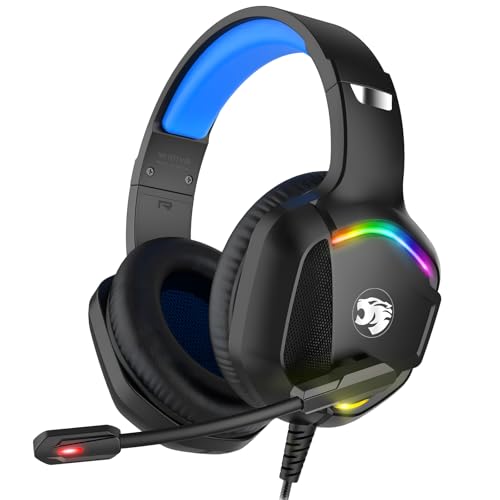
- Integrated RGB accent lighting
Cons
- Requires separate adapter for older Xbox One controllers
- Relatively heavy at nearly 0.93 pounds

Pros
- Broad multi-platform console and PC compatibility
- Convenient inline volume and mute controls
- Flexible omnidirectional microphone
- Lightweight build with cushioned ear pads
Cons
- Requires separate adapter for older Xbox One controllers
- Short 49-inch integrated cable length

Pros
- Versatile USB and 3.5mm connectivity options
- Dedicated USB controls for mic and audio
- Detachable microphone design
- Lightweight build with padded ear cushions
Cons
- Lacks wireless connectivity
- Inline controls require the USB connection
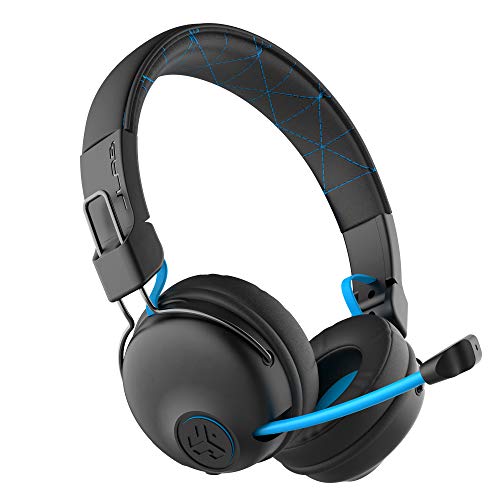
Pros
- Advertised 22+ hours of wireless playtime
- Includes wired AUX backup
- Built-in 85dB volume limiting
- Retractable boom microphone
- Supports major gaming platforms
Cons
- Designed primarily for ages six and up
- 85dB limit may restrict maximum volume
- Wireless use requires battery charging
| Headset | Connection | Microphone | Best suited to | Important limitation |
|---|---|---|---|---|
| Logitech G432 | USB DAC or 3.5mm | 6mm flip-to-mute boom | PC and multi-platform gaming | DTS Headphone:X requires Logitech G HUB |
| Ozeino Wireless Gaming Headset | 2.4GHz, Bluetooth, or 3.5mm | Integrated microphone | Wireless PC, PlayStation, and Switch use | 3.5mm mode supports music and calls only |
| Razer Kraken V3 X | USB-A only | HyperClear cardioid microphone | Windows PC gaming | Not compatible with 3.5mm devices or consoles |
| Razer BlackShark V2 X | 3.5mm | HyperClear cardioid microphone | PlayStation and controller gaming | USB features are not included |
| EKSA E900 | Wired connection | Detachable noise-reducing microphone | Multi-platform use and chat | Exact connector details are not specified |
| BENGOO G9000 | Wired connection with USB lighting | Noise-isolating microphone | Budget console and PC setups | Old Xbox One controllers need an adapter |
| FIFINE H9W | USB and 3.5mm | Detachable microphone | PC, PS5, Xbox, and Switch setups | 7.1 surround features are associated with USB use |
| Jimonyer Gaming Headset | 3.5mm | Adjustable noise-canceling microphone | Broad console and mobile compatibility | Old Xbox One controllers need an adapter |
| IMYB A36 | 3.5mm | Noise-isolating microphone | Simple multi-platform gaming | Surround processing details are not specified |
| JLab Play Gaming Wireless | Bluetooth or AUX | Retractable boom microphone | Younger players and wired backup use | Designed for ages six and up |
How to Choose the Best Aux Headsets for Gaming
Start with the Connector You Actually Need
A 3.5mm headset is usually the safest choice when you play through a controller, laptop headphone socket, phone, handheld, or several different platforms. The Razer BlackShark V2 X, Jimonyer, and IMYB A36 follow this approach, while the Logitech G432 and FIFINE H9W offer both analog and USB connections.
USB can support software surround processing, control boxes, and lighting, but it may reduce compatibility. The Razer Kraken V3 X demonstrates this trade-off because it is limited to Windows PCs and laptops with USB-A.
Check Whether Features Work Over AUX
Not every advertised headset feature remains available through a 3.5mm cable. DTS processing on the Logitech G432 requires Logitech G HUB, the Razer Kraken V3 X requires Windows software, and the Ozeino model specifies that its 3.5mm mode supports music and calls only.
If you want game-specific surround processing, confirm the connection mode and operating system before purchase. For straightforward stereo game audio, a direct analog headset avoids many of these software dependencies.
Consider Microphone Maintenance and Controls
Flip-to-mute microphones are convenient for quick privacy, while detachable microphones help convert a gaming headset into a general listening headset. The Logitech G432 uses a flip-to-mute boom, whereas the EKSA E900 and FIFINE H9W use detachable microphones.
Inline controls and headset volume wheels are useful when the gaming device is positioned away from your desk. However, microphone noise reduction claims describe intended operation rather than independently measured call quality.
Match the Headset to Your Platform
PC buyers can choose from the full selection, but console compatibility varies considerably. The Razer Kraken V3 X is PC-only, the Ozeino headset does not support Xbox consoles, and older Xbox One controllers may require an adapter with the BENGOO G9000, Jimonyer, and IMYB A36.
PlayStation and Switch users should verify whether the headset connects directly to the console or through a controller. USB transmitters, USB DACs, and 3.5mm cables do not provide identical functionality on every platform.
Prioritize Comfort for Long Sessions
Documented comfort features include memory foam cushions, padded headbands, rotating ear cups, breathable fabric, and lightweight construction. These details can indicate the intended fit, but they cannot guarantee comfort for every user.
The Razer BlackShark V2 X lists a 240-gram design, while the Razer Kraken V3 X lists a 285-gram build. Other models emphasize padding or adjustable earcups without providing comparable weight figures, so direct comfort rankings would not be reliable.
Are Aux Headsets Better Than USB Headsets for Gaming?
Aux headsets are often better for compatibility because they can connect directly to a controller, laptop, phone, handheld, or console headphone jack. They also avoid some driver and software requirements associated with USB audio.
USB headsets can offer software surround processing, RGB controls, separate microphone adjustments, or a dedicated DAC. The trade-off is that those features may only work on specific operating systems or devices.
Frequently Asked Questions
What is the best aux headset for gaming on PC?
The Logitech G432 is the most flexible PC choice because it supports both 3.5mm and USB DAC connections. If you only need USB and do not use consoles, the Razer Kraken V3 X adds Windows-specific surround and Chroma features.
Which listed headsets use a 3.5mm connection?
The Logitech G432, Razer BlackShark V2 X, FIFINE H9W, Jimonyer, IMYB A36, BENGOO G9000, and JLab Play include an analog connection according to the supplied specifications. The Ozeino headset also includes 3.5mm, but its documented wired mode is limited to music and calls.
Do all aux headsets provide surround sound?
No. Some products advertise surround processing through software or USB, while an analog connection may deliver standard stereo audio. Check the manufacturer’s connection requirements before assuming that surround features work through AUX.
What is the best aux headset for console gaming?
The Razer BlackShark V2 X is a strong PlayStation-focused choice because it uses a 3.5mm jack and includes a flexible microphone. For broader console coverage, the Logitech G432, FIFINE H9W, Jimonyer, or EKSA E900 may fit better, subject to each platform’s connector requirements.
Final Recommendation
The best aux headsets for gaming are not identical because connection flexibility matters more than a long feature list. Choose the Logitech G432 for broad PC and console use, the Razer BlackShark V2 X for simple PlayStation-oriented AUX gaming, or the FIFINE H9W when USB and 3.5mm support are both important.
The EKSA E900, BENGOO G9000, Jimonyer, and IMYB A36 suit buyers who want basic wired compatibility across several devices. Select the Razer Kraken V3 X only for a Windows PC setup, and choose the Ozeino or JLab Play when wireless features matter alongside a wired backup.




Write Your Review
No reviews yet. Be the first to share your experience!