

The right gaming desk depends first on your available space and how much room your setup needs. For adjustable sitting and standing, the Flycity model is the only option here with a powered height range; for a compact corner, consider the SageNest or Korfile 40-inch desk.
For more storage and accessories, the SEDETA and 66-inch Korfile provide L-shaped layouts, while the Itaar offers a long desktop with a keyboard tray and drawers. These recommendations are based on supplied specifications, not hands-on testing. Treat listed capacities and ergonomic benefits as manufacturer claims.
Top Gaming Desks

Pros
- Reversible layout fits various corner room configurations
- Included CPU stand lifts tower off the floor
- Integrated side pocket adds accessible storage
- Adjustable leveling feet improve stability on uneven floors
- Scratch-resistant and water-resistant desktop finish
Cons
- Total weight capacity is limited to 176 pounds
- Compact 50-inch footprint limits large multi-monitor setups

Pros
- Reversible corner or straight desk configuration
- Integrated power outlets and USB ports
- Ample organization with pegboard and hutch
- Dedicated keyboard tray frees surface area
- App-managed RGB lighting with sound sync
Cons
- Shallow 19.7-inch desktop depth limits large stands
- Heavy overall assembly at 76 pounds

Pros
- Motorized height adjustment from 28.3 to 47.2 inches
- Integrated PC host shelf moves with the desktop
- Built-in cable management tray and magnetic slot
- Customizable RGB lighting with app and remote controls
- Sturdy steel frame supports 176-pound dynamic load
Cons
- 24-inch desktop depth limits space for deep monitor stands
- Enclosed host shelf may restrict oversized PC cases

Pros
- Built-in AC outlets and USB charging ports
- Dedicated raised monitor riser
- Multi-tier storage with dedicated PC tower shelf
- Sturdy frame rated for up to 220 pounds
- Includes headphone hook and cup holder
Cons
- Shallow 18.9-inch desktop depth limits workspace
- Product description contains contradictory claims regarding L-shaped design
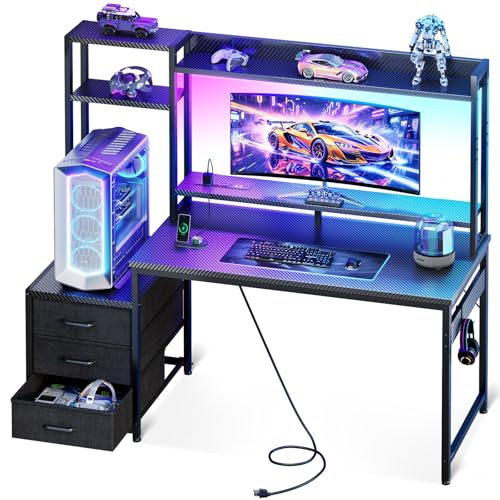
Pros
- Compact design for bedrooms and dorms
- Integrated RGB lighting with adjustable effects
- Three storage drawers reduce desktop clutter
- Reversible shelf supports flexible placement
- Includes elevated monitor stand
Cons
- 11.6-inch tower shelf may limit larger PC cases
- 18.9-inch depth provides a relatively compact workspace
- USB port specifications are not provided

Pros
- Built-in hub with AC, USB, and USB-C ports
- Elevated shelf supports dual monitor setups
- App-controlled RGB lighting with sound sync modes
- Sturdy steel frame with P2 engineered wood top
- Straightforward assembly with included tools
Cons
- Narrow 19.7-inch desk depth limits peripheral clearance
- Engineered wood construction instead of solid wood

Pros
- Reversible orientation accommodates left or right corner layouts
- Dedicated desktop platform keeps PC towers off the floor
- Dual display shelves maximize usable primary desk surface
- Built-in multi-mode LED lighting enhances setup ambiance
- Side fabric bag offers easy-access peripheral storage
Cons
- Side storage is limited to a non-rigid fabric bag
- Requires assembly of a multi-piece reversible frame

Pros
- Integrated 3 AC outlets and 2 USB charging ports
- Reversible design adapts to left or right corner layouts
- Raised monitor stand frees up desktop surface space
- Includes sliding CPU shelf and dual headphone hooks
- Customizable LED strip with multiple colors and brightness modes
Cons
- Storage drawers are fabric rather than solid materials
- Assembly required for multi-piece frame and components

Pros
- Expansive 78.7-inch desktop surface for multi-monitor setups
- Built-in power strip with AC outlets and USB ports
- Integrated raised monitor shelf improves display ergonomics
- Dedicated hooks, cup holder, and lower storage shelves
- App-controlled RGB lighting with music sync capability
Cons
- Drawers are constructed from fabric instead of solid materials
- Requires extensive assembly of multiple components

Pros
- Integrated 7-port power strip with USB-C
- Two-height adjustable monitor riser
- App- and controller-managed RGB lighting
- Accommodates PC towers up to 21.7 inches tall
- Reinforced steel frame with dual X-braces
Cons
- Narrow 18.9-inch depth limits primary workspace
- Fabric storage drawer lacks rigid construction
How to Choose a Gaming Desk
Measure the room and desk footprint before choosing a model. Check the full width and depth, including monitor risers, hutches, side shelves, and any L-shaped return. Confirm that the desk orientation works with your wall, outlet locations, chair movement, and access to the PC tower.
Match the layout to your setup
A straight desk is usually easier to fit along a wall, while an L-shaped desk uses a corner and separates tasks across two surfaces. Reversible designs can help with room planning, but verify which components can switch sides during assembly. The supplied details do not give every model’s complete dimensions.
For a compact corner setup, the SageNest L Shaped Desk, 50 Inch Reversible has a reversible layout, a CPU stand, and a stated 176-pound capacity. Its smaller listed size may suit a single-monitor or modest setup; the supplied specifications do not state desktop depth, so measure your peripherals before buying.
The Korfile 40 Inch Gaming Desk with LED & Power adds a monitor stand, shelves, and a power station with three AC outlets and two USB ports. Its compact footprint is aimed at smaller rooms, but the 40-inch width limits how much equipment can sit across the main surface.
For a longer corner setup, the SEDETA 67" L Shaped Gaming Desk with Pegboard LED can be arranged as an L-shaped desk or a 94.5-inch two-person desk, according to its listing. It includes a keyboard tray, shelves, pegboard, and a power station. Check the full assembled layout and room clearance before choosing the two-person configuration.
The Korfile 66” L Shaped Gaming Desk with Storage pairs an L-shaped surface with fabric drawers, a sliding CPU shelf, and a long monitor riser. It may suit a setup that needs storage close by, though the listing does not provide the desk’s overall dimensions or a load rating.
The AODK 51 Inch L Shaped Gaming Desk with Display is designed for corner placement, with reversible shelves and a side storage bag. Its dedicated desktop tower platform may appeal if you want the PC visible, but confirm that your case fits the platform; no platform dimensions are provided.
Prioritize usable desktop space
Compare desktop depth as well as width. A raised monitor stand can free surface area below a screen, but it does not guarantee a comfortable viewing position for every person or monitor. Check stand dimensions and height against your display, viewing distance, and preferred posture when those details are available.
The PRAISUN 55 inch Gaming Desk, LED & Power Outlets lists a 54-by-19.7-inch desktop and a raised monitor stand. That gives shoppers a clearer footprint to compare with their monitor and mouse space. Its relatively shallow listed depth is worth checking if you use a large keyboard, extended mouse movement, or deep monitor bases.
The Itaar 79" Gaming Desk with 2 Fabric Drawers has a listed 78.7-by-21.7-inch desktop, keyboard tray, monitor shelf, and two drawers. It is a better fit for a wide multi-device setup than a tight room. Measure carefully, and check whether the tray and shelves accommodate your preferred peripherals.
For a smaller straight-desk setup with built-in storage, the Casaottima 48 Inch Gaming Desk with Shelves & 3 includes a hutch, display shelves, and three fabric drawers. The listing describes a 36-inch main desktop plus an 11.6-inch side shelf. Those sections may help organize accessories, but the main work area is narrower than the long Itaar option.
Decide whether height adjustment matters
The 55" x 24" Electric Gaming Standing Desk with LED is the clear choice in this list for users who want powered height adjustment. Its stated range is 28.3 to 47.2 inches, with a dynamic capacity of 176 pounds and static capacity of 330 pounds. Confirm that the range suits your seated and standing positions, and account for the combined weight of your equipment.
A powered frame adds moving parts and requires a nearby power connection. The manufacturer also describes cable management and an enclosed host shelf that moves with the desk. Plan cable slack for the full height range, and check that connected devices and cables can move without snagging.
Choose storage and power features carefully
Monitor risers, drawers, CPU shelves, and keyboard trays can reduce desktop clutter, but each takes space and may constrain where equipment fits. Check tower width and height against the shelf opening, and ensure that a PC placed inside or beside a desk has unobstructed ventilation. The supplied data does not specify every shelf’s dimensions.
Integrated outlets and USB ports are convenience features, not a replacement for checking electrical requirements. The PRAISUN 55-inch model lists four AC outlets, two USB ports, and one USB-C port; the SEDETA lists four AC outlets and two USB ports. The specifications do not state USB-C charging power or data capabilities, so do not assume support for a particular device or function.
RGB lighting is an optional room feature rather than a measure of desk stability or usable space. If you plan to use it, consider access to power and how the strip is controlled. Compare the desk’s frame, stated capacity, dimensions, and layout before treating lighting or included accessories as deciding factors.
Which Gaming Desk Should You Choose?
Choose the Flycity if powered sitting-to-standing adjustment and cable management are your priorities, and its dimensions and capacity fit your equipment. For a compact corner, compare the SageNest’s simple CPU stand with the Korfile 40-inch model’s monitor shelf and built-in power. For a larger shared or storage-heavy setup, consider the SEDETA, 66-inch Korfile, or Itaar, based on your room measurements and need for drawers, shelves, or a keyboard tray.




Write Your Review
No reviews yet. Be the first to share your experience!