

For demanding 1440p gaming, the KOTIN system with Ryzen 7 9700X, Radeon RX 9070 XT, and 32GB DDR5 has the strongest listed graphics configuration. The RTX 5060 Ti desktops are alternatives for buyers prioritizing NVIDIA features, while the RTX 5060 systems suit more modest expectations.
These are specification-based recommendations, not measured performance rankings. A 1440p monitor is also included because the right display depends on whether you value a high refresh rate, screen size, or a lower-cost IPS option.

Pros
- Fast 240Hz refresh rate via DisplayPort
- Crisp 1440p QHD resolution
- Deep 4000:1 static contrast ratio
- Immersive 1000R curved panel
- Four total video inputs
Cons
- Stand only provides basic tilt adjustment
- 240Hz refresh rate requires DisplayPort connection

Pros
- High-performance Ryzen 7 9700X and RX 9070 XT hardware
- Integrated 11.3-inch real-time system monitoring screen
- 360mm liquid cooler with pump-head digital temperature display
- WiFi 7 and Bluetooth wireless connectivity built in
- 850W 80 PLUS Gold certified power supply
Cons
- 1TB storage capacity fills quickly with modern games
- Requires separate adapters for legacy VGA or DVI monitors

Pros
- Fluid 180Hz refresh rate with 1ms response time
- Sharp 27-inch QHD Fast IPS display
- Simultaneous ELMB and variable refresh rate technology
- G-Sync compatible and FreeSync Premium support
- Wide 130% sRGB color gamut coverage
Pros
- Eight-core AMD Ryzen 7 8700F processor
- Dedicated GeForce RTX 5060 Ti graphics
- Fast 1TB PCIe 4.0 NVMe storage
- Integrated WiFi 6 and Bluetooth 5.3
- Keyboard and mouse included in the box
Cons
- 8GB VRAM limits headroom for high-resolution textures
- 16GB system RAM may require future expansion

Pros
- Intel Core i5-14400F 10-core processor
- Dedicated NVIDIA GeForce RTX 5060 8GB graphics
- Fast 1TB PCIe 4.0 NVMe SSD
- Modern DDR5 RAM on B760 platform
- Built-in WiFi 6 and Bluetooth 5.3
Cons
- No documented USB-C ports
- Six of eight USB ports are USB 2.0

Pros
- AMD Ryzen 7 8700F and RTX 5060 Ti configuration
- High-speed 1TB PCIe Gen4 NVMe storage
- Latest-generation WiFi 7 wireless connectivity
- Expansion-ready motherboard with three M.2 slots
- Efficient 650W 80 PLUS Gold power supply
Cons
- Baseline 16GB RAM may require upgrading for heavy multitasking
- Requires separate adapters to support legacy VGA or DVI displays
Pros
- AMD Ryzen 7 8700F and RTX 5060 Ti configuration
- High-speed 32GB DDR5 RAM and 1TB Gen4 SSD
- Three M.2 slots and four DDR5 slots for upgrades
- Modern wireless connectivity with WiFi 7 and Bluetooth
- Integrated digital temperature display on the CPU cooler
Cons
- Graphics card limited to 8GB of VRAM
- Older VGA and DVI monitors require adapters
- Motherboard video ports provide no display
How the 1440p options differ
The GPU is the main listed distinction among these PCs for gaming at 2560 × 1440. The RX 9070 XT model has 16GB of graphics memory, whereas each RTX 5060 or RTX 5060 Ti configuration lists 8GB.
That capacity difference is useful context, but it does not establish exact frame rates or guarantee performance in a particular game. Results depend on the title, settings, and features used, and no benchmark results are provided for these systems.
Recommended PCs and monitors
KOTIN Ryzen 7 9700X with RX 9070 XT: strongest listed graphics configuration
The KOTIN Gaming PC, Ryzen 7 9700X, RX 9070 XT 16GB pairs an eight-core Ryzen 7 9700X with a Radeon RX 9070 XT, 32GB DDR5, and a 1TB PCIe 4.0 NVMe SSD. Its 16GB graphics memory and 850W 80 PLUS Gold power supply make it the most substantial listed choice for demanding 1440p play and other GPU-heavy work.
Wi-Fi 7, Bluetooth, Windows 11 Home, and a 360mm liquid CPU cooler are included. The 11.3-inch system display and ARGB components add visual features, but do not determine gaming performance.
Pros: RX 9070 XT with 16GB graphics memory, 32GB DDR5, 1TB NVMe storage, and an 850W Gold-rated PSU. Cons: The supplied information does not specify motherboard upgrade options or measured game performance. Who should skip it: Buyers seeking a basic or lower-cost 1440p system should compare the less powerful GPU configurations.
KOTIN Ryzen 7 8700F with 32GB RAM: memory-ready RTX 5060 Ti option
The KOTIN Gaming PC Desktop Ryzen 7 8700F combines an eight-core Ryzen 7 8700F, RTX 5060 Ti with 8GB, 32GB DDR5, and a 1TB Gen4 NVMe SSD. The larger memory configuration may suit multitasking alongside games, while DLSS 4 and ray tracing support are listed for the graphics card.
Its 650W 80 PLUS Gold power supply, Wi-Fi 7, four DDR5 DIMM slots, and three M.2 SSD slots are documented. The 8GB graphics memory is a meaningful limitation to weigh for demanding games and high-detail settings.
Pros: 32GB DDR5, three M.2 slots, four memory slots, and Wi-Fi 7. Cons: The GPU has 8GB of memory, and exact 1440p performance is not provided. Who should skip it: Buyers who would rather prioritize a larger graphics-memory capacity should consider the RX 9070 XT system.
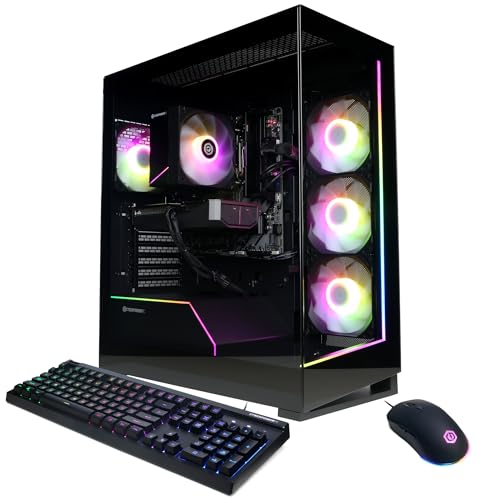
CyberPowerPC Ryzen 7 8700F with RTX 5060 Ti: straightforward NVIDIA configuration
The CyberPowerPC Gaming PC, AMD Ryzen 7 8700F lists a Ryzen 7 8700F, RTX 5060 Ti with 8GB, 16GB DDR5, and a 1TB PCIe 4.0 NVMe SSD. It is a reasonable configuration to compare for 1440p gaming if you want an NVIDIA GPU, but the listed 16GB of system memory is less than the 32GB in two alternatives.
Connectivity includes Wi-Fi 6, Bluetooth 5.3, HDMI, and two DisplayPort outputs. The supplied specifications do not identify the power supply capacity, so check that detail and the upgrade information with the seller if future component changes matter to you.
Pros: RTX 5060 Ti graphics, 1TB NVMe storage, and listed HDMI and DisplayPort outputs. Cons: 16GB DDR5 and unspecified PSU capacity and upgrade details. Who should skip it: Buyers wanting 32GB preinstalled or documented PSU headroom should look at a more completely specified option.
KOTIN Ryzen 7 8700F with RTX 5060 Ti: 16GB memory and upgrade slots
The KOTIN Gaming PC Desktop, Ryzen 7 8700F also combines the Ryzen 7 8700F and RTX 5060 Ti with 8GB, alongside 16GB DDR5 and a 1TB Gen4 NVMe SSD. It lists Wi-Fi 7, a 650W 80 PLUS Gold PSU, four DDR5 DIMM slots, and three M.2 slots, giving buyers specific upgrade details to assess.
The manufacturer describes it for 1080p and 1440p gaming, but supplies no game-specific results. Connecting the monitor to the graphics card’s lower, horizontal output row is required; the motherboard display ports will not provide the intended display output.
Pros: Documented 650W Gold PSU, Wi-Fi 7, and memory and storage expansion slots. Cons: 16GB system memory and 8GB graphics memory may be restrictive for some demanding workloads. Who should skip it: Buyers who want 32GB from the outset can choose the similar KOTIN configuration with 32GB.
CyberPowerPC Intel Core i5 with RTX 5060: entry-level option in this group
The CyberPowerPC Gaming PC, Intel Core i5-14400F has a 10-core Intel Core i5-14400F, RTX 5060 with 8GB, 16GB DDR5, and a 1TB PCIe 4.0 NVMe SSD. This is the least powerful listed graphics tier, so consider it for 1440p with realistic expectations about settings rather than assuming it will sustain high frame rates in every demanding game.
It includes Wi-Fi 6, Bluetooth 5.3, HDMI, and two DisplayPort outputs. The product details do not specify PSU capacity or memory expansion options, so verify them if those factors affect a planned upgrade.
Pros: 10-core processor, 1TB NVMe SSD, and listed HDMI and DisplayPort connections. Cons: RTX 5060 with 8GB and 16GB system memory place it below the other GPU configurations for demanding workloads. Who should skip it: Players targeting demanding 1440p settings or prioritizing graphics headroom should compare the RTX 5060 Ti and RX 9070 XT PCs.
ASUS TUF VG27AQ3A: 27-inch high-refresh 1440p display
The ASUS TUF Gaming VG27AQ3A 27 Inch 1440p 180Hz is a 27-inch QHD monitor with a 180Hz refresh rate and Fast IPS panel. FreeSync Premium, G-SYNC compatibility, and AdaptiveSync are listed, offering variable-refresh-rate features for compatible systems.
Its 1ms response-time specification and ELMB Sync target motion clarity, while HDR-10 support is present. HDR support alone does not establish image quality, and a PC’s refresh rate is not a promise that games will reach the same frame rate.
Pros: 2560 × 1440 resolution, 180Hz refresh rate, Fast IPS, and several listed synchronization options. Cons: It is smaller and has a lower listed refresh rate than the 32-inch KTC display. Who should skip it: Buyers specifically seeking a curved 32-inch screen or 240Hz refresh rate should compare the KTC monitor.
KTC 32-inch curved monitor: larger screen and 240Hz refresh rate
The KTC 32 Inch 240Hz Curved Gaming Monitor is a 32-inch, 2560 × 1440 display with a 1000R curve, 240Hz refresh rate, and advertised 1ms response time. Its two HDMI inputs and two DisplayPort inputs support multiple devices, with DisplayPort specified for refresh rates up to 240Hz.
The monitor also lists adaptive sync and HDR support, but the supplied information does not identify a specific variable-refresh-rate standard or establish HDR image quality. Its stand offers tilt adjustment only, so check whether that suits your positioning needs.
Pros: Large curved QHD screen, high stated refresh rate, and multiple HDMI and DisplayPort inputs. Cons: Tilt is the only listed stand adjustment, and the advertised refresh rate does not mean a PC will produce matching frame rates. Who should skip it: Buyers who prefer a smaller flat IPS panel or need documented height adjustment should consider another display.
How to choose a 1440p gaming PC
Match the GPU to the games and settings you use
Among these selections, the RX 9070 XT with 16GB is the most substantial listed graphics configuration. The RTX 5060 Ti desktops have 8GB, and the RTX 5060 PCs also have 8GB; no supplied benchmark data supports precise frame-rate comparisons.
For esports and less demanding games, a lower-tier GPU may be a sensible fit depending on the title and chosen settings. For demanding AAA games, consider the stronger listed GPU and be prepared to adjust graphics options when needed.
Consider memory, storage, and upgrade details
Most PCs here have 16GB DDR5 and a 1TB NVMe SSD. The Ryzen 7 9700X system and one Ryzen 7 8700F KOTIN model list 32GB, while the latter also specifies four memory slots and three M.2 slots.
Those expansion details are not provided for every desktop, so avoid assuming that components are easy to replace or that unused slots are available. Check the exact configuration and warranty terms before planning upgrades.
Choose a display for your preferred size and motion
Both monitors provide 2560 × 1440 resolution. The ASUS is a 27-inch Fast IPS screen with a 180Hz refresh rate, while the KTC is 32 inches, curved, and lists 240Hz.
Connect the monitor to the PC’s graphics card, not the motherboard output. For the KOTIN prebuilts, the manufacturer specifically identifies the lower horizontal ports as the correct connection point; verify the cable and port support your chosen resolution and refresh rate.
Verdict
Choose the KOTIN Ryzen 7 9700X and RX 9070 XT if you want the strongest listed graphics hardware and 32GB of memory. The KOTIN Ryzen 7 8700F with RTX 5060 Ti and 32GB is an alternative with NVIDIA graphics features and documented expansion slots.
For a 1440p monitor, choose the ASUS for a 27-inch Fast IPS format or the KTC for a larger curved screen with a higher stated refresh rate. Compare the RTX 5060 desktops only if their graphics tier suits your game settings, and do not treat display refresh rate as a guaranteed in-game frame rate.
For more component and setup guidance, see our articles on desktop gaming specifications, gaming PCs for beginners, and choosing a gaming PC seller.




Write Your Review
No reviews yet. Be the first to share your experience!