

Choosing among the best cases for gaming pc build starts with component clearance and cooling layout. MUSETEX K2 suits builds needing many pre-installed fans, NZXT H5 Flow favors compact ATX systems with mesh panels, and MUSETEX NN8 targets builders who want an opening glass side panel.
All three options support gaming-focused ATX builds, but their installation details differ. Check GPU length, CPU cooler height, radiator position, power supply clearance, motherboard connectors, and available fan headers before selecting a case.

Pros
- Seven pre-installed PWM ARGB fans included
- 270-degree dual tempered glass panoramic layout
- Accommodates graphics cards up to 400 mm
- Top support for 360 mm liquid radiators
- Equipped with front-panel USB Type-C
Cons
- Tight 140 mm PSU clearance when using HDD cage
- Pre-installed fans offer modest 24.72 CFM airflow

Pros
- Supports up to 360mm front liquid cooling radiators
- Extensive fine mesh panels for ventilation and dust filtering
- Includes two pre-installed 120mm fans
- Built-in cable channels, hooks, and straps
- Perforated PSU shroud supports dedicated lower air intake
Cons
- Lower PSU shroud fans are not included
- Top radiator support is limited to 240mm

Pros
- Six pre-installed PWM ARGB fans included
- Tool-free magnetic hinged tempered glass door
- High-airflow polygonal mesh front panel design
- Supports up to a 280mm top radiator
- Generous drive mounting capacity for multiple SSDs
Cons
- Requires a motherboard with a 3-pin ARGB header
- Full lighting control depends on motherboard software
| Case | Documented cooling support | Clearance or layout | Front I/O | Best fit |
|---|---|---|---|---|
| MUSETEX ATX PC Case 7 PWM ARGB Fans Pre-Installed | Seven pre-installed PWM ARGB fans, expandable to ten, top radiator support up to 360 mm | GPU up to 400 mm, CPU cooler up to 165 mm | 1 USB-C, 2 USB 3.0, microphone, audio | High-airflow RGB builds |
| NZXT H5 Flow – Compact ATX Mid-Tower PC Case | Two pre-installed 120 mm fans, front radiator up to 360 mm, top radiator up to 240 mm | Compact ATX layout, two optional 120 mm PSU-shroud intake positions | Not specified | Compact ATX builds with added cooling plans |
| MUSETEX ATX PC Case Pre-Install 6 PWM ARGB Fans | Six pre-installed PWM ARGB fans, diamond-mesh front panel | Top 280 mm radiator support, multiple SSD and HDD mounting options | 2 USB 3.0, audio | RGB storage builds with easy interior access |
MUSETEX K2: Best for Pre-Installed Fans and Type-C
MUSETEX ATX PC Case 7 PWM ARGB Fans Pre-Installed combines seven included PWM ARGB fans with a 270-degree panoramic dual tempered-glass design. Its documented layout supports graphics cards up to 400 mm, CPU coolers up to 165 mm, and top-mounted liquid coolers up to 360 mm.
The included fans use 600 to 1300 RPM control, with stated maximum airflow of 24.72 CFM and maximum static pressure of 0.45 mm H2O. The case can expand to ten fans, while its I/O adds one USB-C port and two USB 3.0 ports.
Pros, Cons, and Who Should Skip It
- Pros: Seven PWM ARGB fans included, broad GPU clearance, 360 mm top radiator support, USB-C front I/O.
- Cons: Power supply clearance depends on the hard drive cage, and the stated limit is 140 mm with the cage installed or 150 to 180 mm without it.
- Who should skip it: Builders wanting a restrained appearance, minimal lighting, or a smaller chassis should choose another layout.
NZXT H5 Flow: Best for Compact ATX Airflow Planning
NZXT H5 Flow – Compact ATX Mid-Tower PC Case uses ultra-fine mesh on its top, front, and side panels. Two 120 mm fans come pre-installed, one in front and one in back, giving builders a basic starting layout.
Radiator support reaches 360 mm at the front and 240 mm at the top. The perforated PSU shroud also supports two additional 120 mm fans, but those fans are not included. Wide cable channels, hooks, and straps support cleaner routing.
Pros, Cons, and Who Should Skip It
- Pros: Mesh panels support airflow, compact ATX format saves space, radiator support is flexible, and cable-routing features simplify assembly.
- Cons: Only two fans are included, and the two PSU-shroud intake fans require separate purchases.
- Who should skip it: Builders wanting extensive included RGB hardware or USB-C front I/O should compare the MUSETEX options first.
MUSETEX NN8: Best for Easy Interior Access and Storage
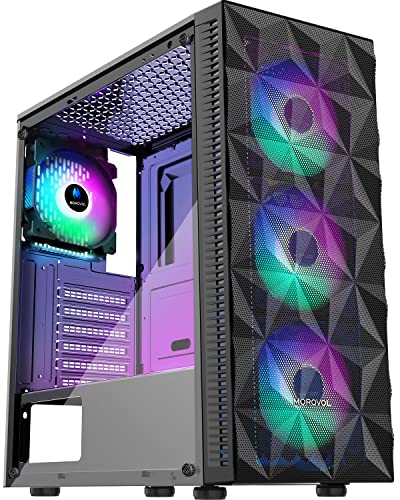
MUSETEX ATX PC Case Pre-Install 6 PWM ARGB Fans includes six adjustable-speed PWM ARGB fans and a diamond-mesh front panel. Its opening tempered-glass side panel uses a pull ring and magnets, which can make routine component access easier than a screw-mounted panel.
The stated layout supports a top 280 mm radiator and several storage combinations, including up to five SSDs and one HDD or four SSDs and two HDDs. The product data does not state GPU or CPU cooler clearance, so verify those dimensions against chosen components.
Pros, Cons, and Who Should Skip It
- Pros: Six PWM ARGB fans included, opening side panel, mesh front, 280 mm top radiator support, and flexible drive capacity.
- Cons: Front I/O lists two USB 3.0 ports but no USB-C, and key GPU and CPU cooler limits are not specified in supplied data.
- Who should skip it: Builders using a long graphics card or tall air cooler should avoid committing before confirming case clearance.
How to Choose Among These Cases
Check Component Clearance First
Compare graphics card length with the K2’s 400 mm limit when that model fits your build. The NN8 data omits GPU and CPU cooler limits, while the H5 Flow data emphasizes its compact ATX layout rather than specific component measurements.
Match Radiator Size to Mounting Position
The K2 supports a top radiator up to 360 mm, the H5 Flow supports 360 mm in front and 240 mm at the top, and the NN8 supports a top 280 mm radiator. Confirm radiator thickness, memory clearance, and tubing direction with your selected hardware.
Count Included Fans and Required Additions
K2 includes seven fans, NN8 includes six, and H5 Flow includes two. Included fan quantity can reduce extra purchases, but motherboard PWM and 3-pin ARGB header support still matters for control and lighting.
Review Connectivity and Storage Needs
Choose K2 for a documented USB-C port. Choose NN8 when multiple SSD and HDD mounting options matter. H5 Flow supplies documented cable-management features, but its supplied data does not list front I/O ports.
For broader system planning, compare these cases with guidance on gaming desktop specifications and gaming PC cases for sale. This review uses documented specifications, not independent measurements or ownership reports.
Final Recommendation
For best cases for gaming pc build, choose MUSETEX K2 when included fans, 400 mm GPU clearance, top 360 mm radiator support, and USB-C matter most. Choose NZXT H5 Flow for a compact ATX build with mesh airflow and planned fan additions. Choose MUSETEX NN8 for six included fans, flexible drive mounting, and easy side-panel access, after confirming missing component clearances.




Write Your Review
No reviews yet. Be the first to share your experience!