

GL.iNet’s Flint 2 stands out for its stated WireGuard and OpenVPN throughput, plus dual 2.5G ports. For newer Wi-Fi 7 features, consider GL.iNet’s Flint 3 or an ASUS ROG model, but confirm VPN-client support and throughput before buying. Router VPN use can increase latency and reduce speed, so Ethernet and a nearby VPN server matter for gaming.
This specification-based comparison covers VPN support, wireless generation, port options, and intended workloads. Advertised wireless rates and VPN speeds are not independent measurements or guarantees of game performance. See our gaming routers and networking guides for more setup advice.

Pros
- Wi-Fi 6 speeds up to 6 Gbps
- WireGuard support up to 900 Mbps
- Built-in AdGuard Home ad blocking
- 1GB DDR4 and 8GB storage for plugins
- Dual 2.5G multi-gigabit network ports
Cons
- Requires an initial firmware update for optimal performance
- VPN throughput varies significantly based on external network factors

Pros
- Dual-band WiFi 6 with OFDMA and MU-MIMO support
- Four dedicated Gigabit LAN ports for wired setups
- Subscription-free Trend Micro network protection included
- AiMesh support for expanding coverage with compatible routers
- Built-in Instant Guard mobile VPN encryption
Pros
- WiFi 6 speeds up to 5400 Mbps with 160MHz channels
- Dedicated gaming port prioritizes wired hardware
- Mobile Game Mode reduces latency via ASUS app
- AiMesh support for expanding whole-home coverage
- Included AiProtection Pro network security

Pros
- WiFi 6 speeds up to 3000 Mbps
- AiMesh compatible for easy network expansion
- OFDMA and MU-MIMO enhance multi-device efficiency
- Built-in VPN and Instant Guard security features
- Configurable parental control scheduling

Pros
- Tri-band support including the 6GHz band
- 1.8GHz quad-core processor for multi-device management
- AI QoS automatic traffic prioritization
- Eight concurrent data streams
- Integrated Mystic Light RGB synchronization
Cons
- Requires WiFi 6E devices for 6GHz access
- Large chassis requires significant setup space

Pros
- Dedicated 6 GHz band reduces wireless interference
- Built-in VPN server and client functionality
- EasyMesh compatibility for scalable network coverage
- Multi-device capacity supported by 512 MB RAM
Cons
- Advanced HomeShield network features require a paid subscription
- Requires a standalone modem for most ISP connections

Pros
- Fast WireGuard and OpenVPN throughput up to 680 Mbps
- Five dedicated 2.5G Ethernet ports for multi-gigabit networking
- Supports Wi-Fi 7 features including MLO and 4K QAM
- Built-in AdGuard Home and Bark parental control support
- Generous 8GB onboard storage allows installing custom DIY plugins
Cons
- Requires immediate firmware update out of the box
- VPN throughput varies heavily by server and ISP conditions

Pros
- Quad-band WiFi 7 with wide 320MHz channel support
- Dual 10G and quad 2.5G Ethernet ports
- Multi-Link Operation for simultaneous multi-band connections
- Integrated triple-level gaming traffic acceleration
Cons
- Large physical footprint demands substantial shelf space
- Relatively heavy chassis weighing 4.4 pounds

Pros
- Compact design for travel
- Fast 2.5G WAN port
- Preinstalled OpenVPN and WireGuard
- OpenWrt customization support
- WPA3 and encrypted DNS options
Cons
- VPN service subscription required
- VPN speeds are below maximum wireless link rates
- Toggle switch requires manual configuration

Pros
- Eight total 2.5G multi-gigabit Ethernet ports
- Tri-band WiFi 7 with 320 MHz channel support
- Up to 3000 square feet of documented wireless coverage
- Smart Home Master allows dedicated IoT and VPN SSIDs
- AiProtection Pro security included without added subscription
How to choose a VPN router for gaming
First confirm that router supports the VPN client protocol your provider requires. A VPN server feature is different: it lets you connect back to your home network, but does not necessarily route gaming traffic through a commercial VPN service.
- VPN throughput: Compare stated protocol speeds with your internet plan. The Flint 2 lists up to 900 Mbps with WireGuard and 880 Mbps with OpenVPN; Flint 3 lists up to 680 Mbps for both. Actual results vary with provider, server, network, and configuration.
- Latency and routing: A VPN can add delay because traffic takes an additional route. Test the chosen VPN endpoint and game server combination, and use split tunneling if router firmware supports it and only selected devices need VPN protection.
- Wired connections: Ethernet avoids local Wi-Fi contention. Multi-gig ports help only when connected equipment and internet service also support those speeds.
- Wi-Fi generation: Wi-Fi 6E and Wi-Fi 7 can offer additional bands or capacity, but compatible client devices are needed to use those features. Advertised aggregate Wi-Fi rates are not single-device gaming speeds.
- Setup and firmware: Check whether VPN client configuration is straightforward, whether your provider supports router connections, and whether firmware updates are available. GL.iNet recommends updating Flint 2 and Flint 3 firmware during initial setup.
Recommended VPN routers by use case
GL.iNet GL-MT6000 Flint 2: Best documented VPN throughput
Flint 2 combines pre-installed OpenWrt, OpenVPN and WireGuard support, and advertised VPN speeds up to 900 Mbps with WireGuard and 880 Mbps with OpenVPN. Dual 2.5G ports and Wi-Fi 6 make it a strong fit for a wired gaming PC, multi-gig internet, and households needing router-level VPN access.
Pros: Explicit VPN throughput figures, two 2.5G ports, and OpenWrt-based customization. Cons: Advertised VPN performance depends on service and network conditions; setup may require more configuration than a basic consumer router. Who should skip it: Buyers who want Wi-Fi 7 or a minimal-configuration router.
GL.iNet GL-BE9300 Flint 3: Wi-Fi 7 with VPN client support
Flint 3 pairs tri-band Wi-Fi 7, 6 GHz, MLO, and five 2.5G ports with stated OpenVPN and WireGuard speeds up to 680 Mbps. It suits homes with compatible Wi-Fi 7 clients, multiple wired devices, and a preference for GL.iNet’s VPN-oriented interface.
Pros: Five multi-gig ports, Wi-Fi 7 features, and explicit VPN client speeds. Cons: Its listed VPN ceiling is lower than Flint 2’s, and Wi-Fi 7 benefits require compatible devices. Who should skip it: Gamers prioritizing the highest stated VPN throughput or using only older Wi-Fi clients.
ASUS ROG Rapture GT-BE98 Pro: Premium Wi-Fi 7 and wired capacity
This quad-band Wi-Fi 7 router advertises up to 30 Gbps, with dual 10G ports, four 2.5G ports, and triple-level game acceleration. It fits demanding wired networks and Wi-Fi 7 households, but the supplied specifications do not state VPN client protocols or VPN throughput. Verify those details with ASUS and your VPN provider before choosing it for router-wide VPN gaming.
Pros: Extensive multi-gig connectivity, Wi-Fi 7, and gaming traffic prioritization features. Cons: VPN support and speed are unspecified in the available product details; Wi-Fi 7 clients are needed to use its newest wireless features. Who should skip it: Anyone choosing primarily for documented VPN performance or seeking a basic-cost setup.
ASUS ROG Strix GS-BE12000: Multi-gig Wi-Fi 7 gaming network
The tri-band Wi-Fi 7 model lists up to 12 Gbps, one 2.5G WAN port, seven 2.5G LAN ports, and Smart Home Master subnetworks for devices and VPNs. Its ROG gaming network and wired capacity suit multi-device gaming setups. The supplied details do not identify VPN protocols or throughput, so confirm VPN client behavior before purchase.
Pros: Seven 2.5G LAN ports, Wi-Fi 7, and separate network options that can help organize devices. Cons: VPN speeds and supported client protocols are not specified. Who should skip it: Buyers needing verified router VPN throughput or an inexpensive VPN-focused unit.
TP-Link AXE5400: Wi-Fi 6E with VPN server and client functions
The AXE5400 offers tri-band Wi-Fi 6E and lists VPN server and client functions for OpenVPN, PPTP, and L2TP. This makes it a practical option for households that want 6 GHz Wi-Fi and built-in VPN options, but the supplied specifications do not state VPN throughput. Check protocol compatibility and current firmware details for your VPN service.
Pros: Explicit VPN client and server support, three bands, and EasyMesh compatibility. Cons: No VPN speed figure is provided; the listed 6 GHz rate needs compatible clients. Who should skip it: Users needing a known high-throughput WireGuard connection, since WireGuard support is not listed.
MSI Radix AXE6600: Tri-band Wi-Fi 6E gaming features
MSI lists tri-band Wi-Fi 6E, an 1.8 GHz quad-core processor, AI QoS, and an eight-stream design. These features target households balancing gaming with other wireless traffic. VPN client support and VPN throughput are not specified in the supplied details, so this is a gaming-router candidate only after confirming VPN requirements.
Pros: Tri-band Wi-Fi 6E, AI QoS, and a stated quad-core processor. Cons: No documented VPN protocol support or throughput in the product information provided. Who should skip it: Anyone who needs a clearly documented router VPN client.
ASUS RT-AX82U: Gaming features with VPN options
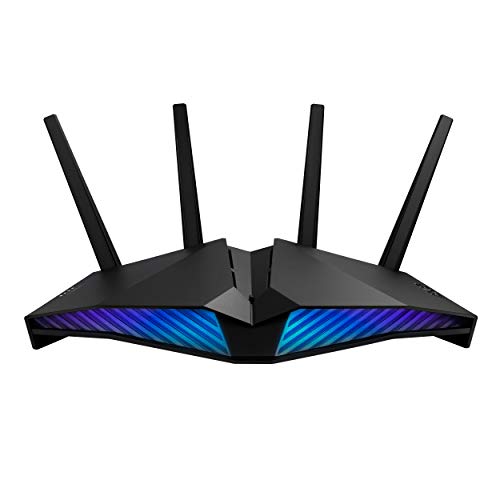
The RT-AX82U combines Wi-Fi 6, a 1.5 GHz tri-core processor, a gaming port, Mobile Game Mode, AiProtection Pro, and VPN features. It suits users who want gaming prioritization and ASUS security tools in one router. The supplied information does not specify VPN protocols or throughput, so verify support for your intended VPN service.
Pros: Gaming-focused features, AiMesh compatibility, and a stated VPN function. Cons: VPN speed and client protocol details are absent from the product data. Who should skip it: Buyers who require specified VPN throughput or multi-gig ports.
ASUS RT-AX3000S: Wi-Fi 6 and AiMesh expansion
The dual-band RT-AX3000S lists a combined networking rate of about 3,000 Mbps, with OFDMA, MU-MIMO, and AiMesh support. It may suit a Wi-Fi 6 home that wants expandable coverage, but the provided feature list does not document VPN protocols or VPN throughput. Confirm router VPN capability before treating it as a VPN gaming option.
Pros: Wi-Fi 6 efficiency features and AiMesh expansion. Cons: VPN support is not described in the supplied specifications. Who should skip it: Users who need confirmed VPN-client support without checking additional model documentation.
ASUS RT-AX1800S: Entry-level Wi-Fi 6 with a VPN feature
This dual-band Wi-Fi 6 router includes one Gigabit WAN port and four Gigabit LAN ports, along with ASUS Instant Guard and built-in VPN wording in its product details. It is suited to modest wired gaming setups that do not need multi-gig Ethernet. The available information does not identify VPN client protocols or throughput; clarify whether its VPN function meets your specific use.
Pros: Four Gigabit LAN ports, AiProtection Classic, and a stated VPN feature. Cons: No listed VPN throughput or protocol details, and ports are limited to Gigabit. Who should skip it: Multi-gig users or buyers who need confirmed commercial VPN client support.
GL.iNet GL-MT3000 Beryl AX: Portable VPN router
Beryl AX is a travel router with OpenWrt, pre-installed OpenVPN and WireGuard, a 2.5G WAN port, and one Gigabit LAN port. Its stated VPN limits are up to 150 Mbps with OpenVPN and 300 Mbps with WireGuard. It fits travel or temporary setups, but those ceilings and its single LAN port make it less suitable as a high-throughput home gaming hub.
Pros: Portable format, explicit VPN protocols and speeds, and an assignable physical feature switch. Cons: Lower stated VPN throughput than Flint 2 and Flint 3, plus only one LAN port. Who should skip it: Households needing multiple wired gaming devices or high-speed VPN routing at home.
Quick comparison
| Router | Wireless class | VPN details provided | Best fit |
|---|---|---|---|
| GL.iNet Flint 2 | Wi-Fi 6 | OpenVPN up to 880 Mbps, WireGuard up to 900 Mbps | Documented VPN throughput and multi-gig wired setup |
| GL.iNet Flint 3 | Wi-Fi 7, tri-band | OpenVPN and WireGuard up to 680 Mbps | Wi-Fi 7 clients and several wired devices |
| ASUS ROG GT-BE98 Pro | Wi-Fi 7, quad-band | Not specified | High-capacity multi-gig gaming network |
| ASUS ROG Strix GS-BE12000 | Wi-Fi 7, tri-band | Not specified | Many wired devices and separate networks |
| TP-Link AXE5400 | Wi-Fi 6E, tri-band | OpenVPN, PPTP, and L2TP client and server; speed not specified | Wi-Fi 6E and listed VPN functions |
| MSI Radix AXE6600 | Wi-Fi 6E, tri-band | Not specified | Gaming prioritization after VPN support is confirmed |
| ASUS RT-AX82U | Wi-Fi 6, dual-band | VPN feature listed; protocol and speed not specified | Gaming features and ASUS ecosystem |
| ASUS RT-AX3000S | Wi-Fi 6, dual-band | Not specified | AiMesh expansion, subject to VPN verification |
| ASUS RT-AX1800S | Wi-Fi 6, dual-band | Built-in VPN feature listed; protocol and speed not specified | Gigabit wired setup, subject to VPN verification |
| GL.iNet Beryl AX | Wi-Fi 6, dual-band | OpenVPN up to 150 Mbps, WireGuard up to 300 Mbps | Travel and portable VPN use |
Setup checks before gaming through a VPN
- Confirm your VPN provider supports router configuration and supplies compatible settings for the router’s protocol.
- Check whether the router can route only selected devices through the VPN. Split routing can keep game traffic outside the VPN while protecting other devices, if supported.
- Connect the gaming PC or console by Ethernet when practical. Confirm that the router, modem, internet plan, and endpoint all support any multi-gig speed you expect to use.
- Compare latency and connection stability with the VPN off and on, using the same game region and server where possible. Choose a VPN endpoint with a suitable route rather than relying on advertised bandwidth alone.
- Update router firmware and review firewall, DNS, and IPv6 settings. VPN behavior can vary by firmware and provider configuration.
Frequently asked questions
Does a VPN router reduce gaming ping?
Not reliably. A VPN adds routing and encryption steps, which can increase latency or reduce congestion on a particular route. Results depend on your ISP, VPN endpoint, game server, protocol, and network conditions.
Is a VPN server the same as a VPN client?
No. A VPN client connects router traffic to a VPN service. A VPN server allows remote devices to connect back to your home network. Check product documentation for the function and protocol you need.
Which router has the clearest VPN performance specifications?
Flint 2 and Flint 3 provide stated OpenVPN and WireGuard throughput figures. Beryl AX also lists both protocols, with lower stated speeds aimed at portable use. These are advertised maximums, not guaranteed gaming speeds.




Write Your Review
No reviews yet. Be the first to share your experience!