

For a living-room Xbox setup, the iFFALCON 55″ 4K MiniLED Smart TV stands out on paper, with a native 144Hz panel, VRR, and two HDMI 2.1 ports rated for 4K at 144Hz. Check your console and games before paying for high refresh: Series X supports up to 4K at 120Hz, while Series S targets lower resolutions and supports up to 120 FPS. The listed portable G-STORY displays suit travel or compact setups, but are not full-size TVs.
Recommendations here use supplied specifications and compatibility details, not independent measurements. Panel refresh capability does not guarantee a game will render at the same frame rate, and HDR labels alone do not establish picture quality.
Top Products

Pros
- Universal 3.5mm cross-platform compatibility
- Detachable directional microphone with mute switch
- Lightweight build with memory foam padding
- Compatible with Windows Sonic spatial sound
Cons
- Restricted to a wired analog 3.5mm connection
- Lacks dedicated USB audio or wireless support

Pros
- Native 144Hz MiniLED panel with local dimming
- FreeSync Premium Pro and Dolby Vision Gaming support
- Integrated 50W 2.1-channel audio system
- Built-in Google TV with hands-free voice control
- Dedicated hotel mode and IP control capabilities
Cons
- Only two HDMI ports support 4K at 144Hz
- Remaining two HDMI ports capped at 60Hz
Pros
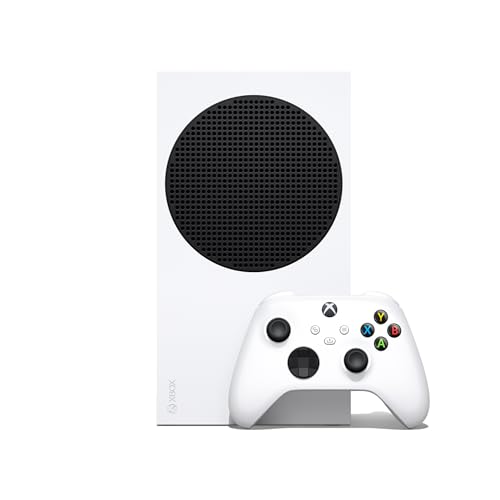
- Up to 120 FPS gameplay support
- Fast load times via custom NVMe SSD
- Seamless switching between titles with Quick Resume
- Four generations of backward-compatible digital games
- Compact footprint for space-conscious setups
Cons
- All-digital system cannot play physical discs
- 512GB internal storage limits total installed games
- Xbox Game Pass requires a separate subscription

Pros
- Official HDMI 2.1 certified with scannable QR verification
- Supports 48Gbps bandwidth for 4K 144Hz gaming
- Reinforced double-layer braided jacket for durability
- Includes eARC support for Dolby Atmos audio
- Backward compatible with older HDMI display standards
Cons
- Fixed 6.6-foot length restricts longer entertainment center setups
- Requires source hardware and software support for high refresh rates

Pros
- Broad compatibility across consoles, PC, and mobile
- Textured grips across bumpers, triggers, and case
- Built-in 3.5mm audio jack for wired headsets
- Custom button mapping through the Xbox Accessories app
- Plug-and-play wired connectivity with USB-C

Pros
- Seamless physical integration with Xbox Series S
- Dual HDMI inputs for multi-device flexibility
- FreeSync support reduces visual tearing
- Crisp Full HD 1080p native resolution
Cons
- Limited to a standard 60Hz refresh rate
- Direct USB power requires lowered brightness and volume
- Small 12.5-inch screen size limits viewing distance

Pros
- Targets 4K resolution at up to 120 FPS
- Custom 1TB NVMe SSD for fast load times
- Quick Resume feature for multiple titles
- Backward compatible across four Xbox generations
- Hardware-accelerated ray tracing support
Cons
- Xbox Game Pass subscription sold separately
- Online multiplayer requires a separate subscription

Pros
- Includes two light bars
- USB-powered installation
- App and remote control
- RGBW and white-light modes
- Audio-sync lighting effects
Cons
- Requires a nearby USB power source
- 12.8-inch bars provide limited coverage
- Mounting hardware details are unspecified

Pros
- Supports high-bandwidth 48 Gbps HDMI 2.1 standards
- Enables 8K at 60Hz and 4K at 120Hz output
- Includes an 18-month manufacturer warranty
- Universal compatibility with standard HDMI video sources and displays
Cons
- Fixed six-foot length restricts distant hardware placement
- Rated for up to 1,000 bends

Pros
- Form-fitting design built specifically for Xbox Series X
- Native 4K UHD resolution on a compact display
- IPS panel with HDR and FreeSync support
- Supports high-refresh 1080p gaming up to 120Hz
- Two HDMI ports for multiple source connections
Cons
- HDMI port 1 caps 4K output at 30Hz
- Xbox Series X console is not included
- Maximum 4K refresh rate is limited to 60Hz
Best Gaming Displays for Xbox: Picks and Trade-Offs
iFFALCON 55″ 4K MiniLED Smart TV: Best full-size TV option
The iFFALCON 55″ 4K MiniLED Smart TV lists a native 144Hz panel, VRR, FreeSync Premium Pro, ALLM, and four HDMI 2.1 inputs. Two inputs are specified for 4K at 144Hz, while two support 4K at 60Hz, making it easier to connect multiple devices. For Xbox, these features suit players who want a large 4K screen and adaptive refresh support. The TV also lists Dolby Vision Gaming and local dimming, but supplied data does not establish measured input lag or HDR performance.
Pros: 55-inch 4K display, VRR, ALLM, and multiple HDMI 2.1 inputs. Cons: Not every HDMI input supports the same refresh rate, and the Xbox cannot use the panel’s full 144Hz capability. Who should skip it: Skip it if you need a portable display or want verified independent picture measurements.
G-STORY 14″ 4K Portable Monitor for Xbox Series X: Compact 4K choice
This 14-inch portable monitor has a 3840 × 2160 native resolution, two HDMI inputs, HDR, and FreeSync. Its port limits matter: HDMI 2 supports 4K at 60Hz, while HDMI 1 supports 4K at 30Hz or 1080p at 120Hz. It may suit a Series X owner who needs a compact screen and accepts choosing between resolution and refresh rate. The Xbox console is not included.
Pros: Native 4K resolution, FreeSync, and two HDMI inputs. Cons: No listed input supports both 4K and 120Hz; one supports 4K at 60Hz, and the other reaches 120Hz only at 1080p. Who should skip it: Skip it if you want a large living-room screen or require 4K at 120Hz from one input.
G-STORY 12.5″ 1080P Portable Gaming Monitor: Series S travel setup
The 12.5-inch display is designed to attach to Xbox Series S and uses a 1920 × 1080 resolution, with two HDMI inputs, FreeSync, and HDR. Its size and integration suit travel or a small desk where a television would be impractical. The listing describes USB-to-DC power use only at reduced brightness and speaker volume, so confirm power needs for your intended setup. The console is sold separately.
Pros: Compact Series S-oriented design, 1080p resolution, and FreeSync. Cons: Small viewing area, and cable-free power use depends on keeping brightness and speaker volume low. No refresh-rate figure is specified. Who should skip it: Skip it if you want 4K, a large shared screen, or a documented high-refresh mode.
Useful Xbox Display Accessories
The Silkland Certified HDMI 2.1 Cable Ultra High Speed is listed with 48Gbps bandwidth and support for 4K at 120Hz. It suits a compatible Xbox and TV connection, but the cable cannot add refresh-rate support that either device lacks. Confirm the display’s selected HDMI input and console video settings.
Pros: Certified HDMI 2.1 listing and stated 48Gbps bandwidth. Cons: A cable alone does not ensure a 4K high-refresh signal; connected equipment and game output also matter. Who should skip it: Skip it if your existing cable already meets your display’s required connection specification.
The Anker HDMI 2.1 Cable,4K@240Hz HDMI Cord lists 48Gbps bandwidth and 4K at 120Hz support. Its supplied specifications also list 8K at 60Hz. These are cable capabilities, not a promise that an Xbox game or display will run at those modes.
Pros: Stated 48Gbps bandwidth and 4K at 120Hz support. Cons: Supplied details do not state HDMI certification, and the product title’s 4K at 240Hz claim is not supported by its listed feature details. Who should skip it: Skip it if you specifically require documented certification or do not need a replacement cable.
The JBL Quantum 100M2 Wired Gaming Headset is a separate audio accessory, not a display. Its 3.5mm connection supports Xbox, and its detachable microphone and Windows Sonic compatibility may suit chat-focused play. The supplied compatibility detail names Xbox One, so confirm headset support for your exact console and controller before buying.
Pros: Detachable directional microphone, mute option, and a 3.5mm connection. Cons: Wired design limits movement, and the listed spatial-sound compatibility specifically names Xbox One and Windows 10 PCs. Who should skip it: Skip it if you need wireless audio or confirmed spatial-audio compatibility for another Xbox model.
The remaining listed items support the broader setup rather than improve TV picture quality. The Xbox Series X and Series S are consoles, the Xbox Wireless Controller is an input device, and the Ledagic light bar adds ambient lighting. Compare these only if you also need a console, controller, or room lighting.
Pros: The console listings specify up to 120 FPS, and the controller supports wireless, Bluetooth, and USB-C connectivity. The light bar offers USB power and app or remote control. Cons: These products do not substitute for a gaming TV, and console frame rates depend on supported games and display settings. Who should skip them: Skip them if your console, controls, and lighting setup already meet your needs.
How to Choose a Gaming TV for Xbox
Match resolution and refresh rate to your Xbox
Series X is specified for 4K gaming up to 120 FPS; Series S is specified for up to 120 FPS, but this does not mean every game reaches that frame rate. A 4K panel can sharpen compatible output, while a 120Hz or faster panel can display high-refresh signals when the console, game, and input all support them. The iFFALCON’s 144Hz panel exceeds the listed Xbox maximum, so its extra refresh capacity is not an Xbox frame-rate guarantee.
Check HDMI ports, VRR, and low-latency features
Read the specifications for each HDMI input, not only the TV’s headline features. The iFFALCON lists two ports for 4K at 144Hz and two for 4K at 60Hz. Its VRR and ALLM support may help match display refresh to variable game output and switch into a lower-latency mode, but supplied data gives no measured latency figures.
Choose a screen size for the room and use
A 55-inch TV suits a shared viewing space better than either portable monitor. The G-STORY models prioritize compactness, with the 12.5-inch display aimed at Series S and the 14-inch 4K model designed for Series X. Both require the console separately, so include console placement and power connections in your setup plan.
Evaluate HDR claims cautiously
The iFFALCON lists Dolby Vision Gaming, HDR10+, local dimming, and up to 1,000 nits advertised HDR luminance. These specifications identify supported formats and a stated brightness figure, not independently verified image quality. The portable monitors list HDR without detailed brightness or local-dimming data, so their HDR performance cannot be compared from the supplied specifications alone.
Frequently Asked Questions
Does Xbox need HDMI 2.1 for 4K gaming?
HDMI 2.1 is relevant when seeking features such as 4K at 120Hz from compatible equipment. Check the exact Xbox model, TV input, cable, and game support. A port or cable specification cannot make unsupported game output run at a higher resolution or frame rate.
Is a 144Hz TV useful with Xbox?
A 144Hz panel can accept refresh rates beyond the Xbox consoles’ listed maximum of 120 FPS, but Xbox does not gain a 144 FPS output from that panel alone. The iFFALCON may still suit multi-device households, including a compatible gaming PC, though PC support depends on the graphics card, input, and settings.
Final Recommendation
Choose the iFFALCON 55″ 4K MiniLED Smart TV for a full-size Xbox setup with several HDMI devices and listed VRR and ALLM support. Choose the 14-inch G-STORY for compact Series X use if 4K at 60Hz or 1080p at 120Hz fits your priorities. Choose the 12.5-inch G-STORY for a small Series S-oriented travel setup. Treat the cables and audio accessories as optional additions, not substitutes for checking your console, game, and display compatibility.
For more display context, see our guide to 1080 TVs and gaming display alternatives. For audio, compare our gaming headset recommendations.





Write Your Review
No reviews yet. Be the first to share your experience!