

Choose by room layout first: the 33.5-inch X-cosrack suits tight spaces, while reversible L-shaped desks use corners for extra surface area. For sitting and standing, compare the ErGear and Veken electric desks; check their dimensions and clearances before buying.
This guide evaluates listed specifications, not independent performance measurements. Confirm each desk’s footprint, monitor placement, tower clearance, and outlet needs against your room and equipment before ordering.

Pros
- Reversible layout fits various corner room configurations
- Included CPU stand lifts tower off the floor
- Integrated side pocket adds accessible storage
- Adjustable leveling feet improve stability on uneven floors
- Scratch-resistant and water-resistant desktop finish
Cons
- Total weight capacity is limited to 176 pounds
- Compact 50-inch footprint limits large multi-monitor setups


Pros
- Corner-friendly L-shaped design
- Built-in outlets and USB ports
- Adjustable LED lighting modes
- Under-desk and side storage
- Adjustable non-slip foot pads
Cons
- Desktop depth is 19.7 inches
- Exact assembly time is not specified
- Maximum supported load is not specified

Pros
- Four programmable height presets
- Adjustment range from 28.35 to 46.46 inches
- Heavy-duty alloy steel frame
- Lifting columns rated for 100,000 cycles
- Low-VOC materials with assembly tools included

Pros
- Integrated power strip with seven charging ports
- Reversible L-shaped layout fits varied room corners
- Adjustable pegboard mounts in horizontal or vertical orientations
- Dedicated CPU stand elevates PC towers off floors
- App-controlled LED strip with music synchronization modes

Pros
- Built-in AC, USB, and Type-C power strip
- Compact footprint suits dorms and small rooms
- Dedicated monitor shelf preserves lower workspace
- Reversible lower shelf accommodates a PC tower
- Customizable multi-mode RGB ambient lighting
Cons
- Shallow 15.75-inch desk depth limits mouse movement area
- Fabric drawer offers less durability than solid materials

Pros
- Built-in 3 AC outlets and 2 USB charging ports
- Integrated 22-mode RGB light strip
- Full-coverage elevated monitor shelf
- Reversible five-drawer storage layout
- Adjustable leveling feet and steel frame
Cons
- Drawers are non-woven fabric rather than solid materials
- Shallow 18.5-inch desktop depth limits workspace

Pros
- Integrated retractable footrest for extended relaxation
- Adjustable 90° to 135° reclining backrest
- Includes dedicated neck and lumbar support cushions
- Durable steel frame with SGS-certified gas lift
- Easy-to-clean PU leather upholstery
Cons
- Linkage armrests lack independent 3D or 4D adjustments
- Maximum recline angle limited to 135 degrees


Pros
- Reversible design fits left or right corner layouts
- Built-in AC, USB, and Type-C desktop power hub
- Detachable monitor stand with adjustable RGB lighting
- Includes dedicated storage shelves and drawer
- Waterproof and scratch-resistant MDF work surface
Cons
- Compact surface limits space for large multi-monitor setups
- Requires complete self-assembly before use
Recommended Desks by Setup
X-cosrack 33.5-inch Small Gaming Desk with LED Lights
At 33.5 inches wide, this is the most explicitly compact option in the list. It combines a monitor stand, reversible CPU shelf, fabric drawer, headphone hooks, and power hub with two AC outlets, one USB port, and one Type-C port.
Its stated 180 lb capacity and X-braced steel frame suit a modest PC setup, while remote lighting offers multiple colors and modes. The compact surface limits room for wide keyboards, large mouse movements, or several monitors; confirm your equipment dimensions first.
Pros: Small stated width, integrated storage, monitor riser, and multiple power connections.
Cons: Limited desktop area; overall depth and height are not specified in the supplied data.
Who should skip it: Gamers needing broad mouse space, multiple large displays, or a documented full desk footprint.
Lufeiya Black Gaming Desk with LED Lights
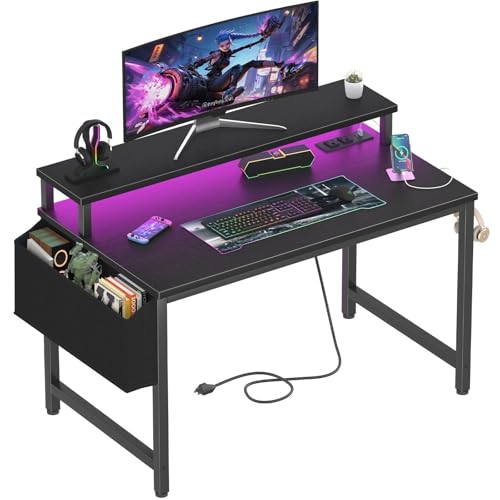
This 40-inch desk adds a raised monitor shelf, two AC outlets, and two USB charging ports. Its shelf is described as accommodating two monitors or laptops, but verify screen bases and available width before planning a dual-display arrangement.
RGB lighting, a storage bag, and two removable headphone hooks provide useful extras for a bedroom or study setup. The product details do not state load capacity or desktop depth, so buyers with heavier equipment should seek those specifications before choosing.
Pros: Integrated power, raised monitor shelf, and removable accessories.
Cons: Load capacity and depth are not specified; particle-board construction may not suit buyers seeking a solid-wood surface.
Who should skip it: Users who need confirmed load limits or ample depth for a monitor, keyboard, and broad mouse movements.
SageNest L Shaped Desk, 50 Inch Reversible
The reversible 50-inch L shape lets you place its short side on either side, helping it fit different corner layouts. A reinforced steel frame, X-shaped crossbars, and stated 176 lb capacity support a PC and gaming peripherals, subject to balanced loading.
A CPU stand raises the tower, and a side bag keeps smaller items off the work surface. The listing does not provide the lengths of both desktop sections or total depth, so measure the intended corner and check the tower’s dimensions.
Pros: Reversible corner layout, stated load capacity, CPU stand, and adjustable feet.
Cons: No integrated power hub or lighting is listed; full section dimensions are not provided.
Who should skip it: Buyers who need a verified small footprint, built-in charging, or electric height adjustment.
ODK 48 Inch L Shaped Gaming Desk with LED Lights
ODK gives its main desktop dimensions as 48 inches wide by 19.7 inches deep by 30 inches high, with an L-shaped corner layout. Its listed three-monitor capacity and shelves suit a multi-device setup, but confirm that each display fits the actual usable surface.
The desk includes three AC outlets, two USB charging ports, LED lighting, an under-desk bookshelf, storage shelves, and a side bag. Its 19.7-inch main depth may feel restrictive with a deep monitor stand and full-size keyboard, and the L-shaped return dimensions are not supplied.
Pros: Stated main-surface dimensions, multiple power connections, and useful storage.
Cons: Main desktop is under 20 inches deep; dimensions for the other L-shaped section are not specified.
Who should skip it: Gamers needing deep mouse space or a complete, dimensioned plan for a corner workstation.
PRAISUN L Shaped Gaming Desk with LED Lights
Its stated overall dimensions are 51.2 inches wide, 39.4 inches deep, and 29.5 inches high. The reversible L shape, adjustable CPU stand, top shelf, and three-level pegboard give users several ways to organize gaming or streaming gear within a corner footprint.
The power hub lists four AC outlets, two USB ports, and one Type-C port. The product data does not specify Type-C charging output, and the overall footprint is relatively deep for a desk marketed to small rooms; measure available floor space and confirm port needs.
Pros: Reversible layout, adjustable storage, stated dimensions, and seven listed power ports.
Cons: Requires a substantial corner area; Type-C power delivery details are not specified.
Who should skip it: Buyers with very narrow rooms or anyone requiring confirmed Type-C charging capability.
Korfile 47 Inch Gaming Computer Desk with Power
This 47-inch desk pairs a monitor stand with five fabric drawers, three AC outlets, and two USB charging ports. Reversible drawer installation offers layout flexibility, while the raised monitor area can free some of the main surface for a keyboard and accessories.
The powder-coated steel frame, crossbar support, and adjustable legs are listed as stability features. Overall depth, load capacity, and monitor-stand dimensions are not provided, so confirm these details if your setup includes a heavy display or large PC equipment.
Pros: Five drawers, monitor riser, integrated power, and flexible drawer placement.
Cons: No stated load limit or full footprint; fabric drawers are not rigid storage.
Who should skip it: Users needing a confirmed capacity, deep surface, or hard-sided drawers.
OLIXIS 47 Inch L Shaped Gaming Desk
This reversible 47-inch corner desk combines open shelves, a drawer, and a detachable monitor stand. Its power hub has two AC outlets, one USB port, and one Type-C port, with a 4.92-foot power cord for placement near a suitable wall outlet.
RGB lighting is attached to the monitor riser, keeping illumination separate from the main tabletop. The product data omits total depth, load capacity, and Type-C output details; check corner dimensions and device power requirements before relying on those features.
Pros: Reversible corner arrangement, detachable riser, storage, and mixed power ports.
Cons: Full dimensions and load capacity are not stated; Type-C charging specifications are unclear.
Who should skip it: Buyers who need a known load limit or exact corner measurements before purchase.
ErGear 48 x 24 Inch Height Adjustable Electric Desk
The 48-by-24-inch surface is a straightforward rectangular option for users who prefer more defined desktop dimensions over corner storage. Electric adjustment spans 28.35 to 46.46 inches, and four memory presets store preferred heights for sit-stand use.
The steel frame and lifting columns are listed as stability features, with the maker reporting a 100,000-cycle lift test. This desk lacks listed drawers, shelves, and integrated charging, and the 24-inch depth still needs to accommodate the monitor, keyboard, and mouse area.
Pros: Known desktop dimensions, electric height range, and four saved positions.
Cons: No integrated storage or power hub is listed; height adjustment requires access to a power outlet.
Who should skip it: Buyers prioritizing a corner footprint, extensive built-in storage, or a desk that does not need electrical power.
Veken 47.2 Inch Large Electric Standing Desk
Veken offers electric adjustment from 28.3 to 46.5 inches, memory presets, and cable management. Those features suit users who want sit-stand flexibility in a compact-width workstation; its desktop uses two boards rather than one continuous panel.
The listing describes a quiet motor under 52 dB and a steel frame, but those are manufacturer specifications, not independent measurements. Desktop depth and load capacity are not provided, so check monitor placement and equipment weight before choosing it for a multi-screen setup.
Pros: Electric height adjustment, memory presets, and cable management.
Cons: Two-piece desktop; depth and load capacity are not specified.
Who should skip it: Buyers who require a one-piece desktop or confirmed capacity and depth measurements.
How to Choose a Small Gaming Desk
Measure the footprint and usable surface
Measure available floor width and depth, including space for the chair to move. For an L-shaped desk, confirm both section lengths and which side can face the room; some listings provide only partial dimensions.
Then map monitor bases, keyboard, mouse, and speakers onto the usable desktop. A monitor riser can free surface area, but it does not increase the width or depth available for peripherals.
Match the layout to the PC and displays
Check PC case dimensions against the listed CPU stand or shelf, and leave room for cable connections and airflow. A tower shelf can lift the case off the floor, but product descriptions do not establish clearance for every case size.
For multiple monitors, compare each display’s base width and depth with the stand or desktop. Product claims about monitor counts do not replace checking the actual screen and stand measurements.
Choose storage and power for actual needs
Drawers hide small items, while side bags and hooks keep frequently used accessories accessible. Shelves and pegboards add organization but also affect how the desk fits against walls and how screens can be positioned.
Count AC outlets and USB ports against your devices, then check the hub’s location and cord reach. USB-C or Type-C port presence alone does not establish charging speed or supported power output. Avoid exceeding the power hub’s rated electrical limits, and follow its manufacturer instructions.
Decide whether height adjustment matters
Electric standing desks suit users who want to change desk height during work or gaming sessions. Check the adjustment range against your seated and standing positions, and confirm outlet access; the supplied listings do not give a load capacity for either electric model.
Frequently Asked Questions
What is the smallest desk in this comparison?
The X-cosrack is listed as 33.5 inches wide, the narrowest stated width here. Its depth and height are not supplied, so confirm the full footprint before purchasing.
Are L-shaped desks a good choice for small rooms?
They can use a corner efficiently while providing separate areas for a monitor and accessories. Their total footprint can still be substantial, so measure both desk sections and the chair clearance.
Can these desks support a gaming PC and multiple monitors?
Some listings describe monitor risers, multi-monitor use, or CPU stands, but stated load capacity and dimensions vary or are missing. Check equipment measurements and desk capacity with the seller before placing heavy devices.




Write Your Review
No reviews yet. Be the first to share your experience!