

For most gaming-focused buyers in this selection, start with the CyberPowerPC for its Ryzen 7 8700F, RTX 5060 Ti 8GB, and 1TB NVMe SSD. Consider the YAWYORE if you value 32GB RAM and an RTX 5060, or the STGAubron Ryzen 5 5500 models for a lower-spec dedicated-GPU option. The OKAMUS and Dell lack documented dedicated graphics, so do not choose them expecting demanding PC gaming performance.
This is specification-based analysis, not a claim of measured gaming results. Actual frame rates depend on game, resolution, settings, drivers, and system configuration. Vendor claims about 60+ FPS are not independent measurements, so treat them as unverified.
Gaming PCs at a Glance

Pros
- Generous 16GB RAM for smooth basic multitasking
- Modern Wi-Fi 6 and Bluetooth 5.0 connectivity
- Includes bundled RGB gaming keyboard and mouse
- Solid-state storage ensures fast operating system boot times
- Pre-installed Windows 11 Home operating system
Cons
- Entry-level RX 550 GPU struggles with modern AAA games
- Specific Intel Core i5 processor generation is not disclosed
- Modest 512GB SSD capacity fills quickly with large titles

Pros
- Modern Wi-Fi 6 and Bluetooth 5.3 connectivity
- Quick boot times with 256 GB M.2 SSD
- Pre-installed Windows 11 Home operating system
- Includes multiple RGB case fans for airflow
- 400W power supply allows room for basic upgrades
Cons
- No dedicated graphics card included
- Modest 8 GB system memory limits heavy multitasking
- Limited 256 GB storage fills up quickly

Pros
- Eight-core AMD Ryzen 7 8700F processor
- Dedicated GeForce RTX 5060 Ti graphics
- Fast 1TB PCIe 4.0 NVMe storage
- Integrated WiFi 6 and Bluetooth 5.3
- Keyboard and mouse included in the box
Cons
- 8GB VRAM limits headroom for high-resolution textures
- 16GB system RAM may require future expansion

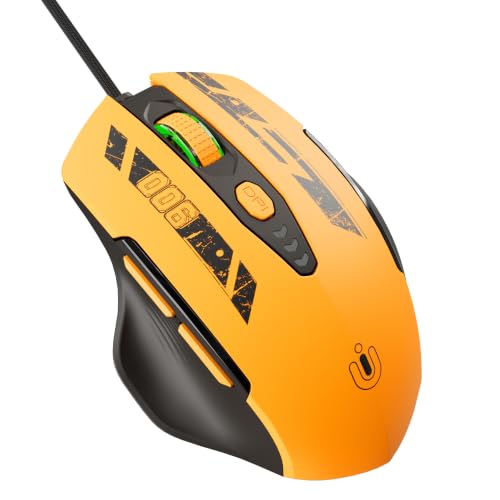
Pros
- Eleven fully programmable buttons with rapid-fire key
- Five quick-switch onboard DPI levels
- Textured rubber side grip for secure handling
- Fingerprint-resistant frosted matte finish
- Five selectable dynamic RGB backlight modes
Cons
- Full 8000 DPI adjustments require software installation
- Tethered wired cable limits placement flexibility
- Right-hand asymmetric shape unsuitable for left-handed users

Pros
- Convertible design switches between satellite and soundbar setups
- Simple plug-and-play installation with no drivers required
- Touch control makes switching lighting modes effortless
- Dedicated knob provides smooth volume and power control
- Generous cable lengths accommodate wider desk layouts
Cons
- Requires both USB power and 3.5mm audio cables
- Lacks Bluetooth or other wireless connectivity options
- Modest 10W total output limits volume in larger spaces

Pros
- Generous 1TB solid-state storage capacity
- Integrated Wi-Fi 6 and Bluetooth 5.0 support
- Comes with six pre-installed RGB cooling fans
- Includes bundled RGB keyboard and mouse accessories
Cons
- Features an older AMD Radeon RX 580 graphics architecture
- Specific Intel Core i7 processor generation is not documented

Pros
- 6-core, 12-thread Ryzen 5 processor
- RTX 3050 with 6GB GDDR6
- 16GB DDR4 and 1TB SSD
- Windows 11 Home included
- Keyboard and mouse included
Cons
- RTX 3050 has 6GB video memory
- Memory speed and upgrade options unspecified
- Who should skip it: buyers needing documented upgrade details

Pros
- Six-core, 12-thread Ryzen 5 5500
- GeForce RTX 2060 Super with 8GB VRAM
- 16GB DDR4 and 1TB SSD
- Wi-Fi 6 and Bluetooth 5.2
- Keyboard and mouse included
Cons
- No upgrade or component compatibility details provided
- No game-specific performance data provided
- Who should skip it: buyers needing confirmed upgrade options

Pros
- Capable 8-core AMD Ryzen 7 5700X processor
- Generous 32GB DDR4 memory configuration
- Fast 1TB M.2 NVMe storage
- Integrated Wi-Fi and Bluetooth wireless support
- 80 Plus Bronze certified power supply
Cons
- Built on older AM4 and DDR4 platform
- Specific graphics card brand varies by unit

Pros
- 16GB RAM for everyday multitasking
- 512GB SSD for faster boot times
- Windows 11 Pro included
- 24-inch monitor included
- RGB peripherals and front-panel lighting
Cons
- Integrated graphics limit demanding gaming headroom
- Monitor resolution and refresh rate unspecified
- Refurbished units may arrive in generic packaging
The product list also contains a mouse and speakers, which are accessories rather than computers. They appear in the supplied product collection, but cannot substitute for a gaming desktop.
Best Gaming PC Choices by Use
Best documented graphics and platform balance: CyberPowerPC Gaming PC, AMD Ryzen 7 8700F
The Ryzen 7 8700F has eight cores, paired with an RTX 5060 Ti with 8GB graphics memory, 16GB DDR5, and a 1TB PCIe 4.0 NVMe SSD. This is the strongest clearly specified graphics configuration in this selection, with HDMI and two DisplayPort outputs for monitor connection.
Wi-Fi 6, Bluetooth 5.3, and a listed B850 chipset round out the core specifications. The listing includes keyboard and mouse, plus a one-year parts-and-labor warranty and lifetime technical support. RAM capacity is 16GB, and the supplied data does not specify power-supply wattage or upgrade clearances.
Pros: RTX 5060 Ti 8GB, eight-core processor, DDR5 memory, 1TB NVMe storage, multiple display outputs.
Cons: 16GB RAM may constrain some demanding multitasking workloads; PSU details are not specified. Who should skip it: Buyers seeking verified power-supply and component-upgrade details before purchase.
Compare more gaming PC options for streaming workloads if gaming and broadcast software will run together.
Best listed memory capacity: YAWYORE Gaming PC, AMD Ryzen 7 5700X
This desktop pairs an eight-core, 16-thread Ryzen 7 5700X with an RTX 5060 8GB GDDR7, 32GB DDR4-3200, and a 1TB M.2 NVMe SSD. The memory capacity can suit heavier multitasking, while the dedicated GPU makes it a more appropriate gaming choice than systems with integrated graphics only.
The listed board is an MSI B550M-A PRO, and the power supply is rated at 650W with 80 Plus Bronze certification. The graphics card brand may vary. The supplied data does not identify display outputs, wireless standard, or a warranty, so confirm those details for your monitor and support needs.
Pros: 32GB memory, eight-core processor, dedicated RTX 5060, 1TB NVMe SSD, specified 650W PSU.
Cons: DDR4 platform; GPU brand may vary; display connections and warranty are not specified. Who should skip it: Buyers who require a specific graphics-card manufacturer or confirmed video outputs.
Lower-cost dedicated graphics option: STGAubron Gaming PC Desktop,R5 5500,RTX 3050
The Ryzen 5 5500 supplies six cores and 12 threads, alongside 16GB DDR4, a 1TB SSD, and an RTX 3050 6GB. Wi-Fi 6 and Bluetooth 5.0 are listed, as are HDMI, DisplayPort, and DVI outputs. This configuration suits buyers who want a dedicated GPU and broad display-connector selection.
The listing includes a keyboard and mouse and states a one-year parts-and-labor warranty. It does not specify the power supply or memory speed. The GPU model is a 6GB RTX 3050, so do not assume it matches higher-memory versions or performance of more powerful graphics cards.
Pros: Dedicated 6GB GPU, six-core CPU, 16GB RAM, 1TB SSD, Wi-Fi 6, three listed video-output types.
Cons: GPU is a lower-tier option in this lineup; PSU specifications are missing. Who should skip it: Buyers targeting demanding graphics workloads or requiring a specified PSU and upgrade path.
Alternative dedicated GPU: STGAubron Gaming PC Desktop,R5 5500,RTX 2060
This model combines the same six-core, 12-thread Ryzen 5 5500 and 16GB DDR4 with an RTX 2060 Super 8GB and 1TB SSD. The larger stated graphics-memory capacity than the RTX 3050 system may appeal to buyers comparing these two particular configurations, but memory capacity alone does not establish which card performs faster in every game.
Listed connections include HDMI and DisplayPort, with Wi-Fi 6 and Bluetooth 5.2. Four RGB fans and bundled keyboard and mouse are specified. The listing gives a one-year parts-and-labor warranty, but omits PSU details and memory speed. Confirm card condition and exact components with the seller before ordering.
Pros: RTX 2060 Super with 8GB, six-core CPU, 16GB memory, 1TB SSD, wireless connectivity.
Cons: PSU and RAM speed are not stated; the listing does not establish comparative frame rates. Who should skip it: Buyers who need complete component documentation or a newer, higher-tier GPU specification.
Basic dedicated-GPU desktop: STGAubron Gaming PC Desktop,Core i7,RX 580 8G,16G
The supplied specifications list an Intel Core i7 up to 3.9GHz, 16GB memory, 1TB SSD, and Radeon RX 580 8GB. Connections include HDMI, three DisplayPort outputs, and DVI, plus Wi-Fi 6 and Bluetooth 5.0. These details suit a buyer who needs several monitor-output options and a dedicated graphics card.
The exact Core i7 generation and PSU are not identified, making component comparison and upgrade planning harder. The RX 580 is an older graphics model relative to the RTX 5060 options in this list. Do not rely on the advertised game claims as measured performance.
Pros: 8GB dedicated GPU, 16GB RAM, 1TB SSD, several listed video outputs, Wi-Fi 6.
Cons: CPU generation and PSU details are missing; older GPU model. Who should skip it: Buyers who need exact CPU identification or a clearly documented modern graphics platform.
Entry-level dedicated graphics: STGAubron Gaming PC Desktop,Core I5,RX 550 4G,16G
This system lists an Intel Core i5 up to 3.6GHz, Radeon RX 550 4GB, 16GB RAM, and a 512GB SSD. Wi-Fi 6, Bluetooth 5.0, HDMI, and DisplayPort are specified. It may suit light gaming and everyday tasks where expectations match this older, entry-level GPU class.
The exact processor generation and PSU are not supplied, and 512GB leaves less room for a large game library than the 1TB systems. The advertised 60+ FPS claim is not independently established and should not guide a purchase without game-specific evidence.
Pros: Dedicated graphics, 16GB memory, SSD storage, Wi-Fi 6, HDMI and DisplayPort.
Cons: RX 550 is the least capable dedicated GPU listed; CPU generation and PSU are unspecified. Who should skip it: Players seeking high settings in demanding modern games or substantial graphics headroom.
Not a dedicated-GPU gaming pick: OKAMUS Pre-Built PC, i5 CPU Up to 3.6GHz
The OKAMUS uses integrated graphics only, with no dedicated GPU, 8GB RAM, a 256GB M.2 drive, and a 400W power supply. Wi-Fi 6 and Bluetooth 5.3 are listed. It is better considered for basic computing or light games than as a ready-to-play system for graphics-heavy titles.
Shared system memory and the absence of a dedicated graphics card limit its suitability for demanding gaming. The exact i5 generation and motherboard expansion details are not stated, so the claimed upgrade space cannot be assessed from the supplied specifications. Check compatibility and PSU capacity before planning a GPU upgrade.
Pros: SSD storage, wireless connectivity, and a specified 400W PSU.
Cons: Integrated graphics only, 8GB RAM, and 256GB storage. Who should skip it: Anyone wanting a gaming PC with dedicated graphics already installed.
Office desktop, not a gaming recommendation: Dell Optiplex PC,Core i5,24” Monitor,16G RAM,512G
This renewed Dell listing specifies a quad-core Intel Core i5 at 3.20GHz, 16GB RAM, 512GB SSD, Windows 11 Pro, and a 24-inch monitor. It does not identify a dedicated GPU. That makes it a possible general-purpose desktop, but the supplied data does not support recommending it for demanding PC gaming.
The listing describes professional refurbishment and a minimum 90-day warranty. It does not state the exact Optiplex model, processor generation, or graphics hardware. Confirm the computer’s GPU and monitor connections before considering it for games, and review renewal terms carefully.
Pros: Monitor included, 16GB RAM, 512GB SSD, Windows 11 Pro, stated refurbishment coverage.
Cons: Dedicated GPU is not specified; exact model and CPU generation are missing. Who should skip it: Gaming buyers who need documented graphics hardware and gaming-focused performance.
Accessories Included in the Product List
The Redragon M612 is a wired mouse, not a computer. Its listed features include five default DPI levels, software-adjustable settings up to 8000 DPI, and 11 programmable buttons. It can suit players who want extra keybinds, but buyers preferring a wireless mouse or fewer controls should look elsewhere. Who should skip it: Anyone shopping for a complete gaming PC.
The OFFSIR two-speaker set is USB-powered and connects through a 3.5mm audio cable. It lists dual 5W drivers, touch-controlled lighting, and a volume knob. It is an add-on for a compatible computer, not a soundbar or PC; the package contains two removable speakers. Who should skip it: Buyers seeking a desktop system or a package that includes a separate soundbar.
How to Choose a Gaming PC
Prioritize the graphics card
For gaming, a dedicated GPU matters more than RGB lighting or bundled peripherals. Among listed systems, compare the RTX 5060 Ti, RTX 5060, RTX 2060 Super, RTX 3050, RX 580, and RX 550 by exact model and game-specific independent results. The product data does not provide comparable benchmarks, so it cannot establish precise frame rates or settings.
Match memory and storage to your workload
The listed gaming desktops range from 16GB to 32GB RAM, while the OKAMUS has 8GB. Storage ranges from 256GB to 1TB. More memory can help with multitasking, and additional storage holds more installed games, but neither specification guarantees a particular frame rate.
Check display connections and upgrade details
Match the PC’s listed video outputs to monitor inputs. The CyberPowerPC lists HDMI and DisplayPort; some STGAubron desktops also list DVI. A compatible connector does not guarantee any particular resolution or refresh-rate performance. Check the exact monitor requirements and confirm PSU, case, motherboard, and available power connections before planning upgrades.
Choose resolution and workload realistically
Game, resolution, graphics settings, and desired frame rate affect hardware needs. The supplied listings lack independent performance results, so compare reliable game-specific benchmarks for the exact GPU before choosing a demanding resolution or high-refresh monitor. For more context, see our guide to budget gaming PCs and 1440p monitor considerations.
Frequently Asked Questions
Which listed PC has the strongest documented gaming graphics?
The CyberPowerPC lists an RTX 5060 Ti with 8GB graphics memory, while the YAWYORE lists an RTX 5060 with 8GB. The specifications identify these GPUs but do not provide comparable game benchmarks, so check independent results for games you play.
Can the OKAMUS or Dell handle modern gaming?
The OKAMUS explicitly has integrated graphics only. The Dell listing does not specify a dedicated GPU. Neither listing supports a confident recommendation for demanding games; verify exact graphics hardware and game requirements before buying.
Final Recommendation
Choose the CyberPowerPC if you want the strongest clearly listed GPU and DDR5 platform in this group. Choose the YAWYORE if 32GB RAM and a specified 650W PSU matter more, while accepting missing display-output details. The STGAubron RTX 3050 or RTX 2060 Super systems suit buyers comparing lower-tier dedicated-GPU configurations, but confirm PSU and component details. Treat the RX 550 system as an entry-level option, and avoid the integrated-graphics OKAMUS or unspecified-GPU Dell for demanding gaming. Browse the wider Gaming PCs category for additional system comparisons.




Write Your Review
No reviews yet. Be the first to share your experience!