

For Dota, start with a mouse that fits your hand and grip, then choose the connection and programmable controls you need. Razer Basilisk V3 offers 11 programmable buttons and a thumb rest; Redragon M617 stands out for its listed 41 g weight and lightweight paracord cable.
This comparison uses supplied product specifications, not independent performance measurements. DPI figures describe adjustable sensitivity, not proof that one mouse improves aim or game results. Check each model’s software and connection limits before assigning Dota commands.
Top Gaming Mice for Dota

Pros
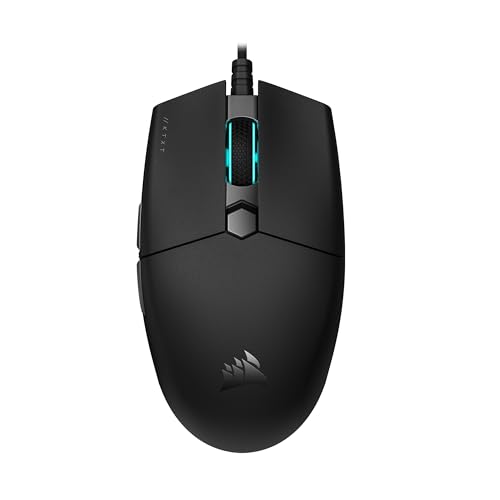
- Tri-mode 2.4GHz, Bluetooth 5.3, and wired USB-C connectivity
- Lightweight 67-gram build reduces wrist fatigue
- Sensor supports up to 12,000 DPI and 1000Hz polling
- Dedicated rapid-fire button for quick in-game actions
- Can store and switch between four paired devices
Cons
- Configuration software is unavailable when using Bluetooth
- Driver programming features only support Windows systems

Pros
- Lightweight 62-gram construction
- Wired and Bluetooth connectivity
- Up to 10000 DPI through software
- 1000Hz polling rate
- Customizable RGB lighting
Cons
- Expanded DPI settings require software
- Battery life is advertised, not independently verified

Pros
- Versatile Bluetooth, 2.4GHz, and USB-C wired connectivity
- Ergonomic contoured shape with dual finger rests
- Rechargeable 1000mAh battery with charge-and-play capability
- Adjustable polling rate up to 1000Hz
- Stores USB receiver inside the mouse body
Cons
- Software configuration requires Windows and wired or 2.4GHz mode
- Bulky ergonomic dimensions are unsuitable for small hands

Pros
- Adjustable eight-piece weight tuning set
- Nine programmable buttons with macro support
- Five onboard memory profiles
- Durable Omron micro switches and Teflon feet
Cons
- Official operating system support limited to Windows
- Lacks wireless connectivity options

Pros
- 11 programmable buttons for comprehensive macro control
- Dual-mode HyperScroll tilt wheel enhances versatility
- High-resolution 26K DPI optical sensor
- Responsive optical switches rated for 70 million clicks
- 11 independently customizable RGB lighting zones
Cons
- Tethered wired cable restricts cable-free mobility
- Ergonomic thumb rest form factor excludes left-handed users

Pros
- Four on-the-fly DPI speed settings up to 3600
- Driver-free plug-and-play operation
- Six-button design with side navigation controls
- Ergonomic contoured shape suited for palm grip
- Integrated multi-color lighting
Cons
- Sensitivity restricted to four predetermined DPI steps
- Lowest available DPI setting starts at 1200 DPI

Pros
- Nine programmable buttons for custom keybinds
- Dual 2.4GHz and Bluetooth wireless support
- Textured rubber side grip aids stability
- Five quick-switch DPI presets up to 8000
Cons
- Full button and DPI adjustments require software
- Relatively heavy profile at 0.24 pounds

Pros
- Up to 7200 adjustable DPI
- Nine programmable buttons with macro editing
- Ergonomic contouring with finger rest design
- Customizable seven-mode RGB backlighting
Cons
- Full macro customization requires separate software download
- Tethered wired connection limits freedom of movement

Pros
- Lightweight 41g honeycomb shell
- Five selectable DPI settings
- Flexible paracord cable
- Software-based control customization
Cons
- Wired connection is not wireless
- Medium symmetrical shape may not suit every grip

Pros
- Ergonomic vertical shape reduces wrist strain
- Versatile tri-mode wireless and wired connectivity
- Five-direction thumb rocker expands input options
- Onboard memory stores button assignments across PCs
- Twelve fully programmable macro buttons
Cons
- Right-handed design excludes left-handed users
- Software installation may trigger OS security warnings
How These Mice Fit Dota Play
Dota relies on repeated pointer movement and access to abilities, items, and interface commands. Side buttons and remapping can place selected actions within thumb reach, but more buttons are useful only if their positions suit your grip.
Wired models avoid battery upkeep. Wireless models add desk flexibility, but check whether the desired mode supports the manufacturer’s configuration software. Advertised polling rates and DPI ranges are specifications, not independent measures of in-game responsiveness.
Razer Basilisk V3: Best for Accessible Button Mapping
The Basilisk V3 combines an ergonomic shape with thumb rest and 11 programmable buttons. Its wired connection avoids charging, while the Focus+ sensor is specified at up to 26,000 DPI. Razer Synapse supports further configuration.
Pros: Many assignable controls, a thumb rest, and a tactile or free-spinning tilt wheel. Cons: Wired-only design, and its larger control layout may not suit every hand or grip. Who should skip it: Players who want wireless use or a lightweight, minimalist mouse.
Redragon M617: Best for a Lightweight Wired Setup
The M617 is listed at 41 g, with a flexible paracord cable, symmetrical shape, two side buttons, and five programmable buttons. Its five DPI presets reach 10,000. The documented features suit players seeking a low-weight wired option with basic remapping.
Pros: Very low listed weight, symmetrical design, and configurable buttons. Cons: Wired connection and fewer programmable buttons than several alternatives. Who should skip it: Players who need wireless connectivity, a thumb rest, or many dedicated controls.
Aula SC620: Best for Multiple Connection Modes
The SC620 offers 2.4GHz wireless, Bluetooth 5.3, and USB-C wired modes, plus seven programmable buttons and a dedicated fire button. It is listed at 67 g and supports up to 12,000 DPI with a 1,000 Hz polling rate. Configuration uses the AULA driver.
Pros: Three connection modes, device switching, and useful remapping options. Cons: The supplied information says Windows driver support applies to 2.4GHz and wired modes, while Bluetooth mode is unavailable for that support. Who should skip it: Players who need programmable controls in Bluetooth mode or prefer a simpler wired setup.
Redragon M730 PRO: Best for Lightweight Wireless Use
The M730 PRO weighs 62 g and supports wired and wireless use, with a listed Pixart SG8925 optical sensor and 1,000 Hz polling rate. Its default DPI presets run from 400 to 4,000; software can set options up to 10,000 DPI. The manufacturer lists battery life up to 77 hours.
Pros: Low listed weight, wireless flexibility, and configurable sensitivity. Cons: The supplied details do not specify the wireless connection type or programmable button count. Battery life is a manufacturer claim, not an independently verified result. Who should skip it: Players who need clearly documented side-button mapping or a specified 2.4GHz receiver.
Redragon Large Wireless Gaming Mouse: Best for Larger Hands
This full-size model targets medium and larger hands, with contoured support, side grips, two side buttons, and tri-mode Bluetooth, 2.4GHz, and wired connectivity. Its driver supports customization in Windows through 2.4GHz or wired mode. The listed battery capacity is 1,000 mAh.
Pros: Shape designed for larger hands, multiple connection options, and remappable controls. Cons: Driver customization is limited to Windows in 2.4GHz or wired mode; listed DPI presets top out at 3,200 unless adjusted through software. Who should skip it: Players with small hands or those who need driver-based remapping on macOS or Bluetooth.
Redragon M801: Best for Wired Macro Controls
The M801 provides nine programmable buttons, five memory profiles, a rapid-fire button, and an adjustable weight set. Its wired design includes a 6-foot braided cable, and its DPI settings reach 16,000. These controls can suit players who want multiple saved layouts, though Dota does not require a high DPI ceiling.
Pros: Multiple profiles, configurable weight, and several programmable controls. Cons: Wired-only, with a more feature-heavy layout than many players need. Who should skip it: Players prioritizing a light mouse or wireless connectivity.
Redragon M612 Wireless: Best for Remappable Controls and Wireless Modes
The M612 offers nine programmable buttons, including a rapid-fire button and two side macro buttons, alongside Bluetooth and 2.4GHz connectivity. Its five default DPI levels range from 500 to 8,000, with software options across that range. The ergonomic shape and textured side grip may appeal to claw-grip users.
Pros: Many remappable buttons, two wireless modes, and adjustable DPI. Cons: The supplied description does not state weight, battery life, or whether a wired mode is available. Who should skip it: Players who need documented charging details or a wired fallback.
Redragon M602: Best for a Conventional Wired Ergonomic Shape
The M602 has a wired connection, nine programmable buttons, adjustable DPI up to 7,200, and software for button and macro configuration. Its ergonomic shape and seven lighting modes are secondary to the practical appeal of customizable controls for a straightforward PC setup.
Pros: Nine programmable buttons and adjustable sensitivity. Cons: Wired-only, and the supplied data does not specify weight or polling rate. Who should skip it: Players who want a lightweight or wireless mouse, or need those specifications before choosing.
BENGOO Wired Gaming Mouse: Best for Basic Button Needs
The BENGOO model has six buttons, including forward and back controls, plus four DPI settings from 1,200 to 3,600. It is wired and described as plug-and-play, so it may fit a basic setup where extensive macros are unnecessary. The listed compatibility includes Windows versions and MacBook, though driver support is not specified.
Pros: Simple wired setup, six buttons, and adjustable DPI. Cons: Fewer programmable controls and a lower maximum listed DPI than several alternatives; no polling rate or weight is specified. Who should skip it: Players seeking extensive button remapping or detailed sensor specifications.
Attoe Gaming Mouse with 5 D Rocker: Best for an Unusual Control Layout
This vertical mouse combines 12 programmable buttons with a five-direction thumb rocker and tri-mode connectivity. The listed DPI presets reach 24,000, and its software saves programmed settings to the mouse. The rocker provides directional inputs, but its unusual layout may require adjustment before it feels natural in Dota.
Pros: Many programmable controls, a directional rocker, and wired, Bluetooth, and 2.4GHz modes. Cons: Vertical shape is a specialized fit, and the supplied description frames its ergonomic benefits as product claims rather than verified outcomes. Who should skip it: Players who prefer a conventional mouse shape or do not want to adapt to a rocker.
What to Consider Before Choosing
- Grip and hand fit: Consider the M617’s symmetrical shape, the Basilisk V3’s thumb rest, or the Redragon large model’s full-size design. Shape descriptions do not replace checking dimensions and fit in person.
- Button placement: Seven to 12 programmable buttons may help assign selected commands, but fewer, well-placed buttons can be easier to use consistently. Avoid mapping actions in ways that conflict with Dota’s rules or your preferred keyboard controls.
- Connection: Wired models need an available USB port and avoid battery upkeep. Wireless models offer more flexibility, but confirm whether software customization works in the connection mode you plan to use.
- Sensitivity: Start with a manageable DPI setting and adjust to preference. A higher maximum DPI does not by itself establish better control.
- Software and operating system: Check the specific driver requirements. The SC620 and large Redragon model have stated Windows limitations for software configuration; other product entries do not fully document operating system support for every feature.
Frequently Asked Questions
How many mouse buttons does Dota need?
No fixed number suits every player. Side buttons can provide quick access to selected commands, while standard mouse buttons and keyboard bindings may already cover your preferred layout. Choose based on reach and comfort, not button count alone.
Is a wireless mouse suitable for Dota?
These listings include wireless models with 2.4GHz or Bluetooth options. The supplied specifications do not provide independent latency comparisons, so choose a connection supported by your setup and check software limitations. A wired model avoids battery management.
Which mouse is the best fit for Dota?
Choose the Razer Basilisk V3 for its documented 11-button layout and thumb rest, the M617 for a 41 g wired design, or the SC620 for three connection modes. Pick the large Redragon model if full-size ergonomics matter most. Confirm hand fit, operating-system support, and button placement before deciding.




Write Your Review
No reviews yet. Be the first to share your experience!