

For most builds, choose case by matching GPU, cooler, radiator, and power supply dimensions before prioritizing lighting. MUSETEX K2 lists clear component limits and seven fans, while HYTE Y70 Touch Infinite suits display-led builds with an integrated screen and included riser.
This comparison uses supplied specifications, not independent performance measurements. Fan counts and advertised airflow features do not establish actual temperatures or noise in a finished PC.
Top Gaming PC Cases

Pros
- Six pre-installed PWM ARGB fans included
- Tool-free magnetic hinged tempered glass door
- High-airflow polygonal mesh front panel design
- Supports up to a 280mm top radiator
- Generous drive mounting capacity for multiple SSDs
Cons
- Requires a motherboard with a 3-pin ARGB header
- Full lighting control depends on motherboard software

Pros
- Seven pre-installed PWM ARGB fans included
- 270-degree dual tempered glass panoramic layout
- Accommodates graphics cards up to 400 mm
- Top support for 360 mm liquid radiators
- Equipped with front-panel USB Type-C
Cons
- Tight 140 mm PSU clearance when using HDD cage
- Pre-installed fans offer modest 24.72 CFM airflow

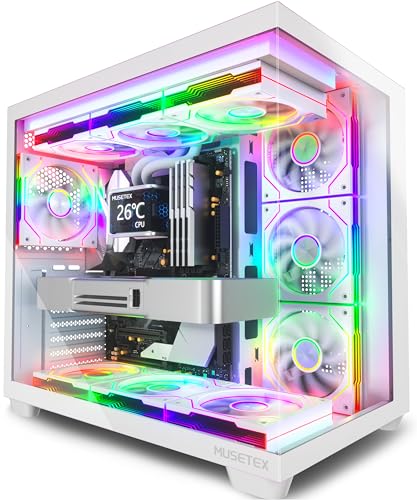
Pros
- Seven pre-installed PWM ARGB fans included
- Panoramic 270-degree dual tempered glass panels
- Supports large graphics cards up to 410mm
- Front panel includes a dedicated USB Type-C port
- Accommodates up to 360mm top-mounted liquid radiators
Cons
- CPU cooler height is limited to 160mm
- Dual glass panels prevent direct front-to-back intake
How These Cases Compare
| Case | Documented fit and cooling | Best fit | Main limitation |
|---|---|---|---|
| MUSETEX NN8 | Six PWM ARGB fans; supports top 280 mm radiator; listed storage configurations include up to five SSDs and one HDD or four SSDs and two HDDs. | Builders seeking included fans and an opening glass panel. | GPU and CPU cooler clearance not specified. |
| MUSETEX K2 | Seven fans, expandable to ten; GPU up to 15.7 inches; CPU cooler up to 6.5 inches; top radiator up to 360 mm. | High-end builds needing stated clearance and USB-C. | PSU limit depends on whether drive cage is installed. |
| HYTE Y70 Touch Infinite | Ten-fan capacity; side radiator up to 360 mm and 125 mm thick; adjustable top radiator up to 360 mm and 68 mm thick; included PCIe 4.0 x16 riser. | Showcase systems built around vertical GPU mounting and touchscreen display. | Display and panoramic design add cost and may not suit practical, low-feature builds. |
| MUSETEX Y6 | Seven 120 mm fans; GPU up to 16.14 inches; CPU cooler up to 6.3 inches; top radiator up to 360 mm. | White builds prioritizing panoramic glass and lighting. | Dual glass panels make appearance a larger priority than a conventional enclosed layout. |
Recommended Cases by Build Type
MUSETEX NN8: Opening Side Panel and Six Included Fans
NN8 includes six PWM ARGB fans, two USB 3.0 ports, and a side-opening tempered-glass panel. Its opening panel can make routine interior access easier than a screw-secured panel, while the mesh front supports an airflow-focused layout.
The case is specified for a top-mounted 280 mm radiator and several SSD/HDD combinations. Confirm GPU length, CPU cooler height, motherboard size, and PSU fit with MUSETEX before buying, because those clearances are not supplied here. Motherboard ARGB control requires a 3-pin RGB interface.
Pros: Six included PWM ARGB fans, tool-free opening panel access, and stated storage flexibility. Cons: Key component clearances are not specified, and motherboard lighting control requires a compatible 3-pin interface. Who should skip it: Builders who need verified GPU or cooler clearance before ordering.
MUSETEX K2: Clearer Component Limits and USB-C
K2 lists seven preinstalled PWM ARGB fans, with expansion to ten, plus a Type-C port and two USB 3.0 ports. Its stated GPU limit is 15.7 inches, CPU cooler limit is 6.5 inches, and top radiator support reaches 360 mm.
Check PSU length against drive-cage configuration: limit is 5.5 inches with cage installed, and 5.9 to 7.1 inches without it. The listed fan layout includes three reverse side fans, three forward top fans, and one forward rear fan. Type-C presence alone does not specify charging, video, or Thunderbolt support.
Pros: Useful GPU, cooler, and radiator limits; seven fans included; front-panel Type-C. Cons: PSU fit changes with drive-cage use, and the listed fan airflow and noise figures are manufacturer specifications, not independent measurements. Who should skip it: Builders whose PSU exceeds the applicable limit or who want a plain, non-RGB case.
HYTE Y70 Touch Infinite: Integrated Display and Vertical GPU Mounting
Y70 Touch Infinite combines a 14.9-inch touchscreen with 682 x 2560 resolution, 60 Hz refresh rate, and 10-point multitouch. HYTE Nexus software powers display customization. An included PCIe 4.0 x16 riser supports vertical graphics-card mounting in its four-slot layout.
Cooling support includes up to ten fans, a side radiator up to 360 mm and 125 mm thick, and an adjustable top radiator up to 360 mm and 68 mm thick. The listing also describes floor cooling for three 120 mm or two 140 mm fans, up to 32 mm thick. Confirm GPU dimensions and radiator combinations against the full case documentation before assembly.
Pros: Integrated customizable touchscreen, included PCIe 4.0 x16 riser, and extensive radiator options. Cons: The screen-centered design is unnecessary for many builds, and supplied specifications do not give GPU clearance or PSU limits. Who should skip it: Buyers seeking a straightforward case or a build with unverified component fit.
MUSETEX Y6: White Panoramic Build with Seven Infinity Fans
Y6 includes seven 120 mm PWM Infinity Mirror ARGB fans and dual tempered-glass panels with a 270-degree view. It supports ATX, Micro-ATX, and Mini-ITX motherboards, GPUs up to 16.14 inches, CPU coolers up to 6.3 inches, and top radiators up to 360 mm.
Front I/O includes Type-C, one USB 3.0 port, and one USB 2.0 port. Listed fan placement uses three reverse side fans, three reverse bottom fans, and one forward rear fan. Verify that your selected GPU, cooler, radiator, and PSU fit together; PSU support is listed up to 9.05 inches.
Pros: Broad motherboard support, substantial stated GPU clearance, seven included fans, and Type-C. Cons: Glass-heavy styling and extensive lighting may not suit understated builds; actual cooling results are not established by fan count. Who should skip it: Builders prioritizing a conventional opaque case or seeking a non-RGB setup.
How to Choose a Gaming PC Case
Check component clearance first. Compare case GPU length and CPU cooler height limits against exact component dimensions. For liquid cooling, check radiator size and thickness, mounting position, and possible conflicts with memory or other parts. The NN8 listing omits several essential clearance figures, so verify those directly before purchase.
Match motherboard and power supply. Confirm motherboard form factor, PSU length, drive-cage configuration, and storage needs. K2 documents PSU limits that change when its cage is removed; Y6 lists PSU support up to 9.05 inches.
Choose airflow and appearance together. Mesh fronts, fan placement, and radiator mounts affect available cooling layouts, but listed fan counts do not guarantee temperatures or quiet operation. Panoramic glass and lighting prioritize component display, while opening panels can simplify access.
Review front I/O and control needs. Compare USB ports with your devices, and check motherboard headers for ARGB and fan control. Do not assume Type-C supports functions beyond its stated presence.
Frequently Asked Questions
Are the included fans enough for every gaming build?
Not necessarily. Included fan counts describe what ships with each case, not measured cooling results. Match fan placement and radiator support to your components, then consult the case manual for installation details.
Which case has the clearest GPU clearance information?
Y6 lists GPU support up to 16.14 inches, while K2 lists up to 15.7 inches. HYTE Y70 Touch Infinite and NN8 product data supplied here do not state GPU clearance, so verify those dimensions with the manufacturer.
Final Recommendation
Choose K2 for documented component limits, included fans, and Type-C, provided its PSU clearance fits your drive-cage plan. Pick Y6 for a white panoramic build with stated GPU and radiator support. NN8 suits builders who value its opening panel but can independently confirm missing clearances. Choose HYTE Y70 Touch Infinite when its touchscreen and included vertical GPU riser justify a display-focused build.
For broader system planning, compare our guides to gaming PCs for streaming and budget gaming PCs for 1440p.




Write Your Review
No reviews yet. Be the first to share your experience!