

For Arma, prioritize reliable aiming, comfortable shape, and useful button placement over maximum DPI. The Redragon M901K suits players who want many remappable commands, while lighter, simpler mice may better suit players who value easier movement and fewer controls.
This roundup compares listed specifications and intended use, not measured gameplay results. Check each mouse’s grip fit, connection mode, software requirements, and button layout against your PC setup and preferred Arma control scheme.

Pros
- 19 programmable buttons for complex macros
- Modular weight tuning with eight removable weights
- Five onboard memory profiles for custom layouts
- Wide DPI adjustment range up to 12400
Cons
- Software download required for macro and lighting customization

Pros
- Tri-mode 2.4GHz, Bluetooth 5.3, and wired USB-C connectivity
- Lightweight 67-gram build reduces wrist fatigue
- Sensor supports up to 12,000 DPI and 1000Hz polling
- Dedicated rapid-fire button for quick in-game actions
- Can store and switch between four paired devices
Cons
- Configuration software is unavailable when using Bluetooth
- Driver programming features only support Windows systems

Pros
- Cable-free 2.4GHz wireless connectivity
- Eight remappable buttons including rapid-fire input
- Adjustable polling rate up to 1000Hz
- Five customizable onboard DPI presets
Cons
- Maximum 45-hour battery life requires eco mode
- Equipped with entry-level PAW3325 optical sensor
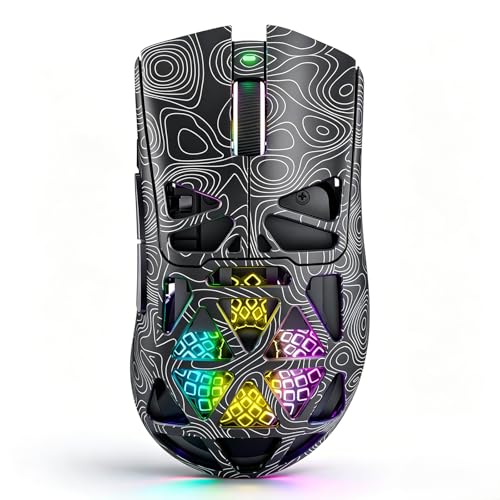
Pros
- Tri-mode wireless and USB-C wired connectivity
- Lightweight breathable honeycomb shell design
- Fast Trigger button for rapid shooting commands
- Up to 1000Hz polling rate for low latency
- Play-while-charging support via USB-C
Cons
- Honeycomb openings expose internal components to dust
- Configuration software requires downloading via external shortlink

Pros
- Ergonomic vertical shape reduces wrist strain
- Versatile tri-mode wireless and wired connectivity
- Five-direction thumb rocker expands input options
- Onboard memory stores button assignments across PCs
- Twelve fully programmable macro buttons
Cons
- Right-handed design excludes left-handed users
- Software installation may trigger OS security warnings

Pros
- Up to 532 hours of Bluetooth battery life
- High-precision 26,000 DPI Marksman sensor
- Ten programmable buttons for custom keybinds
- Comfortable asymmetric shape for larger hands
- Versatile 2.4GHz and Bluetooth dual-mode wireless
Cons
- Asymmetric shape restricted to right-handed users
- Bulky profile unsuitable for smaller hands or fingertip grips

Pros
- Lightweight 62-gram construction
- Wired and Bluetooth connectivity
- Up to 10000 DPI through software
- 1000Hz polling rate
- Customizable RGB lighting
Cons
- Expanded DPI settings require software
- Battery life is advertised, not independently verified

Pros
- Tunable weight system with 120 balance configurations
- Native 18,000 DPI optical sensor with fine adjustments
- Ten programmable buttons for macros and remaps
- Ergonomic contoured body with textured rubber grips
Cons
- Relatively heavy base weight starting at 119 grams
- Requires proprietary software for real-time balance detection

Pros
- Four on-the-fly DPI speed settings up to 3600
- Driver-free plug-and-play operation
- Six-button design with side navigation controls
- Ergonomic contoured shape suited for palm grip
- Integrated multi-color lighting
Cons
- Sensitivity restricted to four predetermined DPI steps
- Lowest available DPI setting starts at 1200 DPI
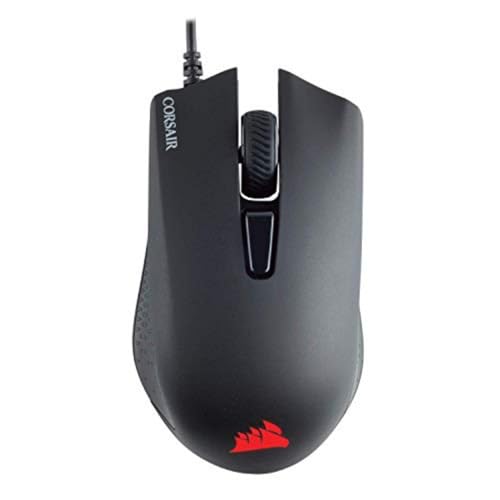
Pros
- Lightweight 85-gram frame
- High-accuracy 12,000 DPI optical tracking
- Six fully programmable buttons
- Textured rubber side grips
- Cross-platform PC and console support
Cons
- Tethered cable restricts movement flexibility
- Advanced button remaps require iCUE software
How to Choose a Mouse for Arma
Arma combines aiming with movement, equipment management, and contextual commands. Extra programmable buttons can place selected bindings or macros within thumb reach, but dense side-button grids require practice and may cause misclicks.
DPI is adjustable cursor sensitivity, not a direct measure of accuracy. Several options offer configurable DPI, but a comfortable, repeatable setting matters more than choosing the largest advertised number. Polling-rate details are provided for some models, not all.
Shape and weight affect handling preference. The lightweight Corsair Harpoon PRO and Redragon M730 PRO may appeal to players who prefer lower listed weights. The Corsair IRONCLAW Wireless SE is designed for larger right hands and palm grip, while the Attoe uses a vertical shape.
For wireless use, check whether the mouse offers 2.4GHz, Bluetooth, or both. Bluetooth can be useful for general multi-device use, while a wired connection avoids battery management. Do not assume every wireless mode supports the same features or operating systems.
Recommended Gaming Mice for Arma
Redragon M901K: Most Remappable Controls
The Redragon Gaming Mouse, MMO Mouse Gaming UP 12400 provides 19 programmable buttons, including 12 side buttons, five memory profiles, adjustable DPI from 100 to 12,400, and polling rates from 125Hz to 1,000Hz. Its removable weights allow balance adjustments for players who want a configurable control hub.
Pros: Extensive remapping, onboard profiles, and adjustable weight suit players assigning many commands. Cons: The numerous side buttons can complicate thumb placement, and the supplied data does not specify a wireless mode. Who should skip it: Players who prefer a light, uncluttered mouse or minimal software customization.
Redragon Gaming Mouse, MMO Mouse Gaming UP 12400
Corsair Harpoon PRO: Straightforward Wired Option
The Corsair Harpoon PRO has a 12,000 DPI optical sensor, six programmable buttons, and a listed weight of 85 grams. Its USB wired connection supports a simple PC setup, and contoured sides with rubber grips provide a more conventional alternative to MMO-style button arrays.
Pros: Plug-in USB setup, six programmable buttons, and stated weight make its basic specifications clear. Cons: It lacks wireless connectivity and offers fewer programmable controls than MMO-focused picks. Who should skip it: Players who need wireless freedom or extensive command mapping.
Corsair Harpoon PRO RGB Wired Lightweight FPS/MOBA
Redragon M730 PRO: Lightweight Wireless and Wired Choice
The Redragon M730 PRO is listed at 62 grams and supports wired and wireless use. Its 1,000Hz polling rate, Pixart SG8925 optical sensor, five DPI levels, and software-adjustable sensitivity up to 10,000 DPI suit players seeking a lighter design with basic remapping needs.
Pros: Low listed weight, dual connection options, and stated battery life of up to 77 hours provide flexibility. Cons: The data does not specify the wireless protocol, and its button count is not provided. Who should skip it: Players who need a confirmed 2.4GHz connection or a documented high number of programmable buttons.
Redragon M730 PRO Wireless Lightweight RGB
Corsair IRONCLAW Wireless SE: Larger-Hand Palm Grip
The Corsair IRONCLAW Wireless SE is shaped for larger right hands and palm grip. It includes 10 programmable buttons and a 26K DPI CORSAIR MARKSMAN sensor, with 2.4GHz and Bluetooth battery-life figures listed by the manufacturer. Its shape is the key reason to consider it for extended sessions.
Pros: Ten programmable buttons, surface calibration, and two wireless modes suit players wanting customizable controls without a wired-only setup. Cons: Its intended larger-hand, right-handed fit may not suit smaller hands or left-handed users. Who should skip it: Players who prefer a compact, lightweight mouse or left-handed shape.
Corsair IRONCLAW Wireless SE Gaming Mouse – Black
Redragon M810 PRO: Wireless Mouse with Eight Programmable Buttons
The Redragon M810 PRO uses a 2.4GHz nano receiver and offers eight programmable buttons, five onboard DPI levels up to 10,000, and a 1,000Hz polling rate in dual mode. It suits players who want wireless movement and several custom bindings without a 12-button side grid.
Pros: The 2.4GHz receiver, eight editable buttons, and stated battery life up to 45 hours in eco mode support untethered play. Cons: The supplied information does not list a wired mode or Bluetooth. Who should skip it: Players who want multiple connection types or more than eight programmable buttons.
Redragon M810 PRO Wireless RGB Gaming Mouse 10000
NSYCA G11: Tri-Mode Connectivity and Lightweight Shell
The NSYCA G11 pairs a PAW3311 optical sensor with adjustable sensitivity up to 22,000 DPI, a stated polling rate up to 1,000Hz, and Bluetooth 5.1, 2.4GHz, and USB-C modes. Its honeycomb shell and programmable controls may suit players wanting one mouse for gaming and general use.
Pros: Three connection modes, adjustable settings, and a dedicated Fast Trigger Button offer flexibility. Cons: The product data gives conflicting button descriptions, listing six customizable buttons and three independent side buttons, so verify layout before purchase. The provided driver link should also be checked carefully before installation. Who should skip it: Players who want a clearly documented button layout or prefer avoiding third-party configuration software.
NSYCA G11 Lightweight Wireless Gaming Mouse
Attoe 5D Rocker: Vertical Shape with Extra Controls
The Attoe combines a right-handed vertical shape, 12 programmable buttons, and a five-direction thumb rocker. It supports Bluetooth 5.0, 2.4GHz wireless, and USB-C wired connections, with a PMW3325 sensor and five listed DPI presets. The rocker may help players assign directional commands, subject to game and software configuration.
Pros: Multiple connection modes and a thumb rocker give it a distinct control layout. Cons: The vertical form differs substantially from conventional gaming mice, and the listed DPI presets jump to 24,000 after 4,800. Who should skip it: Players who want a familiar horizontal shape or conventional aiming controls.
Attoe Gaming Mouse with 5 D Rocker
Aula SC620: Lightweight Tri-Mode Pick
The Aula SC620 is listed at 67 grams and provides seven programmable buttons, a dedicated fire button, six DPI levels up to 12,000, and 2.4GHz, Bluetooth 5.3, and wired modes. Its stated software and connectivity limits matter: 2.4GHz and wired modes support Windows, while Bluetooth mode is unavailable for the described Windows use.
Pros: Low listed weight, programmable controls, and several connection types support flexible setups. Cons: The product data identifies the brand as Strikonx despite the Aula model name, and Windows support differs by connection mode. Who should skip it: Players who need consistent Windows features across Bluetooth, wireless, and wired modes.
Aula SC620 Wireless Gaming Mouse
Corsair NIGHTSWORD: Adjustable Weight and Ten Buttons
The Corsair NIGHTSWORD has 10 programmable buttons, a PMW3391 optical sensor with native 18,000 DPI, and an adjustable weight range of 119 to 141 grams. Its weight system suits players who prefer a heavier mouse and want to tune balance, rather than minimize mass.
Pros: Fine DPI adjustment, multiple weight positions, and programmable controls support detailed setup preferences. Cons: Its listed weight range is considerably heavier than the lightweight options, and the supplied data does not specify connectivity. Who should skip it: Players who prioritize low weight or require confirmed wireless capability.
Corsair NIGHTSWORD RGB Adjustable Weight FPS MOBA
BENGOO Wired Mouse: Basic Budget Controls
The BENGOO wired mouse offers six buttons, four DPI settings from 1,200 to 3,600, and plug-and-play operation without a driver. It can suit players seeking basic extra buttons, but the lower maximum DPI and limited configuration detail make it less flexible than the other listed options.
Pros: Simple USB setup and forward/back buttons cover basic command needs. Cons: DPI tops out at 3,600, and the supplied compatibility list names older Windows versions plus Linux and MacBook without detailing current OS support. Who should skip it: Players who need extensive remapping, wireless use, or clearly documented modern PC compatibility.
BENGOO Gaming Mouse Wired with RGB Backlit
Final Recommendation
Choose the Redragon M901K if extensive button remapping and stored profiles matter most. Choose the Corsair Harpoon PRO for a straightforward wired setup, or the Redragon M730 PRO if its lightweight design and wired or wireless options fit your priorities.
Consider the Corsair IRONCLAW Wireless SE for larger right hands and palm grip, and the M810 PRO for 2.4GHz wireless plus eight programmable buttons. Confirm shape, software support, and connection details before buying, especially where product specifications leave a feature unclear.




Write Your Review
No reviews yet. Be the first to share your experience!