

The best gaming desks for kids depend mainly on available floor space, PC case size, and whether the desk must also support homework. Compact models from Jakyitvi and X-cosrack suit smaller bedrooms, while the AODK offers more room for a large desktop PC and display-focused setup.
This is specification-based research rather than hands-on testing. The listed features show how each desk fits different workloads, but they do not establish long-term durability, stability under every load, or real-world lighting performance.
Top Gaming Desks and Chairs for Kids

Pros
- Dedicated elevated PC stand for hardware display
- Integrated ambient RGB LED light strip
- Three storage drawers for cable and accessory management
- Vertical side shelving maximizes usable workspace
- Reinforced steel frame supports heavy PC cases
Cons
- Storage drawers use fabric rather than rigid materials
- Desktop depth is relatively narrow at under 20 inches

Pros
- Built-in power outlets and USB ports reduce cable clutter
- Reversible shelf installation accommodates different room layouts
- Includes dedicated lower shelf for desktop PC towers
- Compact footprint easily fits small rooms and corners
- Adjustable leveling feet compensate for uneven flooring
Cons
- Shallow 15.75-inch desktop depth restricts usable gear space
- Fabric drawers provide less rigidity than solid materials

Pros
- Pneumatic height adjustment adapts to growing users
- Easy-to-clean TechniFlex synthetic upholstery
- Dual non-marking casters protect hard floors
- Lightweight 20-pound frame enables easy repositioning
Cons
- Restricted 140-pound maximum weight capacity
- Sized exclusively for children and small desks

Pros
- Built-in AC, USB, and Type-C power strip
- Compact footprint suits dorms and small rooms
- Dedicated monitor shelf preserves lower workspace
- Reversible lower shelf accommodates a PC tower
- Customizable multi-mode RGB ambient lighting
Cons
- Shallow 15.75-inch desk depth limits mouse movement area
- Fabric drawer offers less durability than solid materials
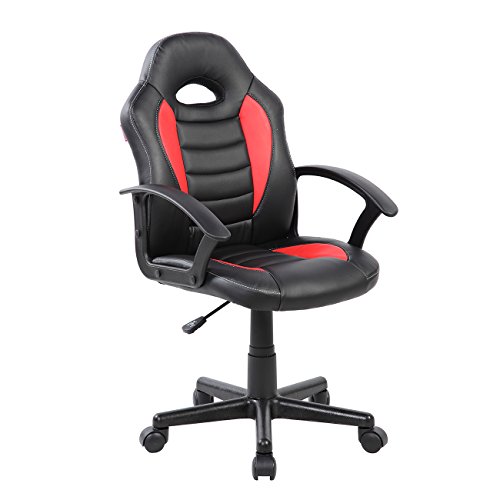
Pros
- Pneumatic seat height adjustment
- Floor-safe non-marking nylon casters
- Easy-to-clean synthetic TechniFlex upholstery
- Stable five-star nylon base
- Lightweight and compact design
Cons
- Limited 140-pound maximum weight capacity
- Sized strictly for children and smaller users

Pros
- Massage lumbar support for lower back relief
- Tested maximum weight capacity of 330 pounds
- SGS-certified gas lift for height adjustment
- Full 360-degree swivel base with rolling casters
Cons
- Linkage armrests lack independent positional adjustments
- Contradictory product dimensions listed in documented specifications
Which Option Fits Your Child’s Setup?
Choose the AODK Gaming Desk w/PC Showcase Stand when a larger desktop footprint and visible panoramic PC case matter more than a compact bedroom layout. Its elevated case platform, three fabric drawers, side display shelving, and integrated RGB strip are aimed at a centerpiece-style gaming station.
The main limitation is that the showcase design needs a suitable case and enough room for its 59-inch desktop. Its advertised compatibility with cases such as the Lian Li O11 and Hyte Y60 is useful, but buyers should still compare their case dimensions and weight with the desk’s installation requirements.
The 33.7 Inch Small Gaming Desk Table with LED Lights is the more practical choice for tight corners, smaller bedrooms, and basic PC or console setups. Its reversible upper shelf, lower CPU stand, two AC outlets, two USB ports, fabric drawers, storage bag, and side hooks provide useful organization without requiring a full-size desk.
Its compact surface leaves less room for wide monitors, large mouse movements, books, and homework materials at the same time. The integrated power strip also needs access to a wall outlet, and the listed USB output should not be treated as evidence of USB-C charging because this model specifies USB ports rather than USB-C connectivity.
The X-cosrack 33.5" Small Gaming Desk with LED Lights targets a similar room-saving use but adds a Type-C port to its power hub. It includes a monitor stand, reversible CPU shelf, fabric drawer, headphone hooks, and adjustable feet, making it suitable for a compact single-monitor setup.
X-cosrack advertises an X-braced steel frame with a 180-pound load capacity and tool-free assembly. That stated capacity is a specification rather than an independent stability test, so the desk should still be assembled correctly and placed on a level surface.
Comparison of the Main Desk Features
| Product | Best suited for | Storage and power features | Important limitation |
|---|---|---|---|
| AODK Gaming Desk w/PC Showcase Stand | Large PC setups and visible panoramic cases | Elevated PC stand, three fabric drawers, side display shelf, RGB strip | Requires substantially more room and a compatible case footprint |
| 33.7 Inch Small Gaming Desk Table with LED Lights | Small bedrooms and corner installations | Two AC outlets, two USB ports, reversible shelf, drawers, side storage | Limited desktop space for larger monitor and homework combinations |
| X-cosrack 33.5" Small Gaming Desk with LED Lights | Compact single-monitor gaming or study setups | Two AC outlets, USB, Type-C port, monitor stand, drawer, hooks | Advertised capacity does not replace careful assembly or load planning |
What to Check Before Buying a Gaming Desk for Kids
Measure the room and the complete setup
Measure the available wall or corner space, then account for the chair, monitor, PC tower, cable routing, and space needed to sit comfortably. A compact desk can fit a bedroom better, but its shorter surface may force the monitor, keyboard, and schoolwork into the same area.
Match the desk to the PC case
Standard desktop towers, panoramic glass cases, and consoles can require different storage arrangements. The AODK is the only listed desk specifically designed around an elevated showcase platform, while the two smaller desks use lower or reversible shelves for a PC case.
Consider power safety and cable placement
Built-in outlets can reduce cable clutter, but they do not remove the need for sensible power management. Check the listed outlet types, USB specifications, cord length, and wall outlet location before placing the desk near a bed or other furniture.
Prioritize posture over RGB lighting
RGB strips are cosmetic features, whereas monitor height, chair adjustment, and adequate legroom affect everyday comfort. A monitor shelf can raise the screen and free desktop space, but the final height should suit the child and the chair used with it.
Plan for storage and schoolwork
Drawers, shelves, hooks, and side bags can keep controllers, notebooks, headphones, and cables off the main work surface. Families using the desk for homework should compare usable desktop area rather than choosing solely by appearance or lighting modes.
Choosing a Matching Kids Gaming Chair
The Techni Mobili Kids Gaming Chair is available in blue and red versions and includes pneumatic seat-height adjustment, non-marking nylon casters, TechniFlex upholstery, and a five-star nylon base. Its stated maximum supported weight is 140 pounds, so the child’s current weight and expected growth should be checked against that limit.
The WENTUM Ergonomic Massage Gaming Chair for Kids has a higher stated weight capacity of 330 pounds, a seat-height range from 17.7 to 21.7 inches, a high backrest, lumbar support, a rocking function, and linkage armrests. However, its larger adult-oriented design may not fit every child as well as a dedicated kids chair, so seat depth, armrest position, and foot support deserve attention.
For more seating ideas, compare these options with the site’s gaming chair category. A chair should allow the child’s feet to rest securely and keep elbows near desk height, rather than simply matching the desk’s racing-style appearance.
Useful Setup Pairings
Pair the AODK with a larger monitor and a visually important desktop PC only when the room can accommodate the desk’s broad footprint. Its drawers and side shelf are better suited to a permanent setup than to a desk that must be moved frequently.
Pair either compact desk with one monitor, a smaller PC case or console, and a compact keyboard and mouse. A quiet keyboard may be useful in a shared bedroom or study area, and the site’s guide to silent gaming keyboards covers that related consideration.
Frequently Asked Questions
What is the best gaming desk for a small bedroom?
The 33.7 Inch Small Gaming Desk Table with LED Lights and the X-cosrack 33.5" Small Gaming Desk with LED Lights are the strongest fits for limited floor space. X-cosrack offers a Type-C port and stated 180-pound load capacity, while the Jakyitvi model provides two USB ports, reversible shelving, drawers, and a storage bag.
Which desk is better for a large glass-sided PC?
The AODK Gaming Desk w/PC Showcase Stand is the relevant choice because its elevated platform is specifically advertised for panoramic cases. Confirm the case dimensions, weight, airflow clearance, and the desk’s installation instructions before placing expensive hardware on the stand.
Are the built-in desk outlets enough for a gaming setup?
They can simplify charging and reduce cable reach, but the listed outlets should not be treated as a complete power-management solution. Check the desk’s electrical specifications and connect only equipment appropriate for the stated outlet and USB ratings.
Final Recommendation
Choose the AODK Gaming Desk w/PC Showcase Stand for a larger, display-focused PC setup with substantial storage. Choose the Jakyitvi desk for a compact corner that needs reversible shelving and multiple built-in charging connections, or choose X-cosrack when its monitor stand, Type-C port, hooks, and stated load capacity better match the room.
For seating, the Techni Mobili chair is the more child-specific option with a 140-pound stated limit, while WENTUM offers a wider adjustment range and higher stated capacity but may suit older or larger users better. The right combination is the one that fits the room, supports the actual PC hardware, and maintains a comfortable posture for both gaming and schoolwork.
Readers comparing broader desktop layouts can also review these PC gaming desk picks or explore compact alternatives for IKEA shoppers.







Write Your Review
No reviews yet. Be the first to share your experience!