

The best desks used for gaming depend mainly on available space, monitor requirements, storage needs, and whether you want fixed or adjustable height. The products below include compact L-shaped desks, wide single-surface models, storage-focused workstations, and one electric standing desk.
This is a specification-based comparison rather than a hands-on test. Check your room dimensions, monitor stand clearance, PC tower size, and available wall outlets before choosing a desk.

Pros
- Integrated three AC outlets and two USB charging ports
- Reversible configuration supports left or right orientation
- Includes dedicated CPU stand, storage bag, and headphone hook
- Adjustable RGB lighting strip with multiple dynamic modes
- Sturdy steel X-frame with adjustable leveling feet
Cons
- Narrow 18.9-inch desktop depth limits peripheral clearance
- Assembly required with numerous individual components

Pros
- Reversible design accommodates left or right corner placements
- Built-in power strip with AC outlets and USB ports
- Integrated multi-mode LED ambient lighting
- Dedicated CPU stand and side storage accessories
Cons
- Shallow 18.9-inch surface limits room for large monitors
- Requires complete assembly of multi-piece frame and shelves

Pros
- Integrated power strip with seven charging ports
- Reversible L-shaped layout fits varied room corners
- Adjustable pegboard mounts in horizontal or vertical orientations
- Dedicated CPU stand elevates PC towers off floors
- App-controlled LED strip with music synchronization modes

Pros
- Reversible layout fits various corner room configurations
- Included CPU stand lifts tower off the floor
- Integrated side pocket adds accessible storage
- Adjustable leveling feet improve stability on uneven floors
- Scratch-resistant and water-resistant desktop finish
Cons
- Total weight capacity is limited to 176 pounds
- Compact 50-inch footprint limits large multi-monitor setups

Pros
- Space-saving L-shaped corner footprint
- Reversible two-tier storage shelves
- Adjustable feet for uneven floors
- 150-pound rated weight capacity
- Lightweight frame is easy to move
Cons
- Compact 39-inch size limits large multi-monitor setups
- Constructed with particleboard rather than solid wood

Pros
- Wide 55-inch workspace
- Built-in mouse pad
- Integrated adjustable LED lighting
- Convenient headphone hook
- Rounded corners
Cons
- 23.62-inch depth may constrain larger setups
- Load capacity is not specified

Pros
- Large desktop for dual-monitor setups
- Monitor arm installation support
- Included gaming accessories
- Built-in cable management
- RGB lighting with app control
Cons
- 23.6-inch depth may limit larger monitor setups
- Assembly is required
- Maximum load claims vary by stated rating
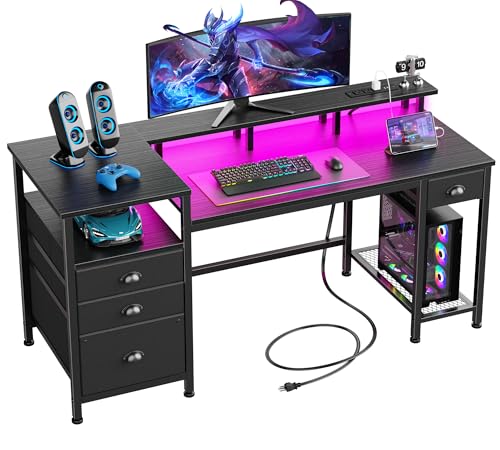
Pros
- Built-in power strip with AC outlets and USB ports
- Full-length monitor riser frees up main desktop space
- Reversible layout suits left- or right-hand placement
- Multi-tier storage includes shelves and a file drawer
- Customizable RGB lighting strip adds ambient illumination
Cons
- Shallow 18.8-inch desk depth limits overall surface area
- Drawers are made of fabric rather than solid materials

Pros
- Motorized height adjustment from 28.3 to 46.5 inches
- Memory presets for quick height recall
- Generous 55-inch surface fits multiple displays
- Quiet motor rated under 52 dB
- Integrated cable management features
Cons
- Desktop is composed of two separate boards
- Stability can vary depending on floor type and load

Pros
- Built-in 3 AC outlets and 2 USB ports
- Sturdy frame supports up to 220 pounds
- Includes raised monitor stand, cup holder, and headphone hook
- App-controlled RGB ambient light strip included
Cons
- Compact 40-inch width restricts larger peripherals and monitors
- Assembly required taking up to an estimated hour
How These Gaming Desks Differ
| Desk | Style | Key specification | Best suited to |
|---|---|---|---|
| ODK 53″ L Shaped Gaming Desk with Shelves | Reversible L-shaped | 53 inches wide, 3 AC outlets, 2 USB ports | Compact dual-monitor corners with storage |
| AODK L Shaped Desk Gaming Desk with LED Light | Reversible L-shaped | 53 inches wide, two shelves, CPU stand, power access | Corner setups needing a monitor shelf |
| PRAISUN L Shaped Gaming Desk with LED Lights | Reversible L-shaped | 4 AC outlets, 2 USB ports, 1 Type-C port, adjustable pegboard | Streaming or multi-device setups |
| SageNest L Shaped Desk, 50 Inch Reversible | Reversible L-shaped | Supports up to 176 pounds, CPU stand, storage bag | Basic PC gaming on a tight budget |
| Furologee 60″ Gaming Desk with 4 Drawers & LED | Long storage desk | 60-inch monitor stand, drawers, file cabinet, 3 AC outlets | Gaming and home-office storage |
| PayLessHere 39 Inch L-Shaped Computer Desk,Gaming | Compact L-shaped | 39-inch design, reversible shelves, supports up to 150 pounds | Small rooms and lightweight setups |
| HLDIRECT 63 Inch Gaming Desk Z Shaped Carbon Fiber | Wide straight desk | 63 inches wide, supports up to 150 pounds, 200-pound static limit stated | Two monitors and monitor-arm use |
| GTPLAYER Gaming Desk 55 Inch with LED Lights | Wide straight desk | 55-inch surface, built-in mouse pad, headphone hook | Simple gaming setups with few storage demands |
| Veken 55 Inch Large Electric Standing Desk | Electric standing desk | 28.3 to 46.5 inches, memory presets, 55-inch surface | Users alternating between sitting and standing |
| Korfile 40 Inch Gaming Desk with Power Outlet | Reversible L-shaped | 3 AC outlets, 2 USB ports, two-monitor stand, cup and headphone holders | Compact accessory-focused gaming stations |
Best Desks Used for Gaming by Setup Type
ODK 53″ L Shaped Gaming Desk with Shelves: Best for Compact Dual-Monitor Corners
The ODK 53″ L Shaped Gaming Desk with Shelves combines a 53-inch reversible workstation with two shelves, a CPU stand, an accessory hook, and a storage bag. Its three AC outlets and two USB ports centralize power for a PC setup, while cable channels can reduce visible wire clutter.
This model suits users who need corner coverage and storage without choosing a very large desk. The 18.9-inch depth is relatively limited, so measure your monitor stands and keyboard space before selecting it.
AODK L Shaped Desk Gaming Desk with LED Light: Best for Corner Storage
The AODK L Shaped Desk Gaming Desk with LED Light offers a reversible 53-inch L-shaped layout, two shelves, a CPU stand, a headphone hook, and a storage bag. The upper rack can be installed as a display shelf or monitor stand, giving buyers some flexibility in arranging screens and accessories.
Its three power outlets and two USB ports are useful when the desk sits away from a convenient wall outlet. The compact 18.9-inch depth may not leave much front-to-back room for large monitor bases, speakers, and a full-size keyboard simultaneously.
PRAISUN L Shaped Gaming Desk with LED Lights: Best for Device-Rich Setups
The PRAISUN L Shaped Gaming Desk with LED Lights has seven built-in ports: four AC outlets, two USB ports, and one Type-C port. It also adds an adjustable three-level pegboard, dual headphone hooks, a top shelf, a fabric bag, and a CPU stand that can be positioned on different legs.
This is a strong fit for streamers, multi-device users, and gamers who want controllers or headsets within reach. The listed dimensions are 39.4 inches deep by 51.2 inches wide, so its footprint should be checked carefully in smaller rooms; the Type-C port’s specific charging and data capabilities are not specified.
SageNest L Shaped Desk, 50 Inch Reversible: Best for a Basic Budget Setup
The SageNest L Shaped Desk, 50 Inch Reversible uses a reinforced steel frame with X-shaped crossbars and states a load capacity of up to 176 pounds. It includes a CPU stand, side storage bag, adjustable feet, and a scratch-resistant, waterproof desktop surface.
Its reversible layout makes it practical for dorm rooms, study corners, and smaller gaming areas. It does not list integrated outlets, USB ports, lighting, or extensive shelving, so buyers wanting a highly accessorized battle station may need separate accessories.
Furologee 60″ Gaming Desk with 4 Drawers & LED: Best for Gaming and Office Storage
The Furologee 60″ Gaming Desk with 4 Drawers & LED provides a long work surface with a full-size monitor stand, three fabric drawers, a file cabinet, and three open shelves. Its three AC outlets and two USB ports support common desk electronics, while the monitor stand can help place screens closer to eye level.
This desk suits users who combine gaming with paperwork, study materials, or office equipment. The storage-focused design requires more room than a compact corner desk, and the supplied information does not specify the total weight capacity.
PayLessHere 39 Inch L-Shaped Computer Desk,Gaming: Best for Very Small Rooms
The PayLessHere 39 Inch L-Shaped Computer Desk,Gaming is designed around a compact corner footprint with two reversible storage shelves. Its metal frame, CARB P2 particleboard surface, adjustable feet, and stated 150-pound capacity support a small PC or console-style station.
This option is suitable when floor space matters more than desk depth or accessories. It does not include built-in power, lighting, or a dedicated CPU stand, and the 39-inch size may be restrictive for multiple large monitors.
HLDIRECT 63 Inch Gaming Desk Z Shaped Carbon Fiber: Best for Wide Monitor Setups
The HLDIRECT 63 Inch Gaming Desk Z Shaped Carbon Fiber offers one of the widest surfaces in this comparison, with room for two monitors and stated compatibility with a desk-mounted monitor arm. Its Z-shaped structure is specified to support up to 150 pounds, with a separate 200-pound maximum static limit.
The carbon-fiber-coated surface is described as water-resistant and scratch-resistant, and the desk includes a mouse pad, cup holder, headphone hook, and cable manager. Buyers using a monitor arm should still verify clamp clearance and mounting requirements because the product information does not provide desktop thickness.
GTPLAYER Gaming Desk 55 Inch with LED Lights: Best for a Simple Wide Work Surface
The GTPLAYER Gaming Desk 55 Inch with LED Lights provides a broad surface with a carbon-fiber finish, integrated mouse pad, headphone hook, rounded corners, and built-in LED lighting. Its straightforward design favors users who want room for a monitor, keyboard, mouse, and basic accessories without shelving.
This model may be easier to arrange than an L-shaped desk because the entire workspace stays on one plane. The supplied specifications do not state a load limit, outlet count, USB ports, or monitor-arm compatibility, so those requirements need separate verification.
Veken 55 Inch Large Electric Standing Desk: Best for Sit-Stand Gaming and Work
The Veken 55 Inch Large Electric Standing Desk is the only height-adjustable model in this group. Its electric frame moves from 28.3 to 46.5 inches, includes memory presets, and uses a 55-inch desktop with cable management.
It suits users who alternate between seated gaming, office work, and standing sessions. The desktop is made from two boards, and the supplied information does not specify a maximum load, so heavy multi-monitor equipment should be checked against the manufacturer’s documentation before purchase.
Korfile 40 Inch Gaming Desk with Power Outlet: Best for Compact Accessories
The Korfile 40 Inch Gaming Desk with Power Outlet combines a reversible L-shaped design with three AC sockets, two USB ports, a long monitor stand, a cup holder, and a headphone holder. Its product information states that the monitor stand can hold two 24-inch monitors or one larger monitor.
The double Z-shaped legs and adjustable feet are intended to improve stability, with a stated leg capacity of up to 220 pounds. The 40-inch format is space-efficient, but users with deep monitor stands or large desktop speakers may find the available surface limited.
What to Check Before Buying a Gaming Desk
Measure the Floor Area and Reversible Orientation
L-shaped desks can use corners efficiently, but their short and long sides still need clearance from walls, doors, and chair movement. Reversible construction helps, although the assembly process may require choosing the left or right configuration before completing the build.
Match the Surface to Your Monitor Arrangement
A single 55-inch or 63-inch surface may be easier for two monitors and a large mouse area. Compact L-shaped desks add corner coverage, but their depth and shelf placement can limit monitor stands, speakers, and monitor-arm clamps.
Check Power and Port Requirements
Integrated AC outlets and USB ports reduce cable reach for phones, headsets, and small accessories. They do not replace a properly rated surge protector for a gaming PC, and you should confirm the desk’s power cord can reach your wall outlet safely.
Allow for the PC Tower and Cable Routing
A CPU stand can keep a tower off the floor, but compatibility depends on the stand’s dimensions and the case footprint. Measure your case, check airflow clearance, and decide whether the tower should sit on the desk, beside it, or underneath it.
Consider Storage Versus Open Legroom
Shelves, drawers, pegboards, and monitor risers organize controllers, files, and speakers without consuming the main surface. However, storage modules can reduce knee room and may restrict where you place a chair or PC tower.
Verify Monitor-Arm and Weight Requirements
Only some listings specifically mention monitor-arm support or a defined load capacity. Before attaching an arm, verify clamp clearance, desktop thickness, frame position, and the combined weight of your monitors and mounts.
Which Gaming Desk Should You Choose?
Choose the ODK or AODK model if you want a reversible corner desk with storage and integrated power. The PRAISUN is more suitable for several powered devices and accessories, while the SageNest and PayLessHere focus on straightforward compact workstations.
For a wide straight surface, the HLDIRECT offers the clearest two-monitor and monitor-arm orientation, while the GTPLAYER keeps the design simpler. The Furologee is the better fit for gaming combined with office storage, and the Veken is the logical choice for users who specifically need electric sit-stand adjustment.
If you are also planning the rest of a PC setup, compare desk dimensions with the guidance in our article on choosing suitable gaming PC specifications. For seating, our guide to comfortable gaming chairs can help you check chair clearance and desk height together.
Frequently Asked Questions
Are L-shaped desks better for PC gaming?
L-shaped desks are useful for corner rooms, dual work areas, and setups that need separate monitor and accessory zones. They are not automatically better, because a wide straight desk may provide more continuous mouse space and simpler monitor-arm placement.
What desk size is suitable for two monitors?
The answer depends on monitor width, stand depth, speakers, and keyboard placement. The HLDIRECT 63-inch model and several 55-inch or 60-inch options provide more continuous surface area, while smaller L-shaped desks rely on corner positioning and shelf layouts.
Do built-in desk outlets power a gaming PC?
Built-in outlets provide convenient power access, but the supplied listings do not establish the total electrical rating for every model. Use the manufacturer’s electrical specifications and avoid exceeding the outlet or extension equipment’s rated load.
Is a standing desk useful for gaming?
An electric standing desk can help users alternate between seated and standing work, especially when gaming is combined with office tasks. It does not guarantee better gaming performance, and you should verify its load capacity and stability for your monitor arrangement.






Write Your Review
No reviews yet. Be the first to share your experience!